
Building a Research Assistant with the Interactions API in Java
First of all, dear readers, let me wish you a happy new year! This is my first post on this blog for 2026. I’m looking forward to continuing sharing interesting content with you.
During my holiday break, I wanted to put my recent Java implementation of the Gemini Interactions API to the test. I implemented and released it with the help of Antigravity. My colleague Shubham Saboo and Gargi Gupta wrote a tutorial on how to build an AI research agent with Google Interactions API & Gemini 3. I thought this was a great opportunity to replicate this example in Java using my Interactions API Java SDK.
A picture is often worth a thousand words, so let’s have a look at the key components of our research agent workflow:
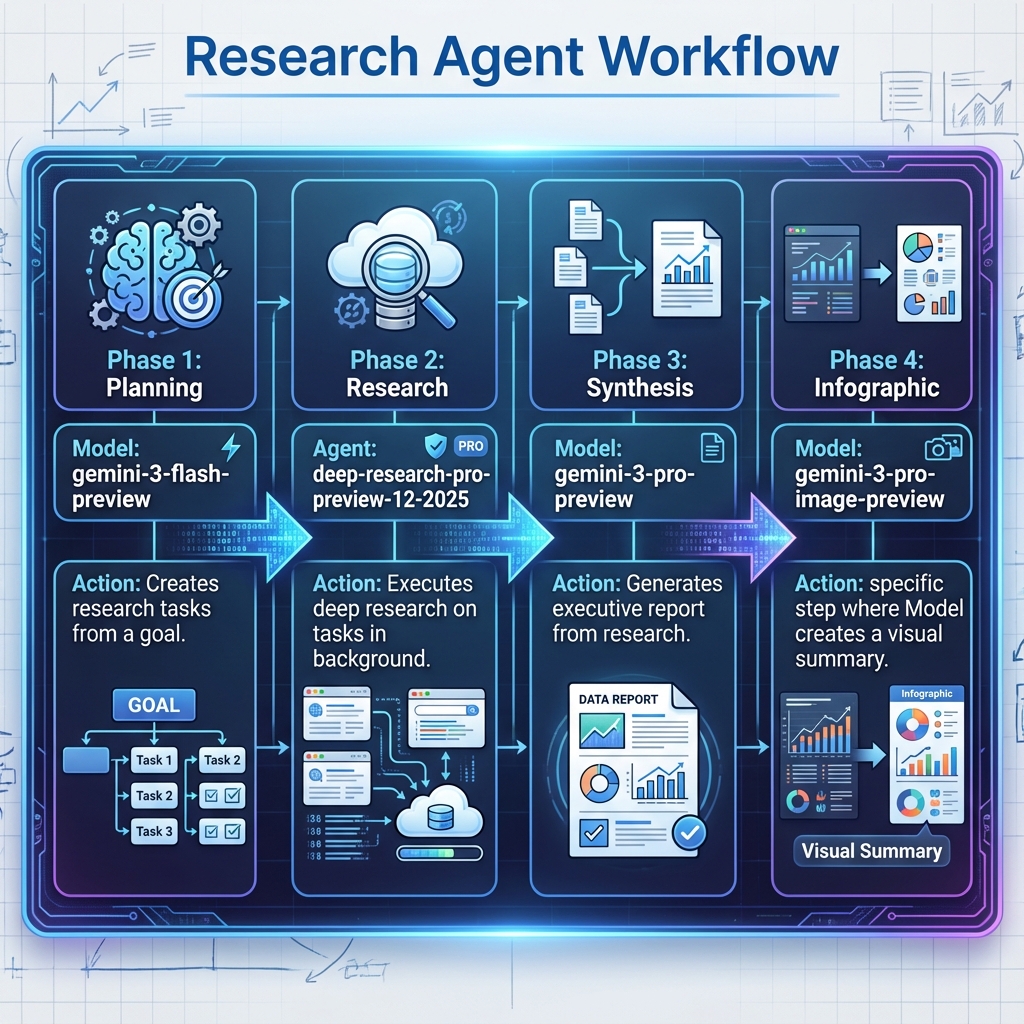
The goal of this tutorial is to build a research assistant, split into 4 key phases:
- Phase 1️⃣ : Planning — Given a topic to research, aided by the Google Search tool, Gemini 3 Flash defines different research tasks related to the topic.
- Phase 2️⃣ : Research — The Deep Research model will be launched as a background task to research the different topic areas defined in the planning phase.
- Phase 3️⃣ : Synthesis — This time, we use the more powerful Gemini 3 Pro to do the synthesis of the research report.
- Phase 4️⃣ : Infographic — Last but not least, we’ll use 🍌 Nano Banana Pro (aka Gemini 3 Pro Image) to generate an infographic about this research.
Let’s Implement this Research Workflow!
You’ll find the entire source code for this example in my GitHub repository.
This all starts with the planning phase, using Gemini 3 Flash:
// Step 0: Define the research goal
String researchGoal = """
    Research the current state of Quantum Computing in 2025,
    specifically looking for major breakthroughs in error correction.
    """;

// --- Phase 1: Plan ---
// Gemini 3 Flash Preview creates research tasks
ModelInteractionParams planParams = ModelInteractionParams.builder()
        .model("gemini-3-flash-preview")
        .input(String.format("""
            Create a numbered research plan for: %s
            Format: 1. [Task] - [Details]
            Include 3 specific tasks.
            """, researchGoal))
        .tools(new GoogleSearch())
        .store(true)
        .build();

// Launch the request
Interaction planInteraction = client.create(planParams);

// Retrieve the response with text and interaction ID
String planText = getText(planInteraction);
String planId = planInteraction.id();
The goal is to research information about the latest breakthroughs in Quantum Computing over the past year. We create an interaction that asks Gemini 3 Flash to define a few research tasks, following a specific format.
Notice that we provide the built-in GoogleSearch tool so the model can search the internet when defining those tasks.
We set store(true) to save the interaction on the server-side,
and we save the interaction ID for later reuse, ensuring subsequent interactions continue the same discussion.
// Utility method to extract the LLM generated tasks
List<String> tasks = parseTasks(planText);

// --- Phase 2: Research ---
// Select tasks and run Deep Research Agent
// In this test, we select all tasks.

String selectedTasks = String.join("\n\n", tasks);

AgentInteractionParams researchParams = AgentInteractionParams.builder()
        .agent("deep-research-pro-preview-12-2025")
        .input(String.format(
                "Research these tasks thoroughly with sources:\n\n%s",
                selectedTasks))
        .previousInteractionId(planId)
        .background(true)
        .store(true)
        .build();
Interaction researchInteraction = client.create(researchParams);

String researchId = researchInteraction.id();
String researchText = getText(researchInteraction);

// Wait for completion up to 10 mins as deep research can be slow
researchInteraction = waitForCompletion(client, researchId, 600);
In this second phase, I use a few utility methods to parse the tasks generated in the previous phase (I should probably use structured output for that at some point) and to wait for the completion of the background tasks.
A few interesting points here:
- We reuse the interaction ID from the previous phase via
previousInteractionId(), taking advantage of the stateful nature of the Interactions API. This allows the research agent to maintain context from the planning phase, in addition to the specific tasks generated. - We specify that the task should run in the background with
background(true). - Finally, we poll for the completion of the Deep Research agent, which can take several minutes.
// --- Phase 3: Synthesis ---
ModelInteractionParams synthesisParams = ModelInteractionParams.builder()
        .model("gemini-3-pro-preview")
        .input("""
            Create executive report with Summary, Findings,
            Recommendations, Risks based on the research.
            """)
        .previousInteractionId(researchId)
        .store(true)
        .build();

Interaction synthesisInteraction = client.create(synthesisParams);
String synthesisText = getText(synthesisInteraction);
Phase 3 is a simple call to Gemini 3 Pro to synthesize the research report. Again, we store the session and reuse the previous interaction ID.
// --- Phase 4: Infographic ---
ModelInteractionParams infographicParams = ModelInteractionParams.builder()
        .model("gemini-3-pro-image-preview")
        .input("Create a whiteboard summary infographic for the following: \n\n"
                + synthesisText)
        .responseModalities(List.of(Modality.IMAGE))
        .build();

Interaction infographicInteraction = client.create(infographicParams);

saveInfographic(infographicInteraction);
The last phase is the infographic generation, using 🍌 Nano Banana Pro. We pass the synthesis from the previous phase. We don’t need to reuse the interaction ID here, as the synthesis itself provides enough context for the infographic.
You can check the entire source code on GitHub.
The Outcome
I won’t include the full output, but I’d like to highlight the impressive infographic generated by Nano Banana Pro as a result of this research plan:

I hope this makes sense to those of you knowledgeable about Quantum Computing. While I’m not an expert in the field, I’m really fond of the infographics that 🍌 Nano Banana can generate, with their sharp and crisp text.
What’s to Like?
What I particularly like about the Interactions API is that it handles state on the server-side. It’s a departure from the traditional stateless LLM conversations where frameworks must pass the entire history at each round. Even unrelated LLM requests or agent tasks can share the same session by reusing the interaction ID.
Additionally, I’m happy that my Java SDK for the Interactions API works well for more involved use cases, validating its capabilities. Until the Gemini unified SDK supports the Interaction API, I’ll definitely be sticking with my own!