
Latest Gemini and Nano Banana Enhancements in LangChain4j
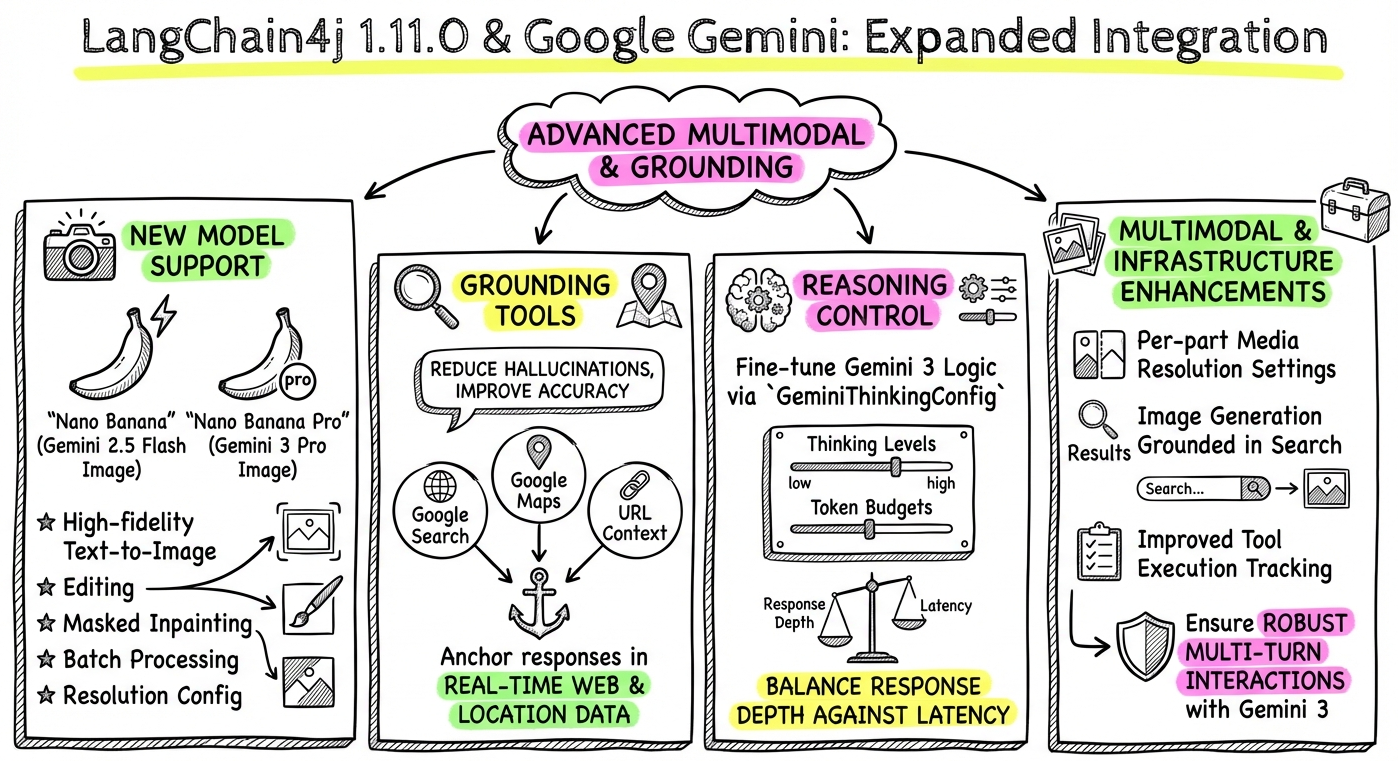
A few days ago, LangChain4j 1.11.0 was released, and with this version, a few notable enhancements to the support of the Gemini model family have landed. Let’s dive in!
New Image Generation Models (Gemini 2.5 & 3.0 Preview, aka 🍌 Nano Banana)
Before showing some snippets of code, let me give you the link to the full documentation on the new image model: docs.langchain4j.dev/integrations/image-models/gemini
There’s a new GoogleAiGeminiImageModel class which allows text-to-image generation and image editing using the latest 🍌 Nano Banana models.
Supported Models:
gemini-2.5-flash-image(Nano Banana): Optimized for speed.gemini-3-pro-image-preview(Nano Banana Pro): High-fidelity, up to 4K resolution.
Features:
- Text-to-Image: Generate images from prompts.
- Image Editing: Edit existing images using text prompts (with optional mask support).
- Search Grounding: Ground image generation in Google Search results.
Text-to-Image Generation
var imageModel = GoogleAiGeminiImageModel.builder()
    .apiKey(System.getenv("GEMINI_API_KEY"))
    .modelName("gemini-2.5-flash-image")
    .aspectRatio("16:9")
    .imageSize("2K")
    .build();

Response<Image> response = imageModel.generate(
        "A cinematic shot of a futuristic city at sunset");

// Save the generated image to a file
Image image = response.content();
byte[] imageBytes = Base64.getDecoder().decode(image.base64Data());
Files.write(Paths.get("output.png"), imageBytes);
As you can see, different configuration parameters are possible;
aspectRatio: among16:9,4:3,3:2,1:1,2:3,3:4, and9:16imageSize: among1K,2K,4K
Image Generation with Google Search Grounding
A powerful capability of Nano Banana Pro is the ability to ground its image generation in Google Search results,
with the useGoogleSearchGrounding(true) flag.
It’s a model that’s able to search for image references on the web, or for the latest information about a topic.
var groundedModel = GoogleAiGeminiImageModel.builder()
    .apiKey(System.getenv("GEMINI_API_KEY"))
    .modelName("gemini-3-pro-image-preview") // search only in Pro
    .useGoogleSearchGrounding(true)
    .aspectRatio("1:1")
    .build();

Response<Image> groundedResponse = groundedModel.generate("""
    A kawaii illustration of the current weather forecast for Paris
    showing the current temperature (in Celsius)
    """);
Here, we want to create a kawaii illustration of the current weather in Paris. So Nano Banana Pro is going to search on Google to find about the weather forecast at this point in time!
At the time of this writing, the forecast is:

Pretty kawaii, right? 😃
Google Maps Grounding
You can now enable Google Maps grounding to allow the model to access real-world location data, including place IDs, addresses, and reviews.
This is currently available on the 2.5 models, not (yet?) the 3.0 models.
var chatModel = GoogleAiGeminiChatModel.builder()
    .apiKey(System.getenv("GEMINI_API_KEY"))
    .modelName("gemini-2.5-flash")
    .allowGoogleMaps(true) // Enable Google Maps tool
    .retrieveGoogleMapsWidgetToken(true) // Optional: UI widget
    .build();

String response = chatModel.chat(
    "Find the best restaurant near the Eiffel tower");
Gemini might answer something along the lines of this (with details coming from Maps, as star rating proves, not from its training knowledge):
For a memorable dining experience near the Eiffel Tower, several highly-rated restaurants offer a range of cuisines and atmospheres.
French Cuisine with a View: For an exceptional meal with stunning views, consider Jules Verne, an elegant restaurant located within the Eiffel Tower itself, boasting a 4.5-star rating. Another option is Francette, a refined restaurant on a barge on the Seine, also with a 4.5-star rating and direct views of the tower.
Café de l’Homme is a stylish bistro in the Musée de l’Homme, featuring outdoor tables with Eiffel Tower views and a 4.1-star rating.
Top-Rated French Bistros: If a classic French bistro is more your style, De la Tour is a popular family-run establishment with a 4.8-star rating. Arnaud Nicolas, known for its artfully presented tasting menus, has a 4.7-star rating. With a 4.8-star rating, Milagro is another excellent choice. Also highly rated is Le CasseNoix, a charming, retro spot with a 4.7-star rating.
Italian Options: If you’re in the mood for Italian food, Chez Pippo is a cozy trattoria with a 4.6-star rating. La Casa di Alfio is another popular choice with a 4.5-star rating. With a 4.7-star rating, In Casa is also nearby. And Pink Mamma has an impressive 4.7-star rating with over 45,000 reviews.
Google Search Grounding
Standard text generation can now be grounded using Google Search, ensuring responses are based on up-to-date web information.
var chatModel = GoogleAiGeminiChatModel.builder()
    .apiKey(System.getenv("GEMINI_API_KEY"))
    .modelName("gemini-3-flash-preview")
    .allowGoogleSearch(true) // Enable Google Search tool
    .build();

String response = chatModel.chat(
    "What are the latest models from OpenAI, Anthropic, and Google?");
URL Context Tool
This feature allows the model to access and use information directly from specific URLs provided in the prompt context.
var chatModel = GoogleAiGeminiChatModel.builder()
    .apiKey(System.getenv("GEMINI_API_KEY"))
    .modelName("gemini-3-flash-preview")
    .allowUrlContext(true) // Enable URL Context tool
    .build();

// The model can now fetch and reason
// over content from URLs in the prompt
String response = chatModel.chat("""
    Check Guillaume Laforge's blog archive at
    https://glaforge.dev/archive/
    and tell me how many articles he wrote in January 2026
    """);
Suffice to have URLs in your prompt. No need to fetch or scrape the content yourself ahead of making the LLM call.
Multimodal Agents (Image Generation)
AiServices now supports returning generated images directly, enabling the creation of multimodal agents that can produce visual content.
interface CreativeAssistant {
    @UserMessage("Generate a high-quality image of {{description}}")
    ImageContent generateArtwork(@V("description") String description);
}

CreativeAssistant assistant = AiServices
    .builder(CreativeAssistant.class)
    .chatModel(GoogleAiGeminiChatModel.builder()
        .apiKey(System.getenv("GEMINI_API_KEY"))
        .modelName("gemini-3-pro-image-preview")
        .build())
    .build();

ImageContent artwork = assistant.generateArtwork(
    "a cyberpunk street food stall");
Then you can retrieve the image via artwork.image().base64data() and save it.
In this example, we’re using Nano Banana Pro! Nano Banana is actually a chat model that has 2 response modalities: text and images.
In the case of the GeminiAiImageModel, we were only requesting images to be generated. No text.

Gemini 3.0 Thinking Configuration
You can configure the “thinking” process (Chain-of-Thought) for Gemini 3.0 models, allowing you to control the depth of reasoning.
Thinking levels available: MINIMAL, LOW, MEDIUM, HIGH.
var thinkingModel = GoogleAiGeminiChatModel.builder()
    .apiKey(System.getenv("GEMINI_API_KEY"))
    .modelName("gemini-3-flash-preview")
    .sendThinking(true)   // Send thinking process to the model
    .returnThinking(true) // Return thought process in the response
    .thinkingConfig(GeminiThinkingConfig.builder()
        .thinkingLevel(GeminiThinkingLevel.HIGH) // Reasoning depth
        .build())
    .build();

String response = thinkingModel.chat(
    "Solve this complex logic puzzle...");
Enhanced Metadata & Token Usage
Responses from both Chat and Image models now include richer metadata, including detailed token usage and grounding source information (e.g., which web pages or map locations were used).
ChatResponse response = chatModel.chat(request);

// Cast to the Gemini specific response type
// to get access to the metadata provided by Gemini
GoogleAiGeminiChatResponseMetadata metadata =
        (GoogleAiGeminiChatResponseMetadata) response.metadata();

// Access Grounding Metadata
if (metadata.groundingMetadata() != null) {
    metadata.groundingMetadata()
        .groundingChunks().forEach(chunk -> {
            if (chunk.web() != null) {
                System.out.println("Source: " +
                    chunk.web().title() + " (" +
                    chunk.web().uri() + ")");
            }
        });
}
Summary
These Gemini-related enhancements in LangChain4j 1.11.0 further expand the capabilities of the Gemini integration.
From advanced image generation and editing with Nano Banana (Gemini 2.5 and 3.0 Preview) to powerful grounding features with Google Search and Google Maps, developers can now build more intelligent and context-aware applications.
The introduction of the URL Context tool, multimodal agents, and configurable thinking processes for Gemini 3.0 allow for richer interactions and more precise control over model behavior.
The improved metadata and token usage reporting also provide valuable insights for optimizing and understanding model responses.
Have fun with Gemini!