
Decoded: How Google AI Studio Securely Proxies Gemini API Requests
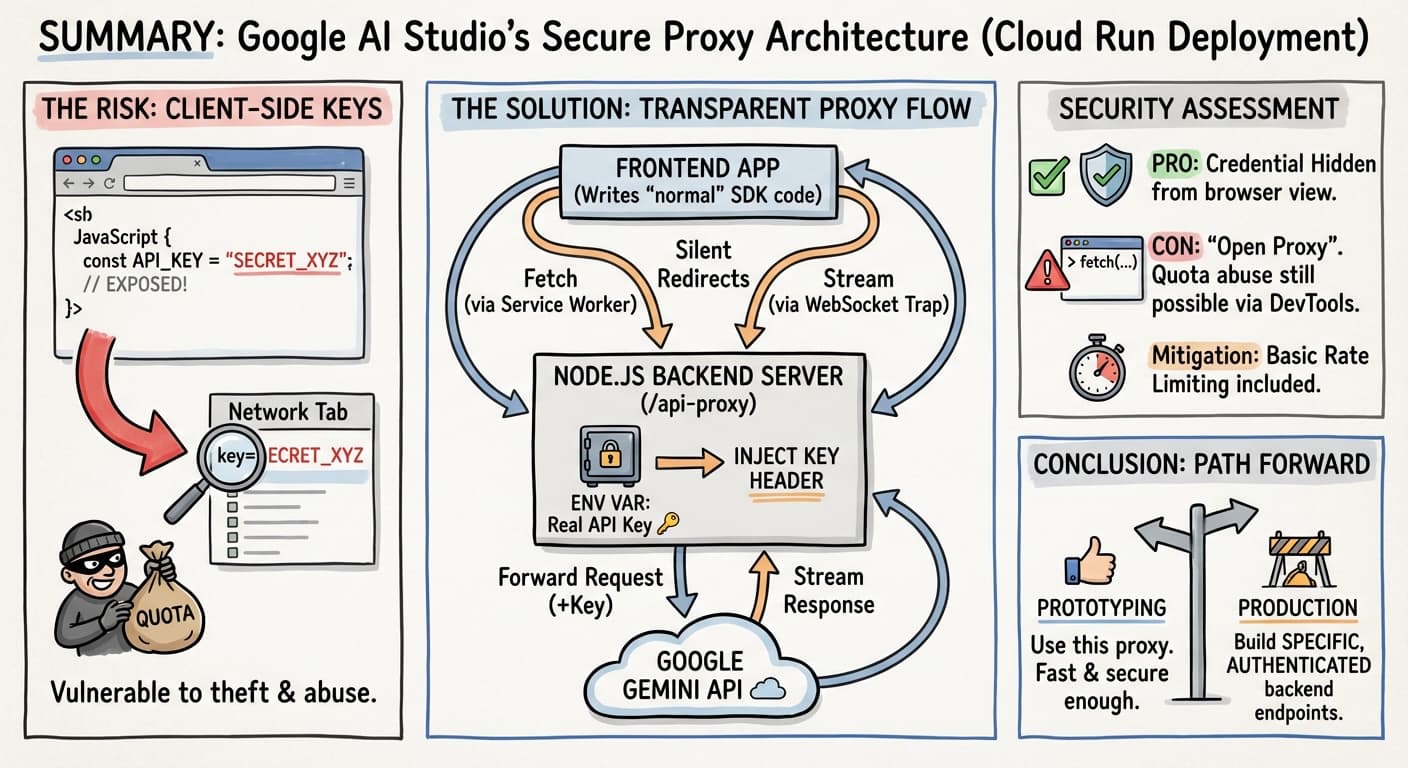
If you’ve recently vibe-coded and exported a Gemini-powered app from Google AI Studio
to host it online on Google Cloud Run,
you might have noticed a server/ directory containing a Node.js application.
This isn’t just a simple file server; it’s a clever “transparent proxy” designed to solve a classic problem in frontend AI development:
How do I use my API key without leaking it to the browser?
In this post (although vibe-coding is supposed to be all about not looking at the code at all) we’ll dissect exactly how this architecture works, why it’s safer than a client-side key, and where its security limits lie.
When exporting/downloading an AI Studio generated app, you won’t see what I’m going to explain below. It’s when you export the app to Cloud Run that the mechanism explained here is put in place. I looked at the code that was deployed on Cloud Run, from the Google Cloud Console.
The Problem: Client-Side Keys
When building an app with a React, Vue, or vanilla JS frontend that talks to an AI model, the path of least resistance would often be:
// ❌ DANGEROUS: Do not do this in production
const API_KEY = "AIzaSy...";
const genAI = new GoogleGenerativeAI(API_KEY);
The moment you deploy this, your API key is visible in the browser’s “Network” tab of the Dev tools, or by inspecting the JavaScript source. A malicious actor can grab your key and use your quota for their own projects, potentially racking up bills or exhausting your limits.

The Solution: The “Transparent” Proxy
💡 Google AI Studio’s exported starter code uses a Node.js proxy server combined with Service Workers to hide the key while letting you write frontend code as if you were calling the API directly.
The classical approach is to have your frontend call your backend code, and it’s only your backend code that has access to the API key. Here, the approach taken by AI Studio for Cloud Run deployment is to let developers continue to write frontend code as usual, calling the generative AI API as if it were a direct call from the frontend… But in reality, the call is intercepted and proxied to a server backend that takes care of making the real call to the AI model, and handle the API key on the backend, without ever exposing it.
Part 1: The Server
The heart of the system is an Express.js server (server/server.js). It serves your frontend files but also listens on a special endpoint: /api-proxy.
When a request hits this endpoint, the server:
- Injects the API Key: It takes the key from a secure environment variable on the server-side (
GEMINI_API_KEY). - Forwards the Request: It sends the modified request to Google’s real API (
generativelanguage.googleapis.com). - Streams the Response: It pipes the answer back to your browser.
Here is the critical logic in server.js where the key is added:
// server/server.js

// ... inside the /api-proxy route handler ...

// Prepare headers for the outgoing request
const outgoingHeaders = {};

// Copy most headers from the incoming request (content-type, etc.)
// ... (code to copy headers) ...

// 🔐 KEY INJECTION HAPPENS HERE
outgoingHeaders['X-Goog-Api-Key'] = process.env.GEMINI_API_KEY;

const axiosConfig = {
    method: req.method,
    url: `https://generativelanguage.googleapis.com/${targetPath}`,
    headers: outgoingHeaders,
    // ...
};

// Forward the request to Google
const apiResponse = await axios(axiosConfig);
The frontend never receives the key. It only receives the results of the API call.
Part 2: Client-Side Interception
If you look at the frontend code (e.g., in App.tsx), you might see standard calls to the Gemini API
(usually it’s implemented in a dedicated services/geminiService.ts file):
// Frontend code looks like it's calling Google directly!
const model = genAI.getGenerativeModel({
  model: "gemini-3-flash-preview",
  temperaturecontents: {...}
});
const result = await model.generateContent(prompt);
How does this work if the frontend doesn’t have the key?
The server injects two scripts into your index.html at runtime:
websocket-interceptor.jsservice-worker.js
The Service Worker
The service-worker.js acts like a network traffic cop inside your browser. It monitors all outgoing fetch requests.
If it sees a request headed for generativelanguage.googleapis.com, it stops it and redirects it to your local server instead.
// server/public/service-worker.js

const TARGET_URL_PREFIX = 'https://generativelanguage.googleapis.com';

self.addEventListener('fetch', (event) => {
  const requestUrl = event.request.url;

  if (requestUrl.startsWith(TARGET_URL_PREFIX)) {
    // ✋ Stop! Don't go to Google directly.
    // 👉 Go to our local proxy instead.
    const remainingPath = requestUrl.substring(TARGET_URL_PREFIX.length);
    const proxyUrl = `${self.location.origin}/api-proxy${remainingPath}`;

    // Forward the request to /api-proxy
    event.respondWith(fetch(new Request(proxyUrl, { ... })));
  }
});
This “transparent” redirection means you don’t have to change your frontend code to point to http://localhost:3000/api-proxy.
You just write standard SDK code, and the Service Worker handles the routing.
The WebSocket Interceptor
For streaming features or chat, the Gemini API uses WebSockets. Service Workers cannot easily intercept WebSocket connections, so the solution uses a different trick: Monkey Patching.
The websocket-interceptor.js overwrites the global browser WebSocket constructor.
// server/public/websocket-interceptor.js

const originalWebSocket = window.WebSocket;

window.WebSocket = new Proxy(originalWebSocket, {
  construct(target, args) {
    let [url, protocols] = args;

    // Check if the connection is destined for Gemini
    if (url.includes('generativelanguage.googleapis.com')) {
       // Redirect to our local proxy endpoint
       url = url.replace('wss://generativelanguage.googleapis.com',
                         `wss://${window.location.host}/api-proxy`);
    }

    // Create the WebSocket with the new URL
    return new originalWebSocket(url, protocols);
  }
});
Security Reality Check
Is this secure? Yes and No.
✅ The Good: Credential Protection
This architecture successfully hides the “Secret String” (your API Key), as if you had written your own backened server.
- It is not in the JavaScript bundle.
- It is not in the network traffic (except between your server and Google).
- A user cannot “copy-paste” your key to use in their own unrelated backend script.
⚠️ The Bad: The “Open Proxy” Risk
Because the server is a “dumb pipe” — it blindly signs any request sent to /api-proxy.
A malicious user on your site can still abuse your quota, by opening Chrome DevTools and running:
// This will be intercepted by the Service Worker and proxied!
fetch('https://generativelanguage.googleapis.com/v1beta/models/gemini-pro:generateContent', {
    method: 'POST',
    body: JSON.stringify({ contents: [{ parts: [{ text: "Generate 5000 words of spam..." }] }] })
})
Your server will happily stamp this request with your API key and send it to Google.
🛡️ The Mitigation: Rate Limiting
The AI Studio team anticipated this. The generated server includes Rate Limiting to prevent a single user from draining your quota instantly.
// server/server.js

const proxyLimiter = rateLimit({
    windowMs: 15 * 60 * 1000, // 15 minutes
    max: 100, // Limit each IP to 100 requests per window
    message: 'Too many requests from this IP...'
});

app.use('/api-proxy', proxyLimiter);
This ensures that while a user can make requests via your proxy, they are capped at a lower speed (e.g., 100 requests per 15 minutes, but that might still be a bit too much!)
Conclusion
I’ve always been curious to understand how Google AI Studio was protecting the Gemini API key, although the code appeared to directly make use of the API key on the frontend. But the (real) code that is actually deployed on Cloud Run is pretty smart, making use of some interesting tricks to not expose the key, and to mitigate the abuse of your quota.
The Google AI Studio proxy server is a nice piece of engineering for prototyping and demos. It allows for a “serverless-feeling” frontend development experience while adhering to the basic security rule of keeping API keys on the server.
However, for a production application, you should eventually replace this generic proxy with specific backend endpoints
(e.g., /api/generate-recipe, /api/chat-response) that:
- Validate user input (“Is this actually a recipe request?”).
- Authenticate the user (“Is this user logged in?”).
- Apply strict business logic before calling the Gemini API.
Even if Google AI Studio protects your API key to some extent, your quota can still be exhausted by a malicious user. So if you’re exposing such an application to the public, ask AI Studio to either add authentication, or to request the user to pass their own API key. Or even both!
I hope you found this exploration interesting!