
Extracting JSON from LLM chatter with JsonSpotter
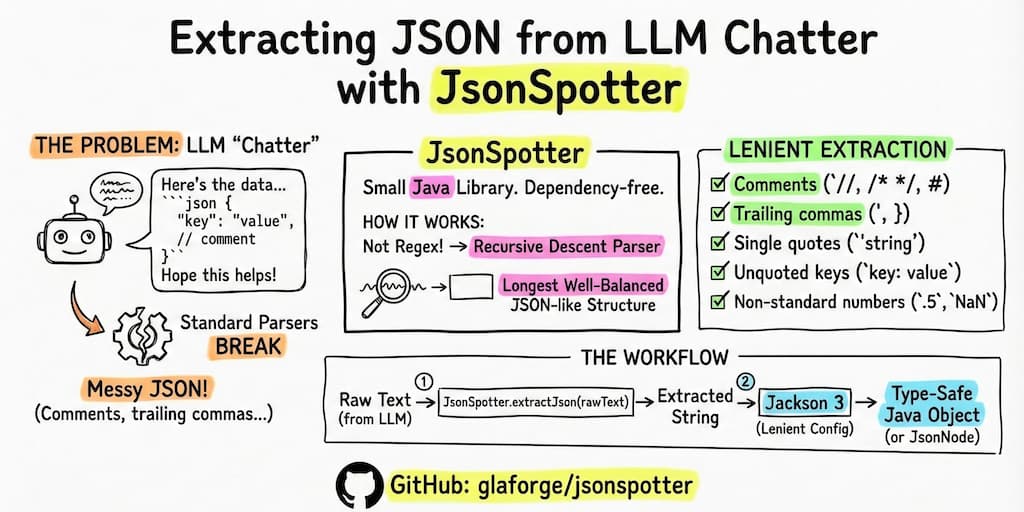
LLMs are great at generating structured data, in particularly those which support a strict JSON output mode (sometimes also called structured decoding), but sometimes they give you a bit more than the requested JSON. You get a Markdown code block wrapped in “Here’s the data you asked for:” and “Hope this helps!”. If you’re lucky, the JSON is valid. If you’re not, it has trailing commas or comments that break standard parsers.
I wrote JsonSpotter to handle this. It’s a small Java library that finds and extracts JSON-like structures from any text, even if the JSON itself is a bit messy. Then, you can use a lenient JSON parser like Jackson 3 to parse the extracted JSON to work with proper type-safe Java objects, instead of text or maps of lists of maps of… more basic types.
Why not just use Regex?
You could try indexOf("{") or a regular expression, but those break quickly. Nested objects, extra braces in the conversational text, or complex arrays make string manipulation a nightmare.
JsonSpotter uses a recursive descent parser. It actually understands the structure it’s looking for. It doesn’t just find brackets; it validates the object or array boundaries structurally as it scans. By doing so, it can accurately find the longest well-balanced JSON-like structure in the text, ensuring that nested objects are handled correctly and that it doesn’t get tripped up by random braces in the conversational text.
Handling “lenient” JSON
Sometimes LLMs output what I call “human-friendly” JSON. They don’t always output strict and valid JSON. They can add comments to explain fields, add an ellipsis to omit parts of the content, or leave trailing commas. By default, standard libraries like Jackson or Gson will throw an error immediately when they see a // comment or a trailing ,.
JsonSpotter is built to be lenient during extraction. It recognizes:
- Single and multi-line comments (
//,/* */,#) - Unquoted keys and single-quoted strings
- Trailing commas
- Non-standard numbers like
.5orNaN
Once JsonSpotter extracts the raw string, you can pass it to a proper JSON parser configured for leniency (i.e. being tolerant to malformed JSON content).
A quick example
First, extract the JSON from your LLM response:
String rawText = "..."; // Text returned by your LLM
String jsonString = JsonSpotter.extractJson(rawText);
Then, parse it with something like Jackson 3 (which has great support for lenient features):
import tools.jackson.databind.json.JsonMapper;
import tools.jackson.core.json.JsonReadFeature;

JsonMapper mapper = JsonMapper.builder()
    .enable(JsonReadFeature.ALLOW_JAVA_COMMENTS)
    .enable(JsonReadFeature.ALLOW_TRAILING_COMMA)
    .enable(JsonReadFeature.ALLOW_SINGLE_QUOTES)
    .enable(JsonReadFeature.ALLOW_UNQUOTED_PROPERTY_NAMES)
    .build();

MyClass myObj =  mapper.readValue(jsonString, MyClass.class);
// or
JsonNode node = mapper.readTree(jsonString);
Get it
JsonSpotter is dependency-free and available on Maven Central.
Add the dependency to your pom.xml:
<dependency>
    <groupId>io.github.glaforge.jsonspotter</groupId>
    <artifactId>jsonspotter</artifactId>
    <version>0.1.2</version>
</dependency>
Or your build.gradle:
dependencies {
    implementation("io.github.glaforge.jsonspotter:jsonspotter:0.1.2")
}
Give it a try and let me know what you think on GitHub if you find it useful.