
Generating music with Lyria 3 and the Gemini Interactions Java SDK

Generative AI isn’t just about text or images (with Nano Banana) but it’s also great at generating videos (with Veo 3). And now with the recently released Lyria 3 model from DeepMind, you can create some engaging and creative music with lyrics (generated, or your own) or invent a calming instrumental track to loop in the background of your online TikTok or YouTube Shorts.
And of course, if you’re a Java developer like me, you can do all that in Java!
In this article, we’ll learn how to create our own songs and clips with the Lyria 3 model, in Java, using my Gemini Interactions API Java SDK.
The examples in this article are inspired by this Colab Notebook in Python. Don’t hesitate to check it out. And if you want to learn more, this article shows some fun app integration ideas, like an alarm clock waking you up with a different song every morning!
To run those examples, you’ll need to get a Gemini API key in Google AI Studio. You’ll then be able to instantiate a Gemini Interactions API client as follows:
GeminiInteractionsClient client = GeminiInteractionsClient.builder()
       .apiKey(System.getenv("GEMINI_API_KEY"))
       .build();
Clip vs. Pro: The Models
Lyria 3 comes in two primary flavors:
lyria-3-clip-preview— Perfect for generating short clips (30 second long), snippets, or quick iterations for sound effects, choruses, and jingles.lyria-3-pro-preview— Fully capable of generating long, structurally cohesive, full-length songs (up to 3 minutes).
Here’s an example of firing off a request for a full-length song using the SDK:
ModelInteractionParams request = ModelInteractionParams.builder()
    .model("models/lyria-3-pro-preview")
    .input("""
        Write a full length epic power metal song
        about a brave knight fighting a dragon.
        It should have a guitar solo.
        """)
    .responseModalities(
        Interaction.Modality.AUDIO,
        Interaction.Modality.TEXT)
    .build();

Interaction interaction = client.create(request);
In addition to the MP3, Lyria also generated the following lyrics:Click to read the full lyrics
[[A0]]
[[B1]]
[16.0:] Cold mountain peaks in the morning haze,
[:] The knight rides forth through the silver maze,
[:] With steel in hand and a heart of fire,
[:] To face the beast and the burning pyre.
[:] Through ancient gates where the shadows sleep,
[:] He finds the path to the valley deep,
[:] No fear of death in his iron soul,
[:] He seeks the fire and the final goal.
[[C2]]
[48.0:] Upon the wind comes the dragon’s breath!
[:] A storm of flame and a dance of death!
[:] Oh, carry the flame on the steel of the knight!
[:] Into the dragon, into the light!
[:] The world will tremble as titans collide!
[:] Nowhere for the ancient beast to hide!
[:] Into the light!
[[B3]]
[80.0:] The claws of iron and teeth of obsidian,
[:] A mountain of scales in the dark stygian,
[:] The sword strikes home but the sparks do fly,
[:] Underneath the heavy sulfur sky.
[:] A roar that echoes through the mountain hall,
[:] The knight stands steady, he will not fall,
[:] Through smoke and cinders the legend grows,
[:] He strikes the heart where the furnace glows!
[[C4]]
[112.0:] Upon the wind comes the dragon’s breath!
[:] A storm of flame and a dance of death!
[:] Oh, carry the flame on the steel of the knight!
[:] Into the dragon, into the light!
[:] The world will tremble as titans collide!
[:] Nowhere for the ancient beast to hide!
[:] Into the light!
[[A5]]
[[B6]]
[160.0:] The wings are broken, the fire is out,
[:] The knight is standing amidst the doubt,
[:] A savior's light in the dark of the cave,
[:] To the halls of legend, he’s wise and brave.
[[D7]]
[176.0:] The legend remains. Forevermore!
[:] (Forevermore!)
MP3 Decoding and Dual Modalities
One of the coolest features of the Interactions API is the ability to request multiple Response Modalities.
Notice the responseModalities parameter in the code snippet above?
By requesting both AUDIO and TEXT, the API will return:
- Text: The actual lyrics generated and the structural breakdown of the song.
- Audio: The music itself natively encoded as an MP3 file.
Because of the API’s MP3 formatting return type, you don’t need to do any complex WAV header manipulation or PCM decoding.
You can safely extract the returned bytes from the payload and push them directly onto disks as an .mp3 file:
interaction.outputs().stream()
    .filter(output -> output instanceof AudioContent)
    .map(output -> (AudioContent) output)
    .findFirst()
    .ifPresent(audio ->
        Files.write(Paths.get("song.mp3"), audio.data()));
Prompt Constraints
The Lyria 3 model is highly receptive to prompting constraints. Depending on what you pass into the text input, here are four major ways to dictate the song output:
1. Give it Lyrics
You don’t have to rely on the model inventing lyrics. If you have written your own song, you can literally paste the lyrics into the prompt:
ModelInteractionParams request = ModelInteractionParams.builder()
    .model("models/lyria-3-clip-preview")
    .input("""
        An uplifting song with guitar riffs about nano banana.
        The lyrics should be:
          Yellow peel, a tiny sweet,
          The Nano Banana, a tropical treat.
          But wait—it hums, it starts to create,
          Switching into AI mode...
        """)
    .responseModalities(
        Interaction.Modality.AUDIO,
        Interaction.Modality.TEXT)
    .build();

Interaction interaction = client.create(request);
2. Control the Structure
You can instruct the model on song composition layout by using bracketed metadata
such as [Intro], [Verse], [Chorus], and [Outro].
ModelInteractionParams request = ModelInteractionParams.builder()
    .model("models/lyria-3-clip-preview")
    .input("""
        [Intro] Calm piano music setting a sunset scene on the beach
        [Verse] Epic rock ballad as the storm rages.
        [Outro] Opera with choir as the sun reappears
                again through the black clouds.
        """)
    .responseModalities(
        Interaction.Modality.AUDIO,
        Interaction.Modality.TEXT)
    .build();

Interaction interaction = client.create(request);
3. Instrumental Only
If you aren’t looking for lyrics or vocals, simply instruct the model that the track should be instrumental. It excels at generating ambient background loops!
ModelInteractionParams request = ModelInteractionParams.builder()
    .model("models/lyria-3-clip-preview")
    .input("""
        Create a looping meditation music that feels like the wind.
        Instrumental only.
        """)
    .responseModalities(Interaction.Modality.AUDIO)
    .build();

Interaction interaction = client.create(request);
4. Give it a Picture for Inspiration!
Since Lyria 3 is a multimodal model, not only can it accept a prompt in input, but you can also pass images to drive its generative inspiration:
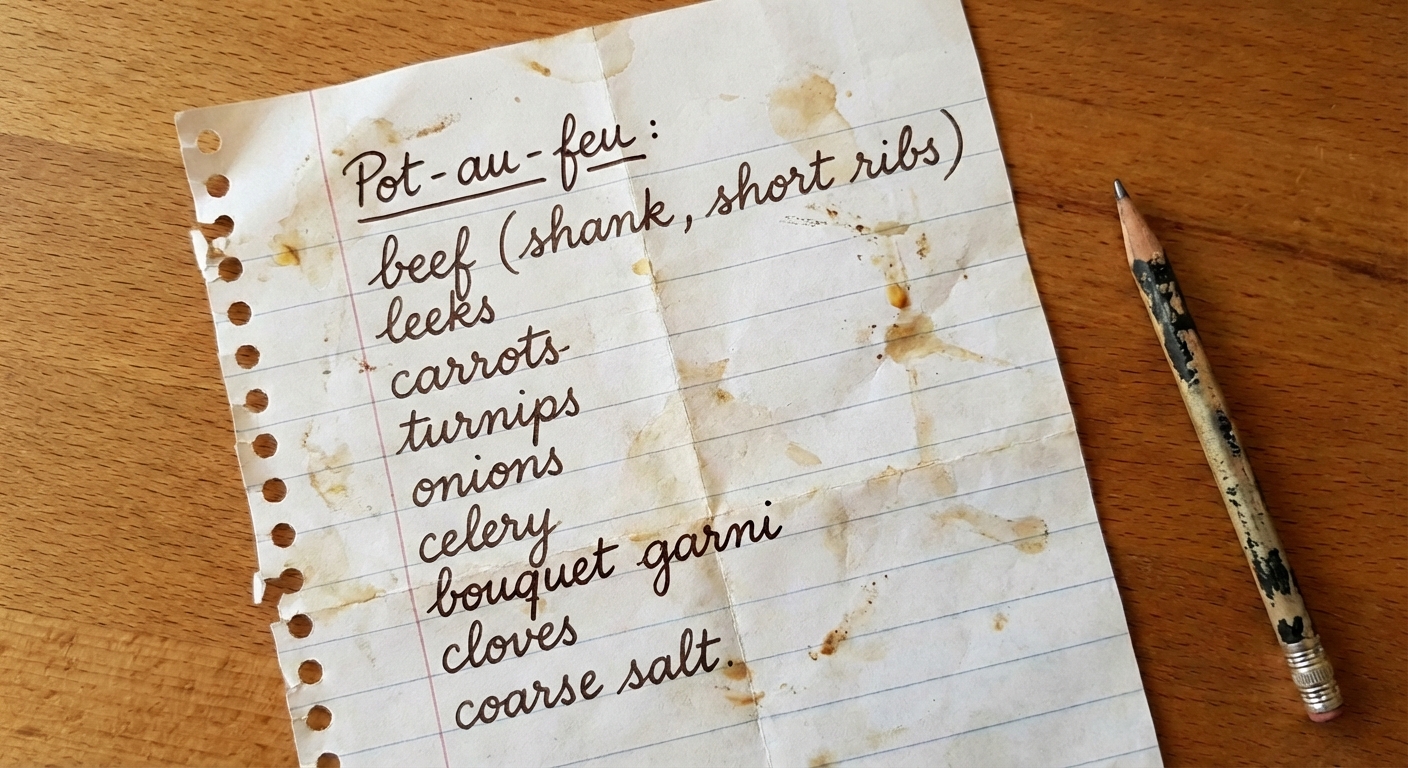
// picture of a groceries list which will drive the lyrics
byte[] imageBytes = URI.create(
    "https://storage.googleapis.com/generativeai-downloads/images/groceries.jpeg")
    .toURL()
    .openStream()
    .readAllBytes();

ModelInteractionParams request = ModelInteractionParams.builder()
    .model("models/lyria-3-clip-preview")
    .input(
        new TextContent("""
            An epic song with opera voices about this quest.
            Deep synths and a speeding up tempo.
            """),
        new ImageContent(imageBytes, "image/jpeg")
    )
    .responseModalities(
        Interaction.Modality.AUDIO,
        Interaction.Modality.TEXT)
    .build();

Interaction interaction = client.create(request);
Wrap Up
Adding music generation to Java applications or AI agents is easier than ever with the Interactions API and Lyria 3.
I highly recommend taking a look at the newly added
test cases
over in the LyriaTest.java class within the SDK repository to see the full setup in action.
Happy prompting & rocking! 🎸