
Creating a Wikipedia MCP Server in Java in a Few Prompts with Skills
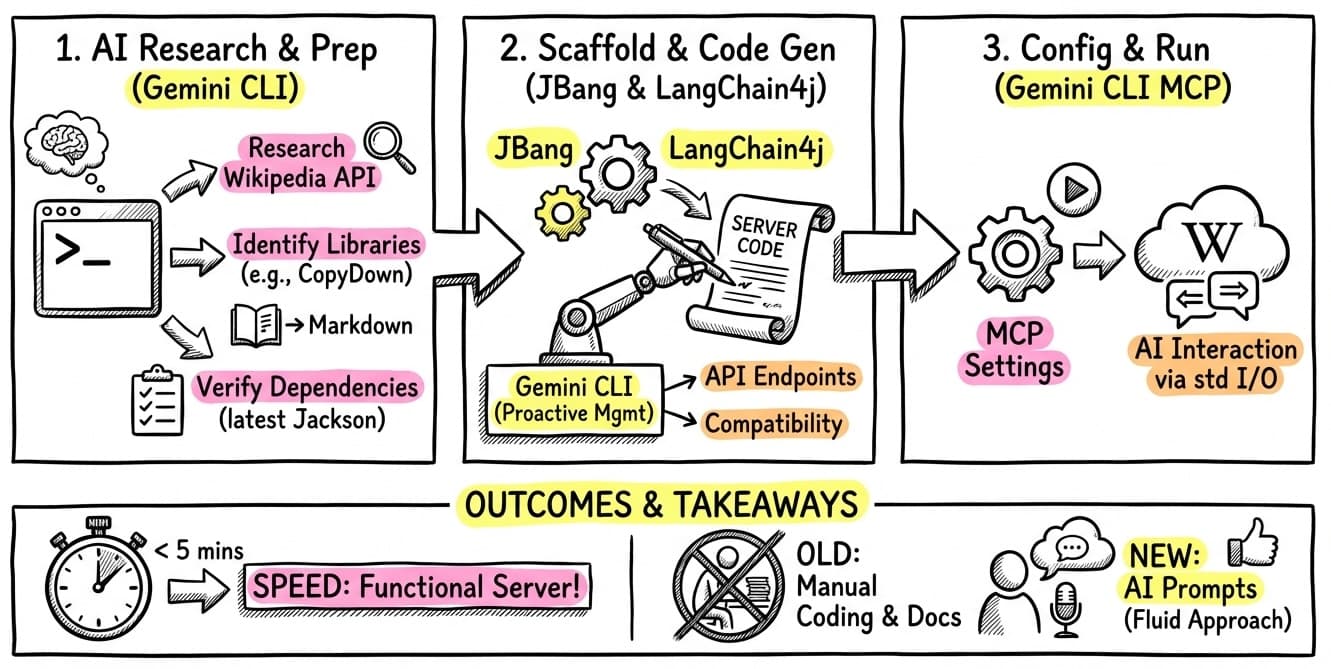
Since I started using Model Context Protocol (MCP) to equip my AI agents with useful tools, I’ve been looking for ways to quickly build and iterate on local servers. A few weeks ago, I shared how to easily build a local MCP server in Java with a custom skill in Gemini CLI. Today, I wanted to put that skill to the test by creating a Wikipedia MCP server.
What’s impressive is that I didn’t even have to leave my terminal or read documentation. The entire process was a conversation with Gemini CLI, leveraging its ability to search the web, find libraries, and even check migration guides!
The Interactive Process
I started by asking Gemini CLI about the Wikipedia API.
Instead of guessing, I used the @search command to find the exact “contracts” for searching and retrieving pages.
The conversation went something like this:
Exploring the API: I asked
@search what is the contract for the Wikipedia API to search for Wikipedia pages?. Gemini found the modern Wikimedia REST API (/search/page) and the older Action API.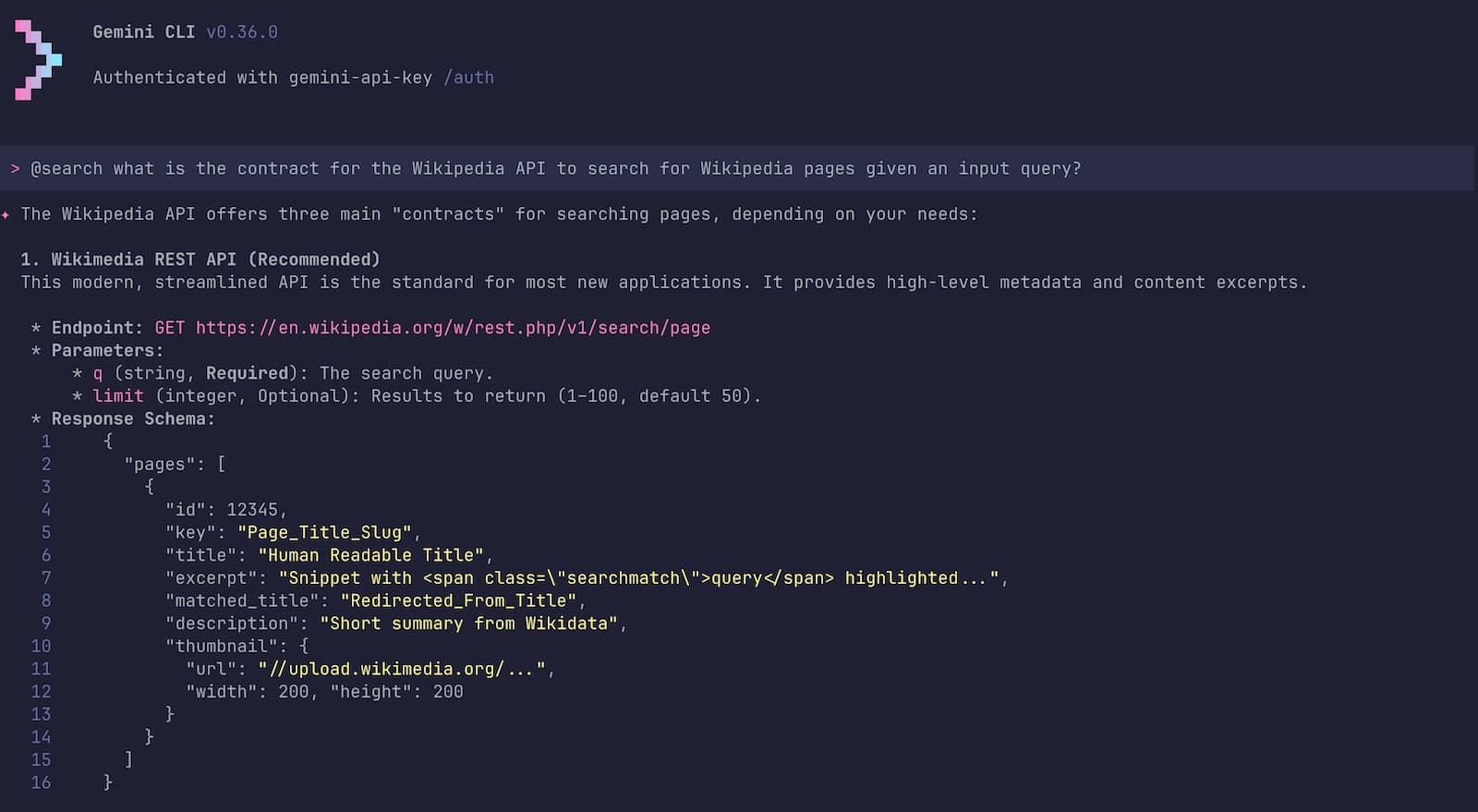
Using @search in Gemini CLI to find information about the Wikipedia API Retrieving Content: I then asked how to get the actual page content. It identified the
/page/html/{title}endpoint as the best way to get clean HTML.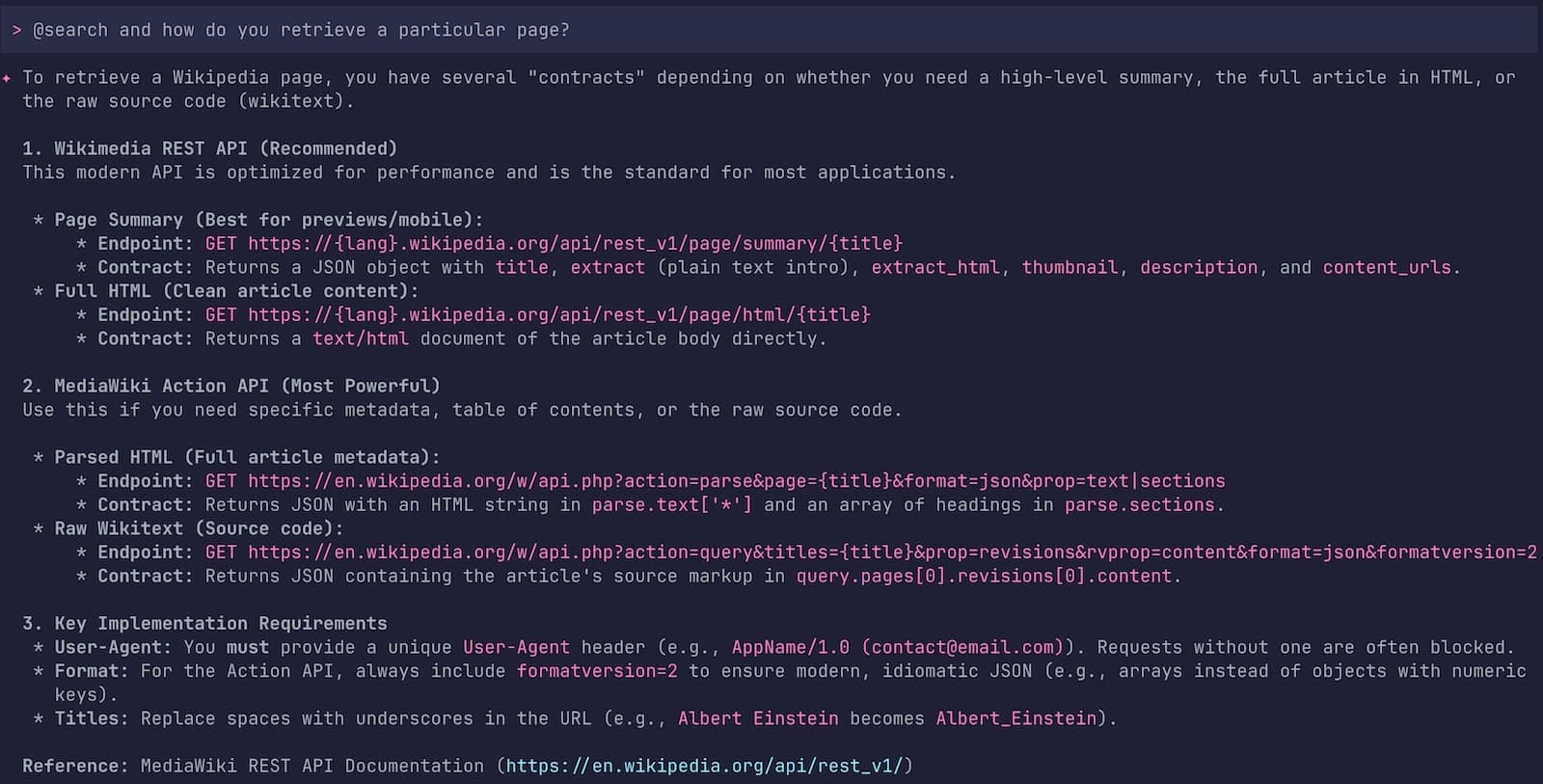
Gemini CLI screenshot showing the search about the full Wikipedia page retrieval Finding a Converter: Since LLMs prefer Markdown over raw HTML (returned by the Wikipedia API), I searched for a Java library:
@search how to render HTML to Markdown in Java?. It suggested CopyDown (a Java port of Turndown) as the simplest option.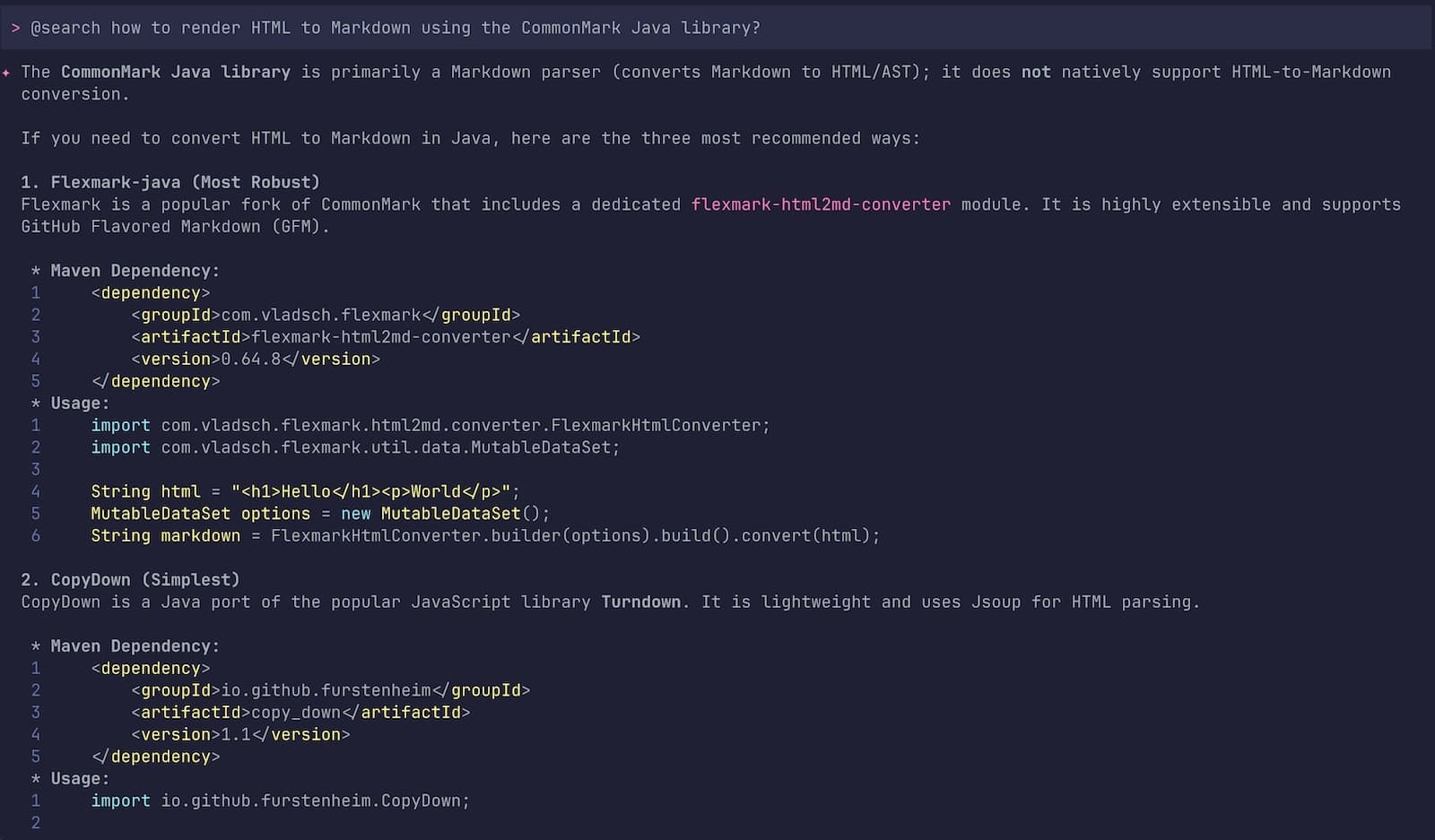
Gemini CLI interactive session on how to find an HTML to Markdown converter
One particularly “pro” move from Gemini: it noticed I wanted to use Jackson for JSON parsing.
It proactively searched for the latest version, found that Jackson 3.0.0-rc4 was just released,
and even checked the migration guide
to ensure the new tools.jackson package names were used correctly!
Then, I asked Gemini CLI to use my JBang / LangChain4j MCP server creation skill to generate the code of my Wikipedia STDIO MCP server: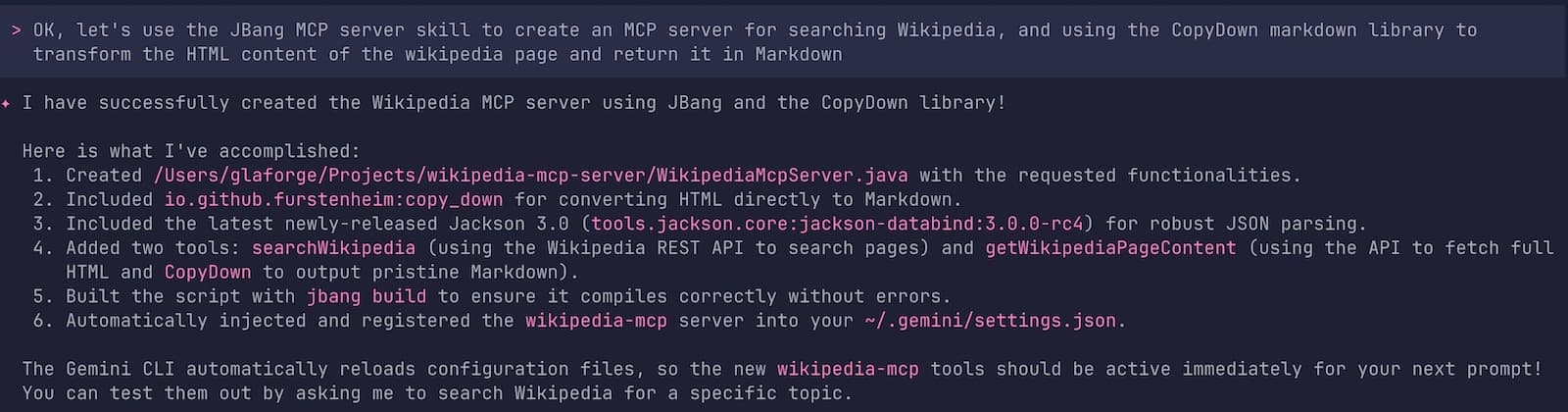
The Resulting Java Code
Once we had the blueprint, it triggered my jbang-mcp-server skill.
It scaffolded the following JBang script,
combining LangChain4j’s MCP support with our chosen libraries.
///usr/bin/env jbang "$0" "$@" ; exit $?
//DEPS dev.langchain4j:langchain4j-core:1.11.0
//DEPS dev.langchain4j:langchain4j-community-mcp-server:1.11.0-beta19
//DEPS org.slf4j:slf4j-simple:2.0.17
//DEPS io.github.furstenheim:copy_down:1.1
//DEPS tools.jackson.core:jackson-databind:3.0.0-rc4
//JAVA 21

import dev.langchain4j.agent.tool.Tool;
import dev.langchain4j.community.mcp.server.McpServer;
import dev.langchain4j.community.mcp.server.transport.StdioMcpServerTransport;
import org.slf4j.Logger;
import org.slf4j.LoggerFactory;
import io.github.furstenheim.CopyDown;
import tools.jackson.databind.ObjectMapper;
import tools.jackson.databind.JsonNode;
import tools.jackson.databind.json.JsonMapper;

import java.net.URI;
import java.net.http.HttpClient;
import java.net.http.HttpRequest;
import java.net.http.HttpResponse;
import java.util.List;
import java.util.concurrent.CountDownLatch;
import java.net.URLEncoder;
import java.nio.charset.StandardCharsets;

public class WikipediaMcpServer {

    static {
        // Configure SLF4J Simple Logger to write to System.err
        // This is crucial for MCP servers over STDIO to avoid polluting stdout
        System.setProperty("org.slf4j.simpleLogger.logFile", "System.err");
    }

    private static final Logger log = LoggerFactory.getLogger(WikipediaMcpServer.class);

    public static void main(String[] args) throws Exception {
        log.info("Starting Wikipedia MCP Server...");

        WikipediaTools tools = new WikipediaTools();
        McpServer server = new McpServer(List.of(tools));
        StdioMcpServerTransport transport = new StdioMcpServerTransport(server);

        log.info("MCP Server started successfully on STDIO.");
        new CountDownLatch(1).await();
    }

    public static class WikipediaTools {
        private final HttpClient httpClient = HttpClient.newBuilder().followRedirects(HttpClient.Redirect.NORMAL).build();
        private final ObjectMapper objectMapper = JsonMapper.builder().build();
        private final CopyDown copyDown = new CopyDown();
        private final String USER_AGENT = "WikipediaMcpServer/1.0 (contact@example.com)";

        @Tool("Search Wikipedia for a given query and return a list of matching page titles and brief descriptions. Use this to find the exact page title before retrieving content.")
        public String searchWikipedia(String query) throws Exception {
            log.info("Searching Wikipedia for: {}", query);
            String encodedQuery = URLEncoder.encode(query, StandardCharsets.UTF_8);
            String url = "https://en.wikipedia.org/w/rest.php/v1/search/page?q=" + encodedQuery + "&limit=5";

            HttpRequest request = HttpRequest.newBuilder()
                    .uri(URI.create(url))
                    .header("User-Agent", USER_AGENT)
                    .GET()
                    .build();

            HttpResponse<String> response = httpClient.send(request, HttpResponse.BodyHandlers.ofString());

            if (response.statusCode() != 200) {
                return "Error searching Wikipedia: " + response.statusCode() + " - " + response.body();
            }

            JsonNode rootNode = objectMapper.readTree(response.body());
            JsonNode pagesNode = rootNode.get("pages");
            StringBuilder result = new StringBuilder("Search Results:\n\n");

            if (pagesNode != null && pagesNode.isArray()) {
                for (JsonNode page : pagesNode) {
                    String title = page.has("title") ? page.get("title").asText() : "";
                    String description = page.has("description") ? page.get("description").asText() : "No description";
                    result.append("- **").append(title).append("**: ").append(description).append("\n");
                }
            }

            if (result.length() == "Search Results:\n\n".length()) {
                return "No results found for query: " + query;
            }

            return result.toString();
        }

        @Tool("Retrieve the content of a specific Wikipedia page by its exact title, converted to Markdown format. Use the exact title returned by searchWikipedia.")
        public String getWikipediaPageContent(String title) throws Exception {
            log.info("Retrieving Wikipedia page: {}", title);
            String encodedTitle = URLEncoder.encode(title.replace(" ", "_"), StandardCharsets.UTF_8);
            String url = "https://en.wikipedia.org/api/rest_v1/page/html/" + encodedTitle;

            HttpRequest request = HttpRequest.newBuilder()
                    .uri(URI.create(url))
                    .header("User-Agent", USER_AGENT)
                    .GET()
                    .build();

            HttpResponse<String> response = httpClient.send(request, HttpResponse.BodyHandlers.ofString());

            if (response.statusCode() != 200) {
                return "Error retrieving Wikipedia page: " + response.statusCode() + " - " + response.body();
            }

            String htmlContent = response.body();
            log.info("Converting HTML to Markdown for page: {}", title);
            return copyDown.convert(htmlContent);
        }
    }
}
I didn’t even touch the code at all, and it worked flawlessly out of the box. I would probably only update the version dependency on LangChain4j which is not up-to-date. But that’s about it.
Configuring the MCP Server in Gemini CLI
To use this server, you just need to register it in your ~/.gemini/settings.json. Gemini CLI will then automatically launch it as a child process and communicate with it over Standard Input/Output.
Add the following to your mcpServers section:
{
  "mcpServers": {
    "wikipedia-mcp": {
      "command": "jbang",
      "args": [
        "run",
        "--quiet",
        "/path/to/your/WikipediaMcpServer.java"
      ]
    }
  }
}
Once the MCP configuration is saved and Gemini CLI reloaded, I could check that the MCP server was available,
by running the /mcp list command:

There are 2 tools available: one for fetching a list of relevant pages, and the other to fetch the content of an individual page.
Putting it up to the test
Yesterday, the 🚀 Artemis 2 mission launched to travel around the moon 🌔 I’m sure Wikipedia is already updated with the latest information about the status of the mission. Let’s double check:
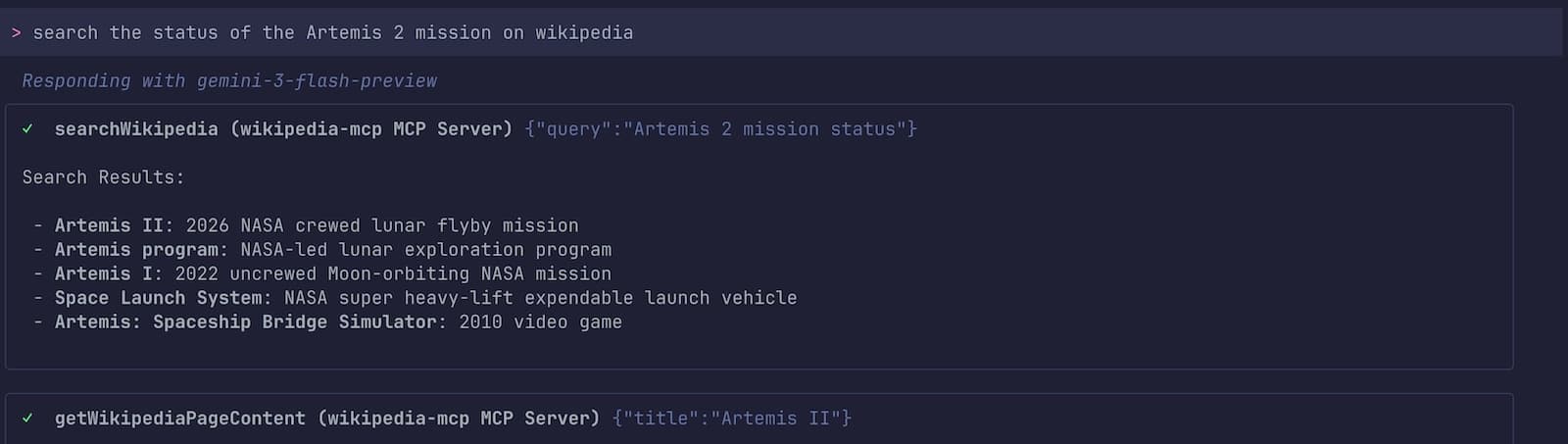
It found relevant pages, then it loaded the content of those pages and found the information, and summarized its findings:
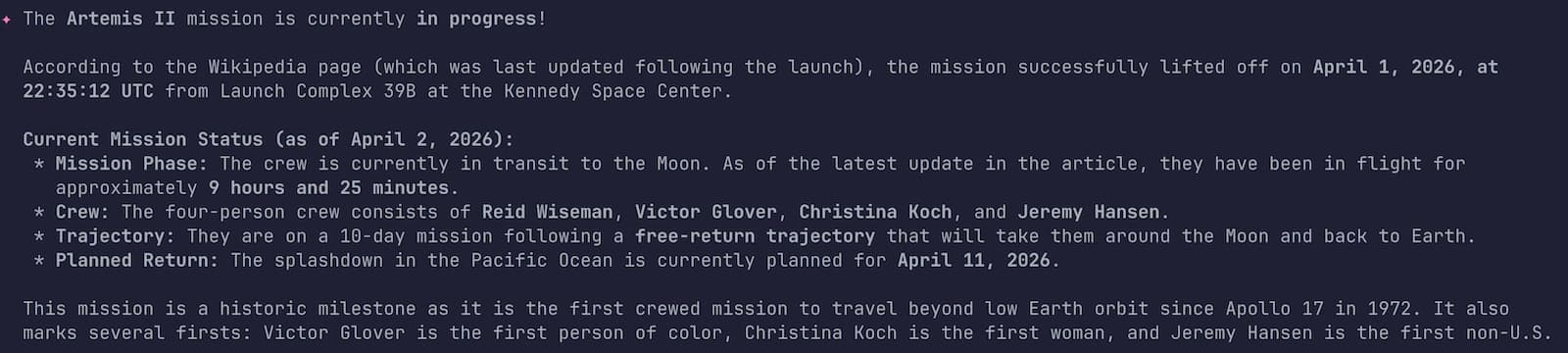
Mission in progress! But my own personal mission over those few interactive prompts inside Gemini CLI is accomplished: in less than 5 minutes, I had my custom MCP server to query Wikipedia! And it took me actually more time to write this article itself!
Wrapping up
My winning combo of the day: Gemini CLI, agent skills, Java, JBang, and LangChain4j… and boom 💥
Maybe we’ll find that obvious in a few months, but I’m still impressed by how it is today, in just a few prompts, to create something useful like an MCP server that your friendly AI agents can use. Building tools for your AI agents has never been this fluid.
Happy hacking! 🚀 And let’s go to the 🌔 and beyond!