
A Simple Coding Agent in a Loop with LangChain4j, Jbang, and Gemini
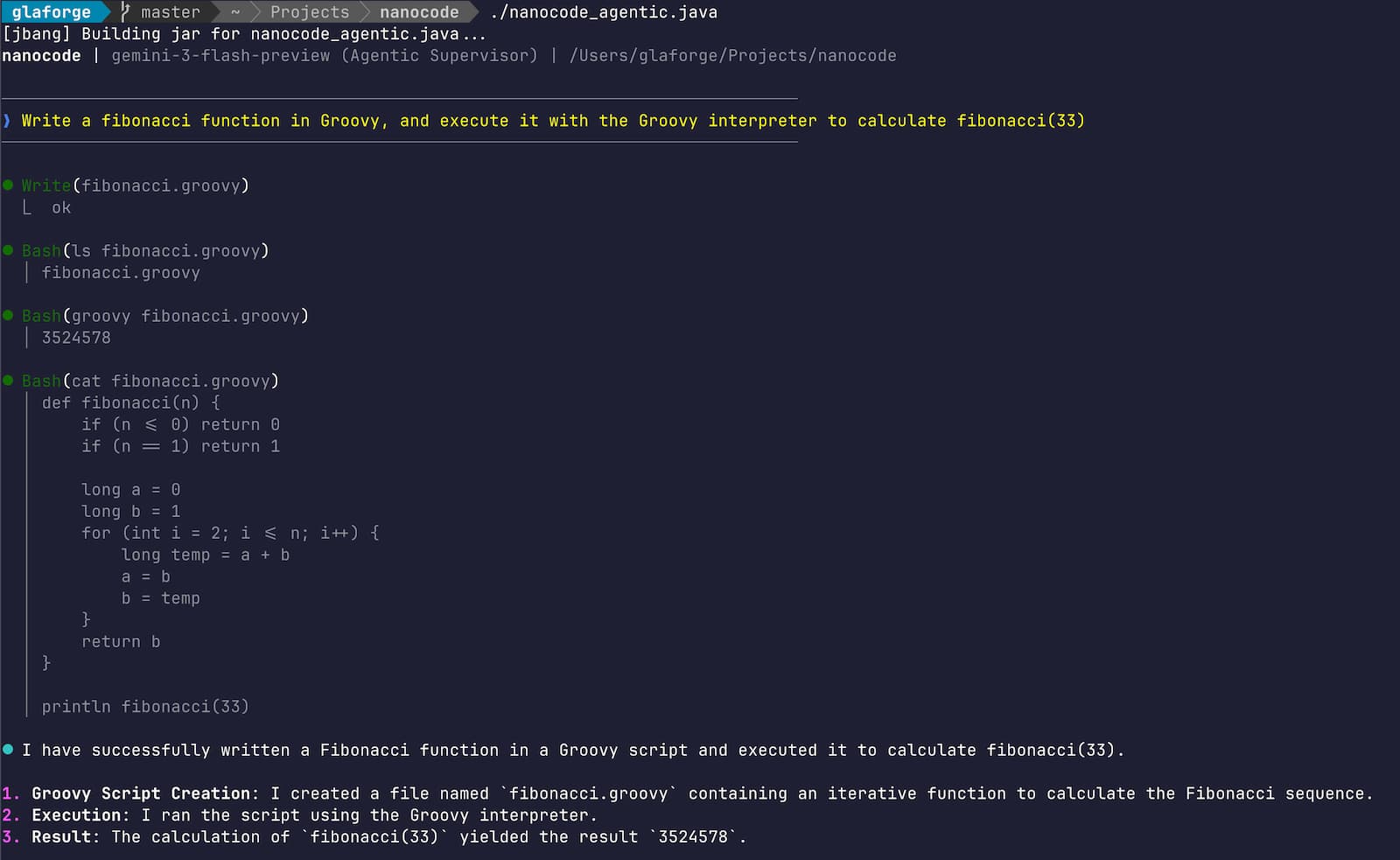
A few days ago, Max Rydahl Andersen published a fascinating article about nanocode: a minimalist Claude Code alternative implemented in just 260 lines of Java (inspired from a 250-line Python equivalent). It was a masterclass in “leanness,” using raw HTTP calls and Jackson JSON parsing, an OpenRouter or Anthropic LLM endpoint, to create an autonomous coding loop.
I loved the concept, but I had a very practical motivation to take it in a different direction: I don’t have a Claude subscription. 😃
Instead, I’m a heavy user of Google’s ecosystem (who would have guessed) and I really wanted to use Gemini. This led me to explore how much it would look like if I could integrate LangChain4j and its first-class support for Google AI Gemini.
In this post, I’ll walk through the two variants I built, the architectural trade-offs between them, and how I evolved the code from its original fork with the help of Gemini CLI and its powerful plan mode.
Before we go further, we need to address the elephant in the room: Security.
A basic coding agent like this is potentially dangerous. It has:
- No sandboxing: It runs directly on your machine with your user permissions.
- No security checks: There is no “human-in-the-loop” to validate shell commands before they execute.
- Full system access: If the LLM decides to run
rm -rf /, this script will happily try to do it.
This is “run at your own risk” territory. Do not use this on your production code or any sensitive machine without further sandboxing (like Docker or a VM) and strict security measures. This is exactly what differentiates a professional coding agent (like Claude Code or Gemini CLI) from a 300-line “toy” project like this one.
What exactly is a “Coding Agent”?
Strip away the marketing fluff and a coding agent is essentially a persistent while loop.
- It waits for a request from the user.
- It sends that request to an LLM along with a set of tools (functions the agent can run locally or that invoke remote APIs).
- The LLM decides which tools to call to achieve the goal (e.g., “Read this file”, “Run this test”, “Write this function”).
- The loop executes those tools, feeds the results back to the LLM, and repeats until the goal is achieved.
This “agentic action” is what distinguishes an agent from a simple chatbot. It doesn’t just talk about code; it actively works on your filesystem to solve the problem you set forth.
The Foundation: Java 25 and Gemini 3
Both variants are written as single-file JBang scripts
and leverage Java 25 preview features—specifically
Implicitly Declared Classes (the bare void main() method)
and the new java.lang.IO class (for friendly IO.println()/readln() shortcuts).
Thanks to the new IO class, the main loop is incredibly lean:
while (true) {
    var input = readln("❯ "); // Modern Java 25 input
    if (input == null || input.equals("/q")) break;

    var response = assistant.chat(input);
    println("\n⏺ " + markdown(response));
}
The model of choice is gemini-3-flash-preview. Gemini 3 introduces “thinking” capabilities
and “thought signatures”, which are essential for stable tool-calling in long-running agentic conversations.
On some Coding/SWE-focused benchmarks Gemini 3 Flash is often just as good as Gemini 3 Pro, but faster! So don’t hesitate to use this super fast model! And reserve Pro for more complex reasoning scenarios.
Two Approaches to Agentic Design
I implemented two distinct variants to explore using LangChain4j for coding agents.
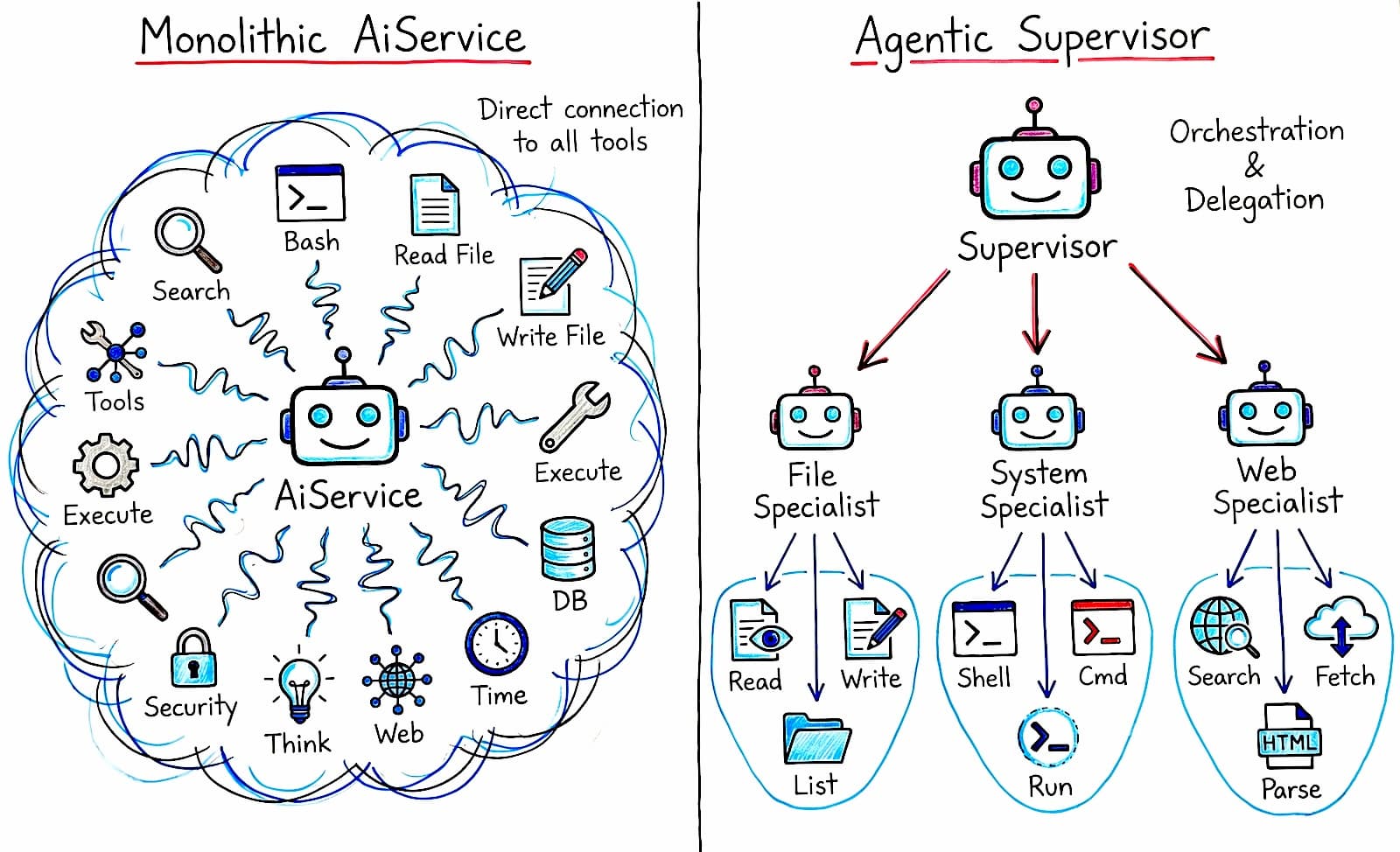
1. The Monolithic Agent (nanocode_basic.java)
This version uses the tried-and-true AiServices pattern.
It’s a single agent that is directly “wired” to a set of tools (read, write, bash, etc.).
var assistant = AiServices.builder(Assistant.class)
        .chatModel(model)
        .chatMemory(MessageWindowChatMemory.withMaxMessages(20))
        .tools(new Tools())
        .build();
2. The Multi-Agent Supervisor (nanocode_agentic.java)
This variant uses the experimental langchain4j-agentic module.
Instead of one agent with twenty tools, we have a Supervisor orchestrating specialized specialists.
Each specialist agent has a narrower set of tools.
Not all the tools, just the useful ones for the task at hand.
To get the idea, here is a simplified look at how the sub-agents and supervisor are structured and wired together:
// 1. Specialized Tool Sets
class FileTools {
    @Tool public String read(String path, Integer offset, Integer limit) { ... }
    @Tool public String write(String path, String content) { ... }
}
class SystemTools {
    @Tool public String bash(String cmd, String dir) { ... }
}

// 2. Sub-Agent Interfaces
public interface FileAgent {
    @Agent(name = "file_specialist")
    String work(@V("task") String task);
}
public interface SystemAgent {
    @Agent(name = "system_specialist")
    String work(@V("task") String task);
}

// 3. Wiring it all together
var fileAgent = AgenticServices.agentBuilder(FileAgent.class)
        .chatModel(model).tools(new FileTools()).build();

var systemAgent = AgenticServices.agentBuilder(SystemAgent.class)
        .chatModel(model).tools(new SystemTools()).build();

SupervisorAgent supervisor = AgenticServices.supervisorBuilder()
        .chatModel(model)
        .subAgents(fileAgent, systemAgent, webSearchAgent)
        .responseStrategy(SupervisorResponseStrategy.SUMMARY)
        .build();
- Pros: Each sub-agent has a narrower context and higher accuracy.
- Cons: The module is still experimental and adds orchestration overhead.
Implementing the Tools
The tools themselves are simple POJOs with methods annotated with @Tool. Here is an example of the read tool, which reads a file with line numbers and provides a nice console log so you can see exactly what the agent is doing:
@Tool("Read file with line numbers")
public String read(@P("Path to the file") String path,
                   @P("Start line") Integer offset,
                   @P("Limit") Integer limit) throws IOException {
    println("\n⏺ Read(" + path + ")"); // Visual feedback
    var lines = readAllLines(Path.of(path));
    // ... logic to format lines with numbers ...
    return formattedContent;
}
All these annotations instruct the LLM what the purpose of each tool is, what each parameter means. No need to write tool’s JSON schemas by hand.
Adding some “Personal Touches”
While I moved away from the “smallest LOC / least dependencies” goal, I wanted to keep the script concise while adding features that genuinely improve the CLI experience.
ANSI Markdown Rendering
Reading raw Markdown strings in a terminal is a chore. I added a markdown() method inspired
by a routine I shared in a previous article,
which uses regex patterns to transform Markdown syntax into ANSI escape codes.
static String markdown(String md) {
    return md
        .replaceAll("\\*\\*(.*?)\\*\\*", BOLD + "$1" + RESET) // Bold
        .replaceAll("\\*(.*?)\\*", ITALIC + "$1" + RESET)     // Italic
        .replaceAll("(?s)```(\\w+)?\\n(.*?)\\n```", CODE_BG + "$2" + RESET) // Code blocks
        // ... more regex rules ...
}
Built-in Web Search
A coding agent is only as up-to-date as its knowledge cut-off date.
I added a websearch tool that leverages Gemini’s native Google Search capability,
so that the coding agent could search the web for the latest information
(for example, finding the last version of a dependency in Maven Central, how to use the last JDK enhancement…)
I created a dedicated sub-agent that takes care of the searches, simply by calling the Gemini model with Google Search enabled:
class SearchTools {
    @Tool("Search the web using Google Search")
    public String search(String query) {
        var searchModel = GoogleAiGeminiChatModel.builder()
                .apiKey(GEMINI_KEY)
                .allowGoogleSearch(true) // Native Gemini Search
                .build();
        return searchModel.chat(query);
    }
}
Conclusion
Whether you prefer the stability of a monolithic agent or the sophisticated orchestration of a multi-agent system, LangChain4j makes building these tools remarkably accessible. By combining it with the reasoning power of Gemini 3 and the modern features of Java 25, you can build a cool little coding assistant in a single file (thanks to JBang’s ability to handle dependencies and execution without the boilerplate of a project build file).
You can find both implementations in my fork here:
I’m curious to see what others will do with this experiment. What would you add next? How would you do it differently? I’d love to see more forks that continue to explore this space while keeping the coding agent small enough to fit in a single file.
Happy coding!
An ADK Java agent powered by Gemma 4