
Streaming Gemini 3.1's expressive new TTS model in Java
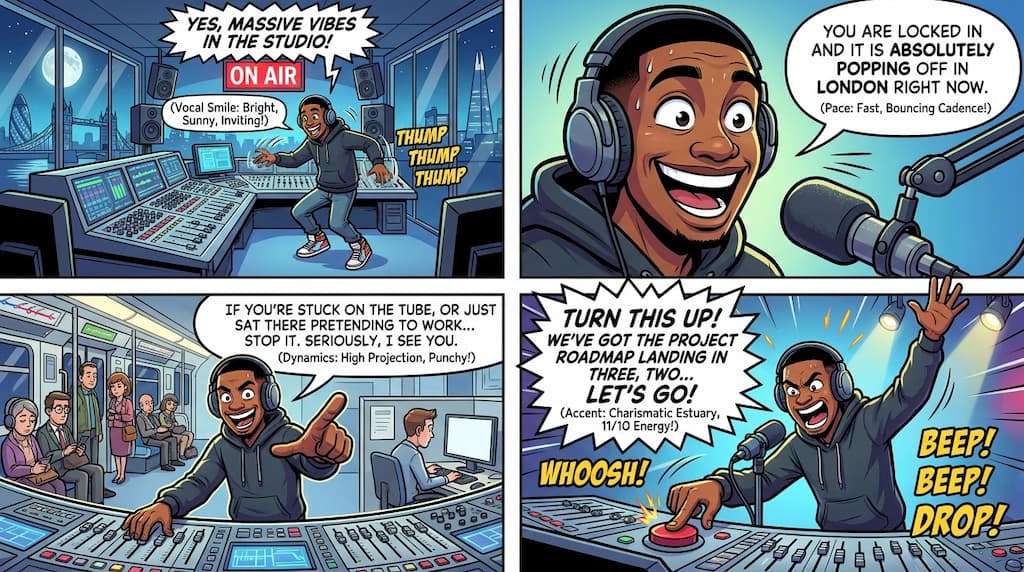
Google just released Gemini 3.1 Flash Text-to-Speech (TTS), a new expressive TTS model that you can steer with audio tags and scene descriptions.
I wanted to see how it worked with the Gemini Interactions SDK for Java.
Expressive control
The model sounds natural out of the box, but the real benefit is the control you have over expressiveness. By defining “Audio Profiles”, “Scene Details”, and “Director’s Notes” in your prompt, you can control the character’s pacing, tone, and environment.
You can also use inline tags like [excitedly], [whispers], or [shouting]
to change the emotional delivery mid-sentence.
There’s not a finite set of tags you can use, you can express any emotion within the square brackets.
For more on the prompting mechanics, see this article from DEV Community:
How to prompt Gemini 3.1’s new text to speech model
The article even suggests a meta-prompt you can use to generate good prompts for Gemini 3.1 TTS!
You could even turn that into a reusable SKILL.md file!
Streaming audio directly to the speakers
I set up a “Morning DJ” persona using the example and techniques from the article. Beyond just generating a file, I wanted to stream the audio directly to the speakers as the model generated it.
Here is the implementation using the Gemini Interactions Java SDK.
First, let’s define the client, with an Gemini API key (that you can get from AI Studio):
GeminiInteractionsClient client = GeminiInteractionsClient.builder()
    .apiKey(System.getenv("GEMINI_API_KEY"))
    .build();
You don’t necessarily have to create such a complex and detailed prompt, but I’ve reused the example from the article:
String prompt = """
    # AUDIO PROFILE: Jaz R.
    ## THE SCENE: The London Studio
    It is 10:00 PM in a glass-walled studio overlooking the moonlit London skyline,
    but inside, it is blindingly bright. The red "ON AIR" tally light is blazing.
    Jaz is standing up, not sitting, bouncing on the balls of their heels
    to the rhythm of a thumping backing track.
    Their hands fly across the faders on a massive mixing desk.
    It is a chaotic, caffeine-fueled cockpit designed to wake up an entire nation.

    ### DIRECTOR'S NOTES
    Style:
    * The "Vocal Smile": You must hear the grin in the audio.
      The soft palate is always raised to keep the tone bright, sunny, and explicitly inviting.
    * Dynamics: High projection without shouting. Punchy consonants and elongated vowels on excitement words.
    Accent: Jaz is a DJ from Brixton, London
    Pace: Speaks at an energetic pace, keeping up with the fast music.
    Speaks with a "bouncing" cadence. High-speed delivery with fluid transitions—no dead air, no gaps.

    ### SAMPLE CONTEXT
    Jaz is the industry standard for Top 40 radio, high-octane event promos,
    or any script that requires a charismatic Estuary accent and 11/10 infectious energy.

    #### TRANSCRIPT
    [excitedly] Yes, massive vibes in the studio!
    You are locked in and it is absolutely popping off in London right now.
    If you're stuck on the tube, or just sat there pretending to work... stop it.
    Seriously, I see you.
    [shouting] Turn this up! We've got the project roadmap landing in three, two... let's go!
    """;
Feel free to just try the with the audio
[tags],
it goes already far enough.
Now, it’s time to create the request, pass the model, prompt, output modalities (i.e. audio!), and also speech config to chose the voice and language. But let’s not forget the streaming setting to stream the answer as soon as it’s generated:
ModelInteractionParams request = ModelInteractionParams.builder()
    .model("gemini-3.1-flash-tts-preview")
    .input(prompt)
    .responseModalities(Interaction.Modality.AUDIO)
    .speechConfig(new SpeechConfig("Algenib", "en-GB"))
    .stream(true)
    .build();
Gemini 3.1 TTS is not a streaming model like the Gemini Live model. So it’s generating the audio and sends it when it’s ready. But the idea of setting streaming here, is to start streaming the audio as soon as we start receiving it.
We use the client.stream() method to consume Server-Sent Events (SSE),
and open up the local audio system’s data line to serve chunks of audio as they are generated:
try (Stream<Events> eventStream = client.stream(request)) {
    AudioFormat format = new AudioFormat(24000, 16, 1, true, false);
    DataLine.Info info = new DataLine.Info(SourceDataLine.class, format);

    // Obtain a SourceDataLine connected to the system's active audio output
    try (SourceDataLine line = (SourceDataLine) AudioSystem.getLine(info)) {
        line.open(format);
        line.start();

        // Decode base64 bytes dynamically and pipe to the speakers
        eventStream.forEach(event -> {
            if (event instanceof Events.ContentDelta cd && cd.delta() instanceof Events.AudioDelta audioDelta) {
                byte[] audioData = Base64.getDecoder().decode(audioDelta.data());
                line.write(audioData, 0, audioData.length);
            }
        });

        line.drain();
    }
} catch (Exception e) {
    e.printStackTrace();
}
Results
Let’s listen! What do you think of the expressivity and tone of the voice? Pretty good, right?