
Managed AI Agents with the Gemini Interactions Java SDK
Google recently announced Managed Agents in the Gemini API at Google I/O. This feature allows developers to run autonomous agents that “reason, plan, use tools, and execute code inside isolated cloud sandboxes”.
Rather than requiring developers to manually build, secure, and scale the execution environment (including sandbox containers, network routes, and runtime engines), the Gemini API handles this infrastructure. This is powered by the Antigravity agent running on Gemini 3.5 Flash.
This article shows how to implement these agentic capabilities in Java using the Gemini Interactions SDK.
1. Understanding Agent Environments
When you run a managed agent using the Interactions API, it operates within an agent environment.
An environment is an ephemeral, sandboxed Linux workspace where the agent can run commands, write and read files, and access allowed external network services. By setting the environment parameter to "remote", the SDK provisions this isolated workspace in the cloud. Sessions can be resumed across multiple API calls, preserving files and environment state by referencing the previous interaction ID.
2. Getting Started with the SDK
To get started, add the SDK dependency to your Maven pom.xml:
<dependency>
    <groupId>io.github.glaforge</groupId>
    <artifactId>gemini-interactions-api-sdk</artifactId>
    <version>0.10.0</version>
</dependency>
Then, initialize the client using your API key (that you can create in Google AI Studio):
import io.github.glaforge.gemini.interactions.GeminiInteractionsClient;

GeminiInteractionsClient client = GeminiInteractionsClient.builder()
    .apiKey(System.getenv("GEMINI_API_KEY"))
    .build();
3. Running Pre-Defined Agents: Deep Research
Pre-defined managed agents can be executed out-of-the-box. As detailed in one of my
previous articles on building a Java research assistant,
you can invoke Google’s managed deep-research-pro agent directly to run multi-turn research, generate reports, and use search grounding tools.
To run the Deep Research agent with the SDK, initialize AgentInteractionParams specifying the model ID:
import io.github.glaforge.gemini.interactions.model.Interaction;
import io.github.glaforge.gemini.interactions.model.InteractionParams.AgentInteractionParams;

AgentInteractionParams params = AgentInteractionParams.builder()
    .agent("deep-research-preview-04-2026")
    .input("""
        Research the development and architecture
        of Google Tensor Processing Units (TPUs).
        """)
    .background(true)
    .build();

Interaction interaction = client.create(params);

// Poll for agent completion (or you can stream too)
while (interaction.status() != Interaction.Status.COMPLETED) {
    Thread.sleep(10_000);
    interaction = client.get(interaction.id());
}

System.out.println(
    "Research completed. Steps taken: " + interaction.steps());
4. Invoking the Default Antigravity Agent
The Antigravity agent is the default general-purpose developer agent. It is designed to reason through complex coding and logic tasks, write scripts, and execute them in its cloud container.
The preview model identifier for this agent is antigravity-preview-05-2026.
You can interact with it by configuring the parameters to request a "remote" environment:
import io.github.glaforge.gemini.interactions.model.Interaction;
import io.github.glaforge.gemini.interactions.model.InteractionParams.AgentInteractionParams;
import io.github.glaforge.gemini.interactions.model.Step;
import io.github.glaforge.gemini.interactions.model.Content;
import io.github.glaforge.gemini.interactions.model.Content.TextContent;

AgentInteractionParams params = AgentInteractionParams.builder()
    .agent("antigravity-preview-05-2026")
    .input("""
        Write a Python script that computes the first 10
        Fibonacci numbers, execute it in your sandbox,
        and print the output.
        """)
    .environment("remote")
    .stream(true)
    .build();

Interaction interaction = client.create(params);

// Wait for the agent execution in the cloud sandbox to complete
while (interaction.status() != Interaction.Status.COMPLETED) {
    Thread.sleep(5_000);
    interaction = client.get(interaction.id());
}

// Print output steps
interaction.steps().stream()
    .filter(step -> step instanceof Step.ModelOutputStep)
    .flatMap(step -> ((Step.ModelOutputStep) step).content().stream())
    .forEach(content -> {
        if (content instanceof TextContent text) {
            System.out.println(text.text());
        }
    });
5. Provisioning Custom Agents: GitHub Repository Analyzer
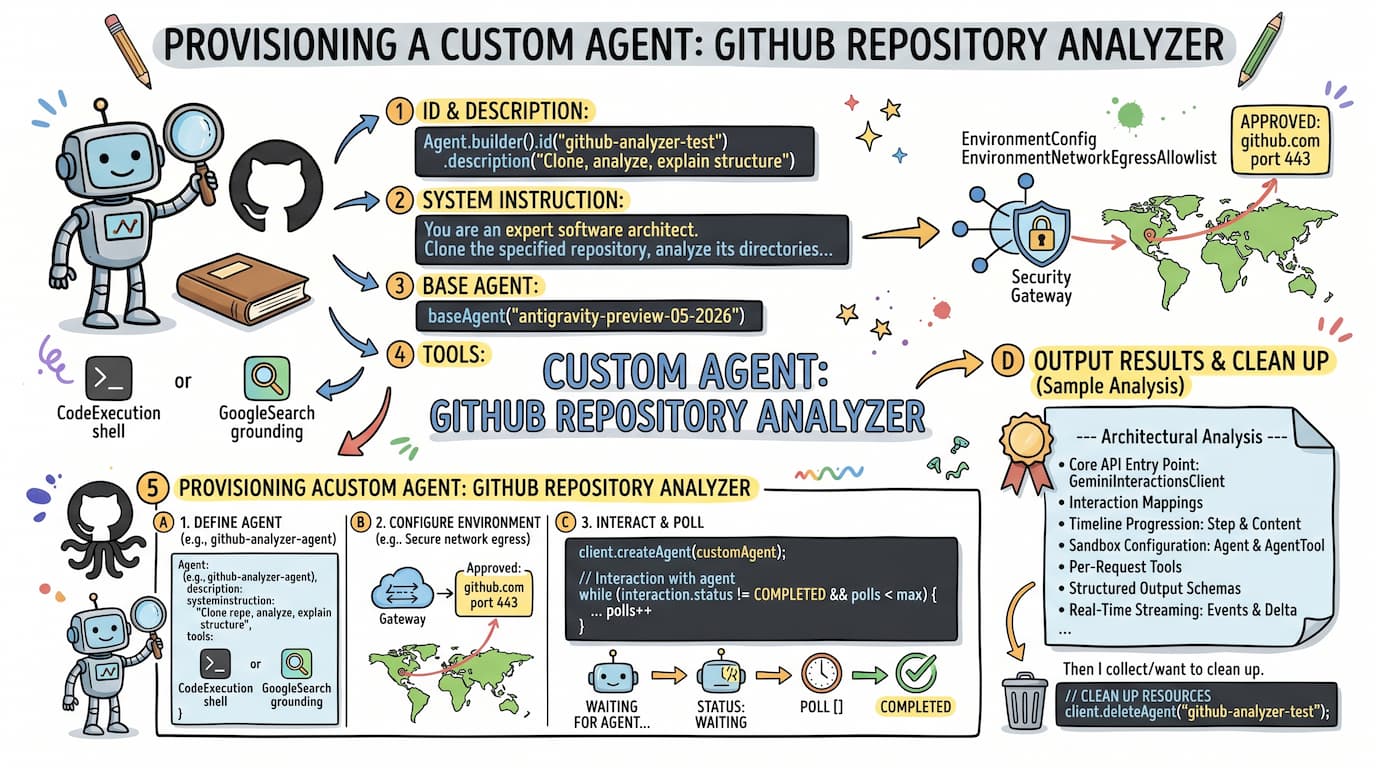
For specialized tasks, you can provision custom agents with unique system instructions, mounted files, tool specifications, and custom network egress rules.
Below is an example showing how to create a custom agent that clones a public GitHub repository, reads the source code using bash tools inside its remote Linux environment, and analyzes the architecture.
First, let’s define our custom agent based on the antigravity-preview-05-2026.
To allow the sandbox to communicate with GitHub over HTTPS, we explicitly configure the network egress allowlist for github.com on port 443.
import io.github.glaforge.gemini.interactions.model.*;
import io.github.glaforge.gemini.interactions.model.InteractionParams.AgentInteractionParams;
import java.util.List;

Agent customAgent = Agent.builder()
    .id("github-analyzer-agent")
    .description("""
        An agent that clones public GitHub repositories,
        analyzes the codebase structure,
        and explains its architecture.
        """)
    .baseAgent("antigravity-preview-05-2026")
    .baseEnvironment(new EnvironmentConfig(
        new EnvironmentNetworkEgressAllowlist(List.of(
            // Securely allow git clone via HTTPS
            new AllowlistEntry("github.com")
        )),
        List.of()
    ))
    .systemInstruction("""
        You are an expert software architect.
        Clone the specified repository,
        analyze its primary directories and code files,
        and provide a detailed, technical explanation
        of its components, architecture, and behavior.
        """
    )
    .tools(List.of(
        // Enables terminal command execution to clone & inspect files
        new AgentTool.CodeExecution(),
        // Grounding lookup for external documentation & frameworks
        new AgentTool.GoogleSearch()
    ))
    .build();
Now let’s provision the custom agent on the remote infrastructure:
Agent provisioned = client.createAgent(customAgent);
System.out.println("Custom agent provisioned successfully: " +
    provisioned.id());
Time to initiate the interaction with the custom agent:
try {
    AgentInteractionParams runParams = AgentInteractionParams.builder()
        .agent("github-analyzer-agent")
        .input("""
            Clone the repository
            https://github.com/glaforge/gemini-interactions-api-sdk
            and explain its main classes.
            """)
        .environment("remote")
        .build();

    Interaction interaction = client.create(runParams);
Let’s poll for agent completion (but it’s also posssible to stream):
    int maxPolls = 60;
    int polls = 0;
    while (interaction.status() != Interaction.Status.COMPLETED &&
           interaction.status() != Interaction.Status.FAILED &&
           interaction.status() != Interaction.Status.CANCELLED &&
           polls < maxPolls) {
        System.out.println("Waiting for agent... Current status: " + interaction.status());
        Thread.sleep(3000);
        interaction = client.get(interaction.id());
        polls++;
    }
We can output the results:
    System.out.println("\n--- Architectural Analysis ---");
    interaction.steps().stream()
        .filter(step -> step instanceof Step.ModelOutputStep)
        .flatMap(step -> ((Step.ModelOutputStep) step).content().stream())
        .filter(content -> content instanceof Content.TextContent)
        .forEach(content -> {
            Content.TextContent text = (Content.TextContent) content;
            System.out.println(text.text());
        });
If we know we won’t continue using this custom agent, we can delete it to clean up resources:
} finally {
    client.deleteAgent("github-analyzer-agent");
    System.out.println("Custom agent resource deleted.");
}
Output of our GitHub Repository Analyzer Agent
The managed agent environment is a bit over capacity at times, but if you’re patient enough, you’re going to be able to get some nice analysis of your favorite repository. In the example above, I asked to analyze my Gemini Interactions Java SDK repository, so here’s what our custom GitHub analyzer agent had to say about the key components of the project.
Click to view the Markdown output
# Architectural Analysis: Gemini Interactions API SDK

This document contains the structural and architectural analysis produced by the custom developer agent (`github-analyzer-test-*`) during sandboxed execution. The agent successfully cloned the repository `https://github.com/glaforge/gemini-interactions-api-sdk` under remote network allowlisting and performed a comprehensive walkthrough of its component design.

---

## 1. Core API Entry Point: `GeminiInteractionsClient`

The central programmatic interface for the Gemini Interactions API.

- **API Version Control**: Specifying `Api-Revision: 2026-05-20` on every outbound request header ensures stable, deterministic behavior against specific API versions.
- **Interaction Actions**:
  - `create(Request request)`: Synchronous POST to `/v1beta/interactions` returning an `Interaction`.
  - `stream(Request request)`: Performs a chunked SSE connection (`?alt=sse`) and processes lines prefixed with `data: ` into a lazy, reactive Java `Stream<Events>`.
  - `get(String id)` & `get(String id, boolean includeInput)`: Fetches an interaction.
  - `delete(String id)` & `cancel(String id)`: Controls active/stored interactions.
- **Secondary Operations**: Houses complete CRUD APIs for Custom Agents (e.g., `createAgent`, `deleteAgent`, `listAgents`) and Webhooks (e.g., `createWebhook`, `pingWebhook`, `rotateSigningSecret`).

---

## 2. Interaction Mappings: `Interaction` & `InteractionParams`

These entities represent the state and the request variables for interactions.

- **`Interaction`** *(Record)*: Models the server's tracking of a conversation or execution. Key fields include its `id`, metadata (`created`, `updated`, `status`), token `usage` breakdown, and critically, a polymorphic sequence of `steps` (the core execution timeline). It also features inner records for `Turn` representation in multi-turn conversations and `Usage`/`ModalityTokens` to trace token distributions.
- **`InteractionParams`** *(Class)*: Acting as a namespace, it defines a sealed interface `Request` permitted only to:
  1. **`ModelInteractionParams`**: Inputs directed at LLMs (e.g., `gemini-2.5-flash`), with properties like `model`, `generationConfig`, `tools`, `systemInstruction`, and `responseFormat`.
  2. **`AgentInteractionParams`**: Inputs designed for preconfigured or custom agents (such as Google’s Deep Research Agent or sandboxed coding helpers). Features fields like `agent`, `environment` setup, and `agentConfig`.
- Both request parameters feature rich fluent builders that overload `input(...)` to accept a raw `String`, individual media `Content` objects, multi-turn `Turn` structures, or raw `Step` arrays.

---

## 3. Timeline Progression: `Step` & `Content`

In May 2026, the Gemini Interactions API transitioned to a polymorphic, step-based architecture, replacing the legacy `interaction.outputs()` array with `interaction.steps()`. The SDK handles this shift using elegant sealed records:

- **`Step`** *(Sealed Interface)*: Models individual timeline increments within an interaction. Subtypes bind to specific `type` properties in JSON:
  - `UserInputStep` & `ModelOutputStep`: Represent input and generated model responses containing lists of `Content`.
  - `ThoughtStep`: Reasoning logs from thinking-capable models.
  - `FunctionCallStep` / `FunctionResultStep`: Models function calling workflows.
  - `CodeExecutionCallStep` / `CodeExecutionResultStep`: Secure code block execution inside sandboxes.
  - `UrlContextCallStep` / `UrlContextResultStep`: Web content retrievals.
  - `GoogleSearchCallStep` / `GoogleSearchResultStep`: Built-in web grounding operations.
  - `GoogleMapsCallStep` / `GoogleMapsResultStep`: Built-in map data lookups.
  - `McpServerToolCallStep` / `McpServerToolResultStep`: Model Context Protocol tool integrations.
  - `FileSearchCallStep` / `FileSearchResultStep`: File search grounding operations.

- **`Content`** *(Sealed Interface)*: Models the multimodal inputs/outputs nested inside steps:
  - `TextContent`: Holds text and rich annotations (such as `UrlCitation`, `FileCitation`, and `PlaceCitation` indices).
  - `ImageContent`, `AudioContent`, `VideoContent`, `DocumentContent`: Carry raw binary arrays (Base64) or URI references.
  - `ThoughtContent`: Encompasses reasoning signatures.

---

## 4. Sandbox Configuration: `Agent` & `AgentTool`

Provides full-featured support for Custom Agents running in sandboxed environments.

- **`Agent`** *(Record)*: Custom agent configuration template consisting of a unique `id`, a standard `baseAgent` parent (such as an active planning/coding model), a remote or local Linux `baseEnvironment` configuration, `systemInstructions`, and an array of `AgentTool` specifications.
- **`EnvironmentConfig` & `Source`**: Configures target sandboxes. It holds options for mounting external files and directory trees into the sandbox workspace using sources (such as GCS buckets, git repositories, or inline code).
- **`AgentTool`** *(Sealed Interface)*: Encapsulates capabilities that custom agents are allowed to invoke inside their sandbox. Subclasses include:
  - `GoogleSearch`: Search grounding.
  - `CodeExecution`: Secure local shell execution.
  - `UrlContext`: Fetching third-party web domains.
  - `McpServer`: Secure connections to specialized external servers.

---

## 5. Per-Request Tools: `Tool`

- **`Tool`** *(Sealed Interface)*: Represents tools that can be configured dynamically per-request. Subtypes include `Function` (custom function calling), `GoogleSearch`, `CodeExecution`, `UrlContext`, `ComputerUse` (GUI automation), `McpServer`, `FileSearch`, `GoogleMaps`, and `Retrieval` (Vertex AI Search integrations).

---

## 6. Structured Output Schemas: `io.github.glaforge.gemini.schema`

This package provides a highly robust utility to construct complex JSON Schema definitions for structured model output requests (under `responseFormat`).

- **`Schema`** *(Interface)*: Base object that supports mapping parameters.
- **`GSchema`** *(Class)*: The central entry point. It implements three parsing paradigms:
  1. **Fluent Builder DSL**: Allows writing beautiful, human-readable declarations using static imports:
     ```java
     arr().items(obj().prop("name", str()).prop("age", integer()))
     ```
  2. **Schema Parser**: `fromJson(String json)` parses an existing JSON schema string into structured Java schema objects.
  3. **Reflection Generator**: `fromClass(Class<?> clazz)` inspects POJOs or Java Records recursively and auto-constructs the corresponding schema representation.

---

## 7. Real-Time Streaming: `Events` & `Delta`

- **`Events`** *(Sealed Interface)*: Models the payload delivered over a Server-Sent Events (SSE) stream. Types include:
  - `InteractionCreated` & `InteractionCompleted`
  - `InteractionStatusUpdate`
  - `StepStart` & `StepStop` (emitted as steps begin and terminate execution)
  - `StepDelta` & `ContentDelta` (delivering granular stream updates)
  - `ErrorEvent`
- **`Delta`** *(Sealed Interface)*: Models real-time token chunks, representing everything from standard text/image updates (`TextDelta`, `ImageDelta`) to tool invocation parameters (`ArgumentsDelta` or `GoogleSearchResultDelta`).

---

## 8. Out-of-the-Box Router: `InteractionsHandler`

- **`InteractionsHandler`** *(Abstract Class)*: This is an abstract implementation of JDK's `com.sun.net.httpserver.HttpHandler`. It serves as an out-of-the-box backend routing router.
- **Purpose**: If you want to build a middleman server, proxy, or a local mock server, you inherit from this class and override the abstract methods (like `create`, `stream`, `get`, `delete`). It handles standard path matchings, parses queries, matches URI paths using Regex patterns (e.g., `/interactions/{id}/cancel`), automatically maps JSON bodies to `ModelInteractionParams` or `AgentInteractionParams` using polymorphic deserializers, and serializes responses back to clients.
Summary
The Gemini Interactions SDK for Java provides direct integration with Google’s managed agent infrastructure. By defining agents, custom tools, and secure network environments in code, you can build production-ready agentic workflows that securely inspect repositories, execute terminal commands, and perform deep research without managing the underlying virtualization layer.