
Gemini Interactions API now GA: Exploring the release candidate of my Java SDK
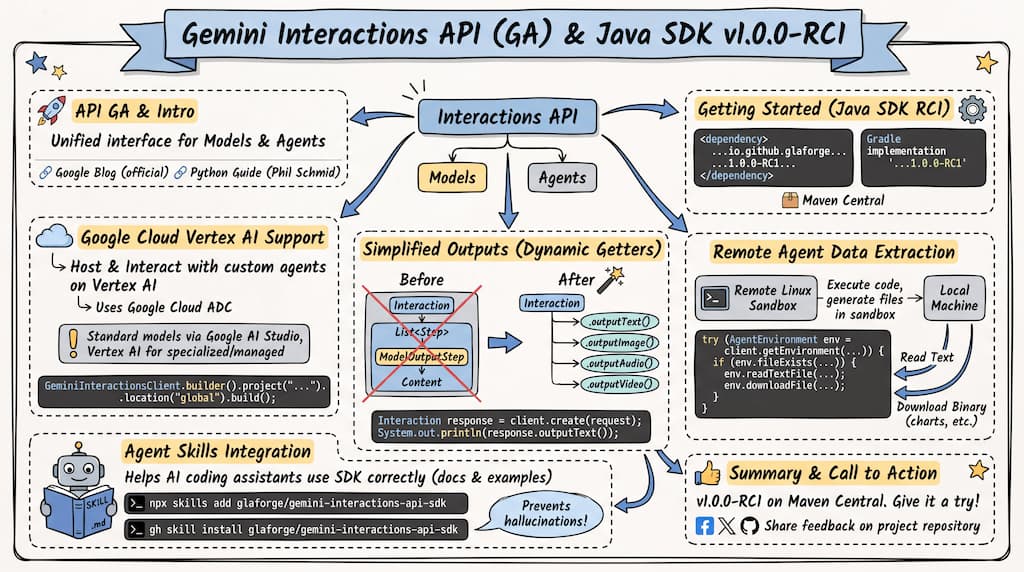
The Google Gemini Interactions API is now generally available (GA). It provides a unified interface for interacting with Gemini models and agents. You can read the official announcement on the Google Blog, and if you are using Python, Philipp Schmid published a helpful developer guide to get started.
For Java developers, the Gemini Interactions API SDK for Java is gearing up for its stable release with the availability of v1.0.0-RC1. Here is a look at what is new in this release candidate.
Getting started
To use the release candidate in your Java project, add the dependency to your build configuration. The library is available on Maven Central.
For Maven, add the following dependency to your pom.xml:
<dependency>
    <groupId>io.github.glaforge</groupId>
    <artifactId>gemini-interactions-api-sdk</artifactId>
    <version>1.0.0-RC1</version>
</dependency>
For Gradle, add this to your dependencies:
implementation 'io.github.glaforge:gemini-interactions-api-sdk:1.0.0-RC1'
Google Cloud Vertex AI support
With the Interactions API reaching GA, you can host and interact with custom agents on Google Cloud Vertex AI (I guess I should really say “Agent Platform” nowadays, right?). The Java SDK supports this using Google Cloud Application Default Credentials (ADC).
As of this writing, standard Gemini models are not directly available via the Interactions API on Google Cloud. The Vertex AI endpoints support specialized media models and managed agents. For standard model interactions, use the Google AI Studio endpoints.
To initialize the client for Vertex AI:
import io.github.glaforge.gemini.interactions.GeminiInteractionsClient;

GeminiInteractionsClient client = GeminiInteractionsClient.builder()
    .project("your-google-cloud-project-id")
    .location("global") // "global" is the default
    .build();
Simplified outputs with convenient methods
The Interactions API recently changed its architecture: interactions are now represented as a sequence of Step objects (such as ModelOutputStep or FunctionCallStep),
with the actual content nested inside those steps.
To avoid deep nested list traversals, the Java SDK v1.0.0-RC1 adds convenience getters directly to the Interaction object:
ModelInteractionParams request = ModelInteractionParams.builder()
    .model("gemini-3.5-flash")
    .input("Why is the sky blue?")
    .build();

Interaction response = client.create(request);

// No need to manually extract the last ModelOutputStep
System.out.println(response.outputText());
Similarly, you can use .outputImage(), .outputAudio(), and .outputVideo() to fetch rich media from the interaction.
Extract data from remote managed agent environments
Beyond chatting with models, the Interactions API lets you run agents inside secure, remote Linux sandboxes where they can execute code, generate files, and analyze data.
The SDK includes an AgentEnvironment class to retrieve files, charts, or code artifacts from the remote sandbox to your local machine:
import io.github.glaforge.gemini.interactions.AgentEnvironment;
import java.nio.file.Path;

// Get the stateful environment manager linked to the interaction
try (AgentEnvironment env = client.getEnvironment(interaction.id()).refresh()) {

    // Check if the agent created the file we asked for
    if (env.fileExists("data_analysis.json")) {
        // Read text directly
        String content = env.readTextFile("data_analysis.json");
        System.out.println(content);

        // Download binary files (like charts) to your local drive
        env.downloadFile("chart.png", Path.of("/local/path/chart.png"));
    }
}
An Agent Skills integration
In this release, I’ve added Agent Skills support, as it allows AI coding assistants to use the Java SDK correctly. It actually gives AI assistants access to the SDK’s API documentation and usage examples, so they can generate code based on the actual API, not based on their training data.
If you use an AI coding assistant that supports the Agent Skills specification, you can add this skill to your workspace using the skills CLI:
npx skills add glaforge/gemini-interactions-api-sdk
Alternatively, if you use the GitHub CLI, you can install the skill using the gh skill subcommand:
gh skill install glaforge/gemini-interactions-api-sdk
This downloads a SKILL.md file and its resources into the .agents/skills/ directory at the root of your workspace.
Supported AI assistants will automatically load this skill, giving them access to the correct builder patterns, API structures, and usage examples for the Java SDK.
This helps prevent the assistant from generating code based on outdated or hallucinated APIs.
Summary
The v1.0.0-RC1 release is available on Maven Central.
Don’t hesitate to share with me (on socials) what you’re working on, and how you’re using this SDK!
If you are building with the Gemini Interactions API in Java, give it a try and share your feedback on the project repository.