# Multimodal Structured Decisions in Java with Gemini Decision 1 and the Interactions SDK
> Using Google DeepMind's new Gemini Decision 1 model and the Gemini Interactions API Java SDK v2.2.0 for fast, zero-output-token multimodal classification, routing, and rubric scoring on Cloud Run.
Author: [Guillaume Laforge](https://glaforge.dev/) | Published: 2026-11-13 | Topics: generative-ai, gemini, gemini-interactions-api, java, cloud-run, machine-learning | Canonical: https://glaforge.dev/posts/2026/11/13/multimodal-decisions-with-gemini-decision-1-and-the-interactions-java-sdk/
Back in September, I wrote about [Multimodal Decision Models: From DiffusionGemma and Jev to LangChain4j](https://glaforge.dev/posts/2026/09/24/multimodal-decision-models-with-diffusiongemma-jev-and-langchain4j/). In that experiment, I deployed Matt Mastracci's `djev` and `DiffusionGemma` on a Cloud Run Blackwell GPU and re-enabled the SigLIP vision encoder so I could classify cat pictures in a single forward pass.
This week, Google DeepMind launched **[Gemini Decision 1](https://ai.google.dev/gemini-api/docs/models/gemini-decision-1)** (`gemini-decision-1`) and the **[Gemini Decisions API](https://ai.google.dev/gemini-api/docs/decisions-api)** (`POST /v1beta/decisions`). Instead of self-hosting a 26B diffusion checkpoint on dedicated GPU instances, you can now get managed, calibrated "System 1" decisions directly through a Gemini API endpoint.
To bring this capability to Java right away, I implemented full Decisions API support and released **[version 2.2.0 of my Gemini Interactions API Java SDK](https://github.com/glaforge/gemini-interactions-api-sdk/releases/tag/v2.2.0)** on Maven Central. I also rebuilt my **Purrfect Match** cat classifier demo as a CPU-only Cloud Run service powered by `gemini-decision-1`, alongside the original GPU edition.
> [!NOTE]
> **Links & coordinates at a glance:**
> - Live demo powered by `gemini-decision-1` (CPU-only Cloud Run): [purrfect-match.cloud.run](https://purrfect-match.cloud.run)
> - Self-hosted `DiffusionGemma` GPU edition for comparison: [purrfect-match-gpu.cloud.run](https://purrfect-match-gpu.cloud.run)
> - [Gemini Interactions API Java SDK on GitHub](https://github.com/glaforge/gemini-interactions-api-sdk) and [v2.2.0 release notes](https://github.com/glaforge/gemini-interactions-api-sdk/releases/tag/v2.2.0)
> - Maven Central (`2.2.0`): [`io.github.glaforge:gemini-interactions-api-sdk:2.2.0`](https://central.sonatype.com/artifact/io.github.glaforge/gemini-interactions-api-sdk)
> - Official documentation: [Gemini Decisions API guide](https://ai.google.dev/gemini-api/docs/decisions-api) and [Gemini Decision 1 model page](https://ai.google.dev/gemini-api/docs/models/gemini-decision-1)
## System 1 Decisions with Zero Output Tokens (and Why Multimodality Matters)
Standard generative interactions (`POST /v1beta/interactions`) generate output autoregressively, one token at a time. When all your application needs is routing, content moderation, rubric grading, or structured classification, asking a chat model to emit formatted JSON adds decoding latency and output token cost.
The Decisions API takes the opposite approach. You pass one shared context and a map of up to **1,000 independent questions**, and `gemini-decision-1` scores every question in a single prefill forward pass:
- **Input budget:** up to **262,144 input tokens** for the shared context, with up to **16,384 tokens** per individual question.
- **Zero output tokens:** `usage().totalOutputTokens()` is always `0`. Pricing is billed at **\$0.10 per 1M input tokens**, with zero output token charges.
- **Latency:** typical text evaluations finish in roughly **150 to 250 ms**, while full image uploads over HTTPS roundtrip in around **400 ms**.
Like the Jev architecture I explored earlier, `gemini-decision-1` exposes three typed question primitives:
1. **`noul` (Yes/No):** evaluates a binary statement and returns a calibrated probability between `0.01` and `0.99`, plus a confidence score.
2. **`choice` (Single-select):** evaluates `2` to `255` mutually exclusive options and returns the winning key, softmax probabilities across every option, and confidence.
3. **`score` (Rubric rating):** evaluates `2` to `255` ordered rubric levels (indexed starting at `0`) and returns a probability-weighted continuous expected score, the level legend, per-level probabilities, and confidence.
Most teams first think of classification and routing as text-only workloads: triaging support tickets, checking policy compliance, or selecting agent tools. Just like `DiffusionGemma`, **`gemini-decision-1` is natively multimodal**. It accepts text, images, audio, video, and PDFs as shared input.
That multimodal foundation is why analyzing cat and non-cat photos is such a good stress test. Instead of forcing a vision-language model to generate prose or JSON, you send image bytes once, ask three different kinds of visual questions (`noul`, `choice`, and `score`) in parallel, and get calibrated probability distributions back.
## Adding the Gemini Interactions Java SDK v2.2.0
To use `gemini-decision-1` from Java 21+, add `io.github.glaforge:gemini-interactions-api-sdk:2.2.0` to your build configuration.
In Maven (`pom.xml`):
```xml
io.github.glaforge
gemini-interactions-api-sdk
2.2.0
```
In Gradle (`build.gradle.kts`):
```kotlin
implementation("io.github.glaforge:gemini-interactions-api-sdk:2.2.0")
```
The SDK models the Decisions API with a sealed `Question` hierarchy, a sealed `Answer` hierarchy, and a fluent `DecisionParams` builder:
```text
DecisionParams (model = "gemini-decision-1", shared input, questions)
├── Question.NoulQuestion ──► Answer.NoulAnswer (noul, yesProbability, confidence)
├── Question.ChoiceQuestion ──► Answer.ChoiceAnswer (choice, probabilities, confidence)
└── Question.ScoreQuestion ──► Answer.ScoreAnswer (score, legend, probabilities, confidence)
```
## Driving `gemini-decision-1` from Java
You call the Decisions API using the exact same `GeminiInteractionsClient` you use for regular interactions, via `client.createDecision(params)`. Let's look at a quick text routing example first, then the multimodal image classifier powering Purrfect Match.
### Text Routing and Triage in One Call
When building `DecisionParams`, `.model(...)` defaults to `ModelOption.GEMINI_DECISION_1` (`"gemini-decision-1"`). You can mix `.noul(...)`, `.choice(...)`, and `.score(...)` questions in one request:
```java
import io.github.glaforge.gemini.interactions.GeminiInteractionsClient;
import io.github.glaforge.gemini.interactions.model.Answer;
import io.github.glaforge.gemini.interactions.model.Decision;
import io.github.glaforge.gemini.interactions.model.DecisionParams;
import java.util.Map;
GeminiInteractionsClient client = GeminiInteractionsClient.builder()
.apiKey(System.getenv("GEMINI_API_KEY"))
.build();
DecisionParams params = DecisionParams.builder()
.input("The blue ceramic mug I ordered arrived shattered in pieces, and I was charged twice.")
.noul("is_damaged", "Did the item arrive physically damaged?")
.choice("department", "Which department should handle the duplicate charge?", Map.of(
"billing", "Payments, invoices, duplicate charges, and refunds.",
"technical", "Software or technical product usage issues.",
"other", "Anything outside these categories."
))
.score(
"severity",
"How severe is the physical condition of the delivered mug?",
"Intact: no visible damage.",
"Minor blemish: small scratch, still usable.",
"Destroyed: broken or shattered, completely unusable."
)
.build();
Decision decision = client.createDecision(params);
Answer.NoulAnswer damaged = decision.noulAnswer("is_damaged");
Answer.ChoiceAnswer department = decision.choiceAnswer("department");
Answer.ScoreAnswer severity = decision.scoreAnswer("severity");
System.out.printf("Damaged prob: %.2f | Department: %s | Severity: %.2f (%s)%n",
damaged.yesProbability(),
department.choice(),
severity.score(),
severity.topLevelDescription()
);
System.out.println("Output tokens billed: " + decision.usage().totalOutputTokens());
```
A few practical details to notice here:
- Each `noulAnswer(...)` exposes `noul()` (the raw probability from `0.01` to `0.99`), `yesProbability()`, `noProbability()`, and `confidence()`.
- Each `scoreAnswer(...)` evaluates levels indexed from `"0"` to `N - 1`. You can inspect the continuous weighted `score()`, call `topLevelKey()` / `topLevelDescription()` for the winning rubric level, or call `normalizedScore()` to map any rubric scale onto `[0.0, 1.0]`.
- `decision.usage().totalOutputTokens()` is strictly `0`.
### Multimodal Visual Decisions: Cat or Imposter?
Because `DecisionParams.Builder.input(...)` accepts `Content...` blocks (`TextContent`, `ImageContent`, `AudioContent`, `VideoContent`, and PDF `DocumentContent`), evaluating images works with the exact same builder pattern. Here is how **Purrfect Match** calls `gemini-decision-1` from `GeminiDecisionCatClassifierService`:
```java
import io.github.glaforge.gemini.interactions.model.Answer;
import io.github.glaforge.gemini.interactions.model.Content.ImageContent;
import io.github.glaforge.gemini.interactions.model.Decision;
import io.github.glaforge.gemini.interactions.model.DecisionParams;
import io.github.glaforge.gemini.interactions.model.ModelOption;
import java.util.List;
import java.util.Map;
Map furTypeCriteria = Map.of(
"calico", "Calico or tortoiseshell coat with patches of orange/red, black/brown, and white",
"tabby", "Tabby patterned coat with distinct stripes, swirls, or spots",
"ginger", "Ginger, orange, marmalade, or red coat",
"black", "Solid black or predominantly black dark coat",
"white", "Solid white or predominantly white coat",
"bicolor", "Bicolor, tuxedo, or piebald coat with two contrasting colors",
"colorpoint", "Colorpoint pattern with darker face, ears, paws, and tail like a Siamese"
);
DecisionParams params = DecisionParams.builder()
.model(ModelOption.GEMINI_DECISION_1)
.input(new ImageContent(imageBytes, mimeType))
.noul(
"is_cat",
"Is the primary subject depicted in this picture a domestic cat or kitten?",
"The image clearly shows a domestic cat or kitten.",
"The image shows another animal (such as a dog), an object, a person, or no cat."
)
.choice(
"fur_type",
"What is the primary coat color or fur pattern of this cat?",
furTypeCriteria
)
.score(
"fluffiness",
"How fluffy and voluminous is the cat's fur coat?",
List.of(
"Sleek, short coat close to the body",
"Medium coat with soft texture and moderate tufts",
"Extremely long, dense, voluminous, fluffy coat like a Persian or Maine Coon"
)
)
.build();
Decision decision = client.createDecision(params);
if (decision.isBlocked()) {
throw new IllegalArgumentException(
"Blocked by safety filter: " + decision.promptFeedback().blockReason()
);
}
Answer.NoulAnswer isCatAns = decision.noulAnswer("is_cat");
Answer.ChoiceAnswer furAns = decision.choiceAnswer("fur_type");
Answer.ScoreAnswer fluffAns = decision.scoreAnswer("fluffiness");
boolean isCat = isCatAns.noul() >= 0.5;
String winningFur = furAns.choice();
double fluffScore = fluffAns.score();
```
If you want to reduce image token consumption when high resolution detail is not needed, `ImageContent` in v2.2.0 also accepts a resolution hint (`new ImageContent(imageBytes, mimeType, Content.Resolution.LOW)`). And when `decision.isBlocked()` is true, `decision.promptFeedback().blockReason()` tells you why input content filters rejected the payload (`SAFETY`, `IMAGE_SAFETY`, `PROHIBITED_CONTENT`, and so on).
> [!TIP]
> If you build custom proxies, webhooks, or mock servers using the `gemini-interactions-server` module, `InteractionsHandler` also supports `createDecision(DecisionParams)` to route `POST .../decisions` requests on the server side.
## Purrfect Match on Cloud Run: Managed Gemini Decision 1 vs. Self-Hosted GPU
To compare the new managed model directly against my September setup, I refactored the Micronaut 5 / Java 25 application into a multi-module Gradle build. A shared module (`cat-classifier-common`) holds the web UI, security headers, IP rate limiting, and classification rubrics, while two separate Cloud Run services implement the backend:
- **[purrfect-match.cloud.run](https://purrfect-match.cloud.run):** runs `cat-classifier-decision-one` on standard CPU-only Cloud Run, authenticating to `gemini-decision-1` with an API key stored in Secret Manager.
- **[purrfect-match-gpu.cloud.run](https://purrfect-match-gpu.cloud.run):** runs `cat-classifier-gpu`, forwarding requests to the self-hosted `DiffusionGemma` + `djev` + `vLLM` container running on an NVIDIA RTX PRO 6000 Blackwell GPU.
Testing the **Calico Beauty** preset in the live `gemini-decision-1` edition shows all three questions evaluated simultaneously in **480 ms** end-to-end:
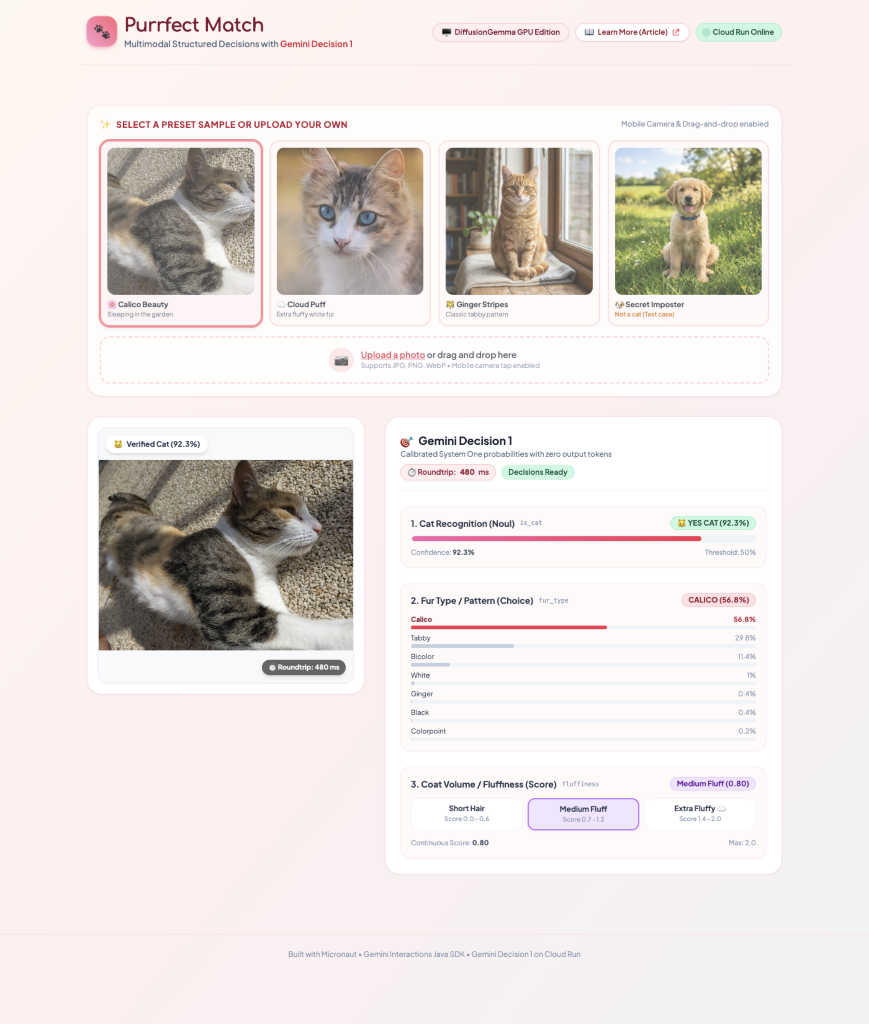
`gemini-decision-1` classifies the photo as a verified cat (`92.3%`), picks `Calico` (`56.8%`, with `Tabby` at `29.8%` and `Bicolor` at `11.4%`, capturing the patched calico-tabby coat nicely), and scores fluffiness at `0.80` (`Medium Fluff`).
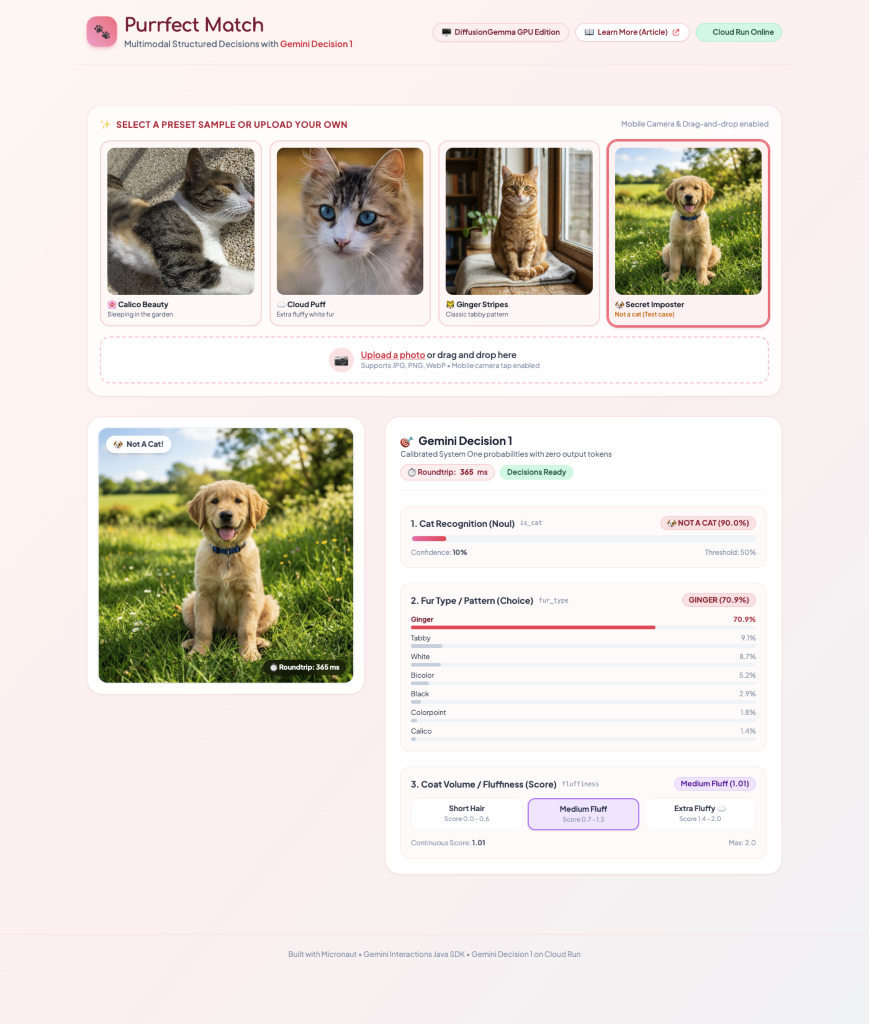
Clicking the **Secret Imposter** sample swaps in a Golden Retriever puppy photo. In **365 ms**, `is_cat` drops to `10%` (`90.0% NOT A CAT`), flipping the verdict banner cleanly while still computing coat color (`Ginger`, `70.9%`) and fluffiness (`1.01`) in the same pass:
Having both versions running side-by-side on Cloud Run makes the operational trade-offs very concrete:
| Dimension | Managed `gemini-decision-1` | Self-Hosted `DiffusionGemma` + `djev` |
| :--- | :--- | :--- |
| **Live demo** | [purrfect-match.cloud.run](https://purrfect-match.cloud.run) | [purrfect-match-gpu.cloud.run](https://purrfect-match-gpu.cloud.run) |
| **API endpoint** | `POST /v1beta/decisions` | `POST /v1/systemone` (vLLM + middleware) |
| **Cloud Run hardware** | CPU-only Micronaut container | Micronaut frontend + 20 vCPU, 80 GiB RAM, 1× RTX PRO 6000 GPU |
| **Scale-to-zero cold start** | ~1 to 2 seconds (JVM startup) | ~90 seconds (loading 26B weights onto GPU) |
| **Warm request latency** | ~350 to 500 ms over HTTPS | ~130 to 200 ms once the GPU container is warm |
| **Supported inputs** | Text, Images, Audio, Video, PDFs (up to 256K tokens) | Text and Images (SigLIP vision encoder) |
| **Best fit** | Zero ops, instant scale-to-zero, broad multimodal inputs | Open weights, private VPC hosting, high sustained GPU throughput |
For bursty traffic or scale-to-zero Cloud Run apps, eliminating that ~90-second GPU weight-loading cold start makes a huge practical difference, while keeping the exact same Java classification semantics.
## Wrap-up
Having a managed multimodal decision model in the Gemini API closes the loop on what I started experimenting with in September. Whenever your Java application needs fast, calibrated yes/no checks, multi-class routing, or rubric scoring across text, images, audio, video, or PDFs without burning output tokens, `gemini-decision-1` fits neatly into your backend.
Give both live editions a try with your own photos at [purrfect-match.cloud.run](https://purrfect-match.cloud.run) and [purrfect-match-gpu.cloud.run](https://purrfect-match-gpu.cloud.run), grab `io.github.glaforge:gemini-interactions-api-sdk:2.2.0` from Maven Central, and let me know on [GitHub](https://github.com/glaforge/gemini-interactions-api-sdk) what kind of routing or visual classification tasks you build with it!