
Comparing Java Formatters: Why Open Java Format Is My New Favorite
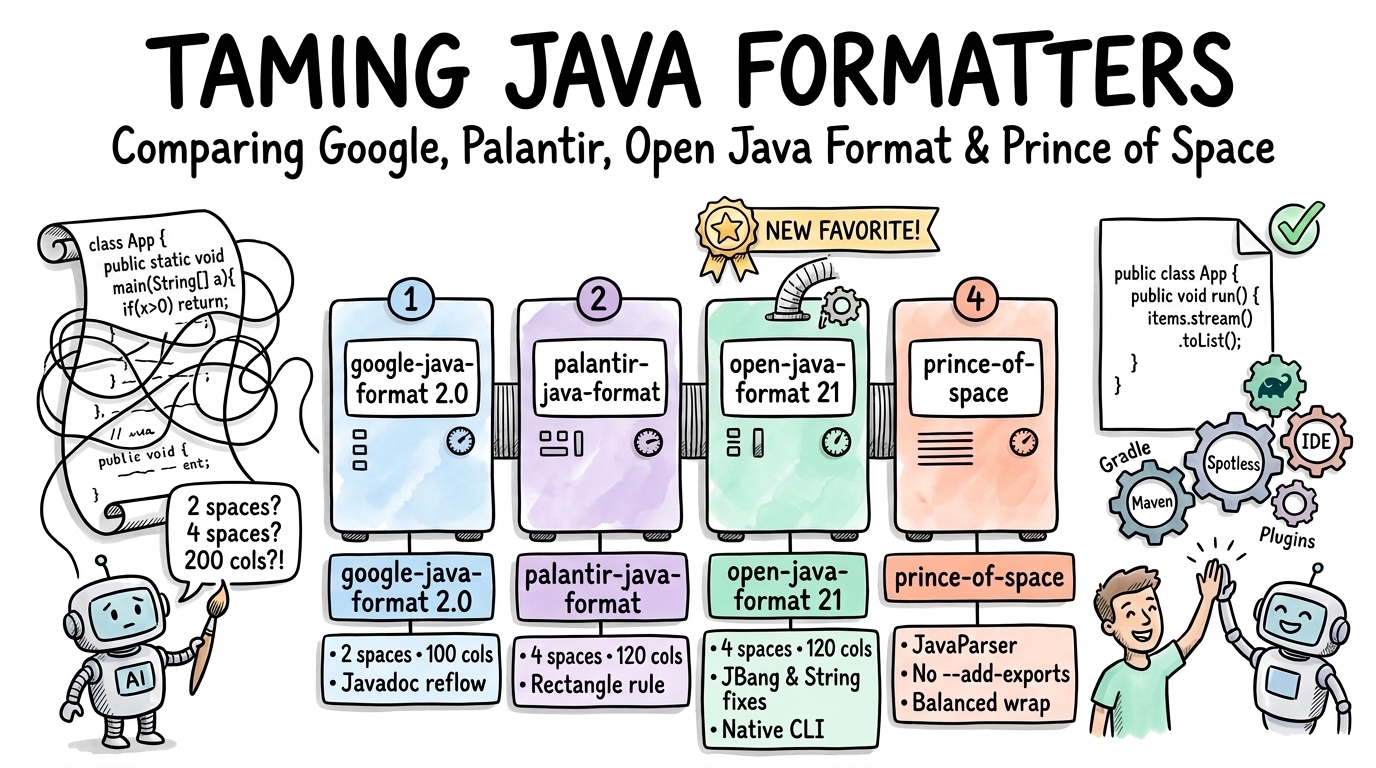
Recently, I read Alex Abashev’s article on Foojay.io, My love-hate relationship with Java formatters.
Unlike Go with gofmt or Rust with rustfmt, Java has never shipped a built-in source code formatter in the JDK, leaving teams to argue in pull requests over Checkstyle rules, IntelliJ XML exports, or where the dot goes in a stream pipeline.
In his post, Alex made two points that immediately resonated with me:
- Once you experience an opinionated, zero-configuration formatter as a CI gate, you never want to go back to bikeshedding over indentation in code reviews.
- AI coding agents make deterministic formatters matter more than ever. Every model and every session has its own idea of code style, regardless of what you write in your
AGENTS.mdorGEMINI.mdfiles. One agent puts every method parameter on its own line, another crams a whole stream pipeline into a 200-character line, and a third reformats untouched methods, turning a two-line bug fix into a 400-line whitespace diff.
In his article, Alex also introduced open-java-format (GitHub), an open-source fork of palantir-java-format that he created to fix long-standing bugs, modernize the build and IDE tooling, and keep pace with recent JDK releases.
That made me curious: how do the main Java formatters actually compare today on modern Java 21 to 25 code?
I put together a test and benchmark suite on JDK 25 (25.0.4.1.1) across 16 targeted Java snippets and a 1,042-line FormatterShowcase.java file covering 86 formatting scenarios, pitting four formatters against each other:
- Google Java Format (
2.0.0, released October 30, 2026, alongside legacy1.37.0) - Palantir Java Format (
2.103.0) - Open Java Format (
21.0.2) - Prince of Space (
2.3.1)
Along the way, I uncovered some surprising edge-case bugs, reported a compilation-breaking annotation bug in Prince of Space (Issue #147), and contributed a backward-compatibility fix to Open Java Format (PR #200, already merged and released in 21.0.2) as well as a pull request to Spotless (PR #3179).
Quick links to the projects and articles:
- Trigger article: My love-hate relationship with Java formatters by Alex Abashev on Foojay.io
- Open Java Format: openjavaformat.dev, GitHub repository, and WebAssembly Playground
- Other formatters: google-java-format, palantir-java-format, and prince-of-space
The Four Contenders at a Glance
Before looking at code diffs, here is how the four formatters compare across their core design choices:
| Dimension | google-java-format (2.0.0) | palantir-java-format (2.103.0) | open-java-format (21.0.2) | prince-of-space (2.3.1) |
|---|---|---|---|---|
| Maven Coordinates | com.google.googlejavaformat:google-java-format:2.0.0 | com.palantir.javaformat:palantir-java-format:2.103.0 | dev.openjavaformat:open-java-format:21.0.2 | io.github.agustafson.princeofspace:prince-of-space-core:2.3.1 |
| Parser Engine | Internal jdk.compiler (javac AST) | Internal jdk.compiler (javac AST) | Internal jdk.compiler (javac AST) | JavaParser (3.28.2, no internal JDK APIs) |
Requires --add-exports on JVM? | Yes (6 --add-exports) | Yes (--add-exports + --add-opens) | Yes on JVM (native binaries need none) | No (runs on standard JVM classpath) |
| Default Line Length | 100 cols (--max-line-length added in 2.0.0) | 120 cols | 120 cols | 120 cols (configurable) |
| Default Indentation | 2 spaces (4sp continuation; AOSP = 4/8) | 4 spaces (8sp continuation) | 4 spaces (8sp continuation) | 4 spaces (8sp continuation; 4sp for chains) |
| Configurability | Minimal (GOOGLE/AOSP, --max-line-length, --no-cleanup) | Minimal (PALANTIR/GOOGLE/AOSP, formatJavadoc) | Minimal (OJF/PALANTIR/GOOGLE/AOSP, formatJavadoc) | 7 options (indentStyle, indentSize, lineLength, wrapStyle, closingParenOnNewLine, trailingCommas, javaLanguageLevel) |
| Single-Arg Block Lambda | Inline in 2.0.0 (wrapped in 1.37.0) | Inline | Inline | Inline |
| Multi-Arg Trailing Block Lambda | Wraps all arguments | Inline (call(a, () -> {) | Inline (call(a, () -> {) | Inline (call(a, () -> {) |
| Method Chain Wrapping | Breaks at 100 cols; .stream() stays on receiver | Breaks at 80-col dot limit or 120-col line limit; 8sp indent | Same as Palantir (80-col dot limit, 120-col line limit, 8sp indent) | Breaks at 120 cols; breaks before .stream(); 4sp indent |
| Import Sorting & Unused Removal | Yes | Yes | Yes (preserves import java.lang.* with wildcards) | No |
| Partial Range Formatting | Yes | Yes | Yes | No (whole-file only) |
JBang //DEPS & //$NON-NLS-1$ | Breaks (// DEPS, // $NON-NLS-1$) | Breaks (// DEPS, // $NON-NLS-1$) | Preserves exact syntax | Preserves //DEPS, moves //$NON-NLS-1$ |
| GraalVM Native / Wasm | Native binaries on GitHub Releases | Native binaries (Linux/macOS) | Native binaries + WebAssembly (Playground) | JVM JAR / CLI fat JAR |
How They Format Code Differently: Side-by-Side Examples
When I ran all four formatters across the 16 test snippets, google-java-format, palantir-java-format / open-java-format, and prince-of-space produced 0 out of 16 identical files between families.
Even small differences in indentation and wrapping philosophy change the visual shape of daily Java code.
1. Lambdas and Reactive / Async Pipelines
For years, the biggest complaint against google-java-format (1.x) was how it treated lambdas and method chains: it forced a line break right after the opening parenthesis of a method call taking a block lambda, creating deep “staircase” indentation.
On October 30, 2026, Google released google-java-format 2.0.0, which finally keeps single-argument block lambdas inline (executor.submit(() -> {).
However, as soon as a method takes more than one argument (such as a context parameter or timeout alongside a trailing block lambda), google-java-format 2.0.0 still wraps every argument onto its own line:
// google-java-format 2.0.0 (2-space indent, 100 columns)
public String multiArgTrailingBlockLambda(
    RetryPolicy retryPolicy, String operationContextDescription) {
  return retryPolicy.executeWithFallbackAndCircuitBreaker(
      operationContextDescription,
      () -> {
        String raw = fetchData();
        return transform(raw);
      });
}
By contrast, palantir-java-format, open-java-format, and prince-of-space apply the “rectangle rule”: they keep the leading argument and the () -> { lambda header on the same line as the call, so the block reads just like a built-in if or for statement:
// palantir-java-format 2.103.0 & open-java-format 21.0.2 (4-space indent, 120 columns)
public String multiArgTrailingBlockLambda(RetryPolicy retryPolicy, String operationContextDescription) {
    return retryPolicy.executeWithFallbackAndCircuitBreaker(operationContextDescription, () -> {
        String raw = fetchData();
        return transform(raw);
    });
}
2. Streams and Fluent Method Chains
Consider a medium-length stream pipeline (around 105 characters total):
// palantir-java-format 2.103.0 & open-java-format 21.0.2
public List<String> mediumChain(List<String> items) {
    return items.stream()
            .filter(s -> s != null)
            .map(String::trim)
            .filter(s -> !s.isEmpty())
            .toList();
}
Notice two subtle details here:
- Even though the entire chain is 105 characters and would fit inside a 120-column limit,
palantir-java-formatandopen-java-formatwrap it onto one call per line because they enforce an 80-column dot limit for chained calls. Short chains (items.stream().filter(s -> !s.isEmpty()).toList()) stay on one line, while multi-step pipelines break cleanly with.stream()attached toitemsand an 8-space continuation indent. - If you run
google-java-format 2.0.0with--max-line-length=120, it has no 80-column dot heuristic, so it flattens the entire 4-stepmediumChainonto a single 105-character line. prince-of-spacetakes a different approach: it breaks before.stream()and indents chained calls by 4 spaces instead of 8:
// prince-of-space 2.3.1
public List<String> mediumChain(List<String> items) {
    return items
        .stream()
        .filter(s -> s != null)
        .map(String::trim)
        .filter(s -> !s.isEmpty())
        .toList();
}
3. Method Signatures and Closing Parentheses
When a method declaration or call overflows the line limit, google-java-format, palantir-java-format, and open-java-format bin-pack short parameters when they fit together on the continuation line (or place them one per line when they don’t) and keep the closing ) { inline after the last parameter:
// palantir-java-format & open-java-format
public Map<String, List<Optional<CompletableFuture<String>>>> orchestrateWorkflow(
        String tenantIdentifier,
        String workflowExecutionId,
        List<String> inputPayloadRecords,
        boolean enableStrictValidation,
        int maxConcurrencyLimit,
        long timeoutMilliseconds) {
    ...
}

private Map<String, List<Optional<CompletableFuture<String>>>> invokeDownstreamService(
        String a, String b, List<String> c, boolean d, int e, long f) {
    return Map.of();
}
prince-of-space defaults to a Rust/Kotlin-inspired BALANCED wrapping style with closingParenOnNewLine = true: whenever a parameter or argument list wraps, every item is placed on its own line and the closing ) { or ); sits on a dedicated line aligned with the declaration:
// prince-of-space 2.3.1 (default BALANCED style)
private Map<String, List<Optional<CompletableFuture<String>>>> invokeDownstreamService(
        String a,
        String b,
        List<String> c,
        boolean d,
        int e,
        long f
) {
    return Map.of();
}
4. Braceless Control Flow and AST Cleanups
Historically, google-java-format refused to modify the AST beyond import ordering and modifier sorting.
That changed in google-java-format 2.0.0, which now runs an AST cleanup pass by default (disableable via --no-cleanup) that:
- Removes redundant double semicolons (
;;becomes;), - Strips empty annotation parentheses (
@Deprecated()becomes@Deprecated), - Removes parentheses around single untyped lambda parameters (
(s) -> s.trim()becomess -> s.trim()), - Reorders modifiers to JLS order (
static public finalbecomespublic static final).
prince-of-space goes even further on control flow: if it encounters a braceless if, else, for, or while statement (if (value < 0) return "negative";), it automatically inserts { ... } curly braces around the body. The Google/Palantir/Open Java Format family leaves braceless statements untouched.
Performance and Idempotency Benchmarks on JDK 25
To measure how fast each formatter runs in-process on the JVM and how compact their outputs are, I benchmarked all four formatters (plus legacy google-java-format 1.37.0) on JDK 25 (25.0.4.1.1) across:
- 16 targeted comparison snippets (25 warmup iterations + 50 timed iterations)
FormatterShowcase.java(a 1,042-line torture test covering 86 Java 21 to 25 formatting scenarios; 10 warmup iterations + 25 timed iterations)
| Formatter | Cold 1st Call (ms) | 16-Snippet Suite Avg (ms) | FormatterShowcase (1,042 lines) Avg (ms) | Showcase Output Lines | Showcase Avg Line Length | 1st-Pass Idempotent on Showcase? |
|---|---|---|---|---|---|---|
google-java-format 2.0.0 | 148.5 | 10.3 | 31.5 | 1,566 | 38.9 | No (converges on pass 2) |
google-java-format 1.37.0 | 18.8 | 9.8 | 30.0 | 1,580 | 38.9 | No (converges on pass 2) |
palantir-java-format 2.103.0 | 35.5 | 11.3 | 47.7 | 1,479 | 45.8 | Yes |
open-java-format 21.0.2 | 25.0 | 11.5 | 83.8 | 1,479 | 45.8 | Yes |
prince-of-space 2.3.1 | 75.0 | 7.7 | 65.4 | 1,598 | 42.0 | Yes |
Two numbers stand out in this table:
- Vertical compactness:
palantir-java-formatandopen-java-formatformat the 1,042-line showcase into 1,479 lines (averaging 45.8 characters per line), saving nearly 100 vertical lines compared togoogle-java-format(1,566lines) and 120 lines compared toprince-of-space(1,598lines). open-java-formatvs.palantir-java-formaton long strings: Across the 16 normal snippets,open-java-formatandpalantir-java-formatrun at the exact same speed (~11.4 ms). OnFormatterShowcase.java(which includes several intentionally oversized string literals),open-java-formataverages ~84 ms vs. ~48 ms for Palantir. Bytecode inspection ofcom.palantir.javaformat.java.StringWrappershows why:open-java-formatwrapsStringWrapper.wrapOnce(...)in a convergence loop (MAX_ROUNDS = 5). Whenever a pass splits or joins a long string literal, it runs an extra verification pass to guarantee that the output is 100% stable on the first call.
Pros, Cons, and the Bugs I Found
Let’s look at the strengths, trade-offs, and bugs I hit when testing each formatter.
1. Google Java Format (2.0.0)
Pros:
- The closest thing to a de facto standard in the Java world, with first-class support across every build tool and IDE.
- The
2.0.0release (October 30, 2026) fixes single-argument block lambdas, adds--max-line-length=N, and introduces the AST cleanup pass. - Reflows both classic
/** ... */HTML Javadoc comments and Java 23+ JEP 467///Markdown doc comments out of the box.
Cons & Gotchas:
- 2-space indentation and a 100-column line limit feel cramped on modern wide monitors (and while
--aospswitches to 4-space indentation, it still wraps multi-argument lambdas). - When
Formatter.formatSourceAndFixImportswraps a string literal longer than 100 columns,StringWrapperindents the continuation+ "..."relative to the start column of the string (e.g., 15 spaces inreturn "..."), whereas a second pass re-indents that binary+expression to the standard 8-space continuation indent. In other words,format(x) != format(format(x))on the first pass! - It corrupts JBang headers and Eclipse
$NON-NLS$comments:///usr/bin/env jbangbecomes/// usr/bin/env jbang(breaking shell execution) and//DEPSbecomes// DEPS(which JBang ignores). It also turns//$NON-NLS-1$into// $NON-NLS-1$becauseJavaCommentsHelpercompiled its exemption regex with a double-escaped backslash ("^//+(noinspection|\\\\$NON-NLS-\\\\d+\\\\$)"), matching a literal backslash followed by end-of-line instead of$NON-NLS-1$!
2. Palantir Java Format (2.103.0)
Pros:
- Created specifically to solve Google Java Format’s vertical staircase problem on modern monitors: 4-space indentation, 120-column line width, the “rectangle rule” for lambdas, and an 80-column dot limit for readable fluent chains.
- Fast (~48 ms on the 1,042-line
FormatterShowcase.java) and 1st-pass idempotent.
Cons & Gotchas:
- As Alex noted in his Foojay article, external issues and PRs often sit unreviewed because releases primarily track Palantir’s internal infrastructure syncs.
- Like
google-java-format,palantir-java-formatbreaks JBang scripts (/// usr/bin/env jbang,// DEPS) and Eclipse// $NON-NLS-1$comments. - I also verified three subtle formatting bugs in
2.103.0that are still present upstream:StringWrapper.getReflowReplacementshardcodes a 4-space continuation indent (12spaces inside a method) instead of4 * indentationMultiplier(16spaces), which leaks into the output whenever 16 spaces would push a wrapped string segment past column 120.- When a file contains a wildcard import (such as
import java.util.concurrent.*;),palantir-java-formatunconditionally strips explicitimport java.lang.Thread;imports, which can cause a compilation error if the wildcard package defines a type with the same simple name. - A leading line comment inside a multi-resource
try (header is dedented to the same column astry (instead of the resource continuation indent.
3. Prince of Space (2.3.1)
Pros:
- Built on JavaParser (
3.28.2) rather than internaljdk.compilerclasses, so you can embed it in any standard JVM application or tool without--add-exportsflags. - Exposes 7 configuration options (
indentStyle,indentSize,lineLength,wrapStyle,closingParenOnNewLine,trailingCommas, andjavaLanguageLevel).
Cons & Gotchas:
- Does not sort imports or remove unused imports, does not reflow Javadoc or
///comments, does not support partial character-range formatting, and normalizes\r\n(CRLF) line endings to\n. FormatterConfig.defaults()setsJavaLanguageLevel.of(17), which fails to parse Java 21 pattern switch guards and Java 25 flexible constructor bodies unless you explicitly configureJavaLanguageLevel.of(21)orof(25).- In switch expression assignments (
String label = switch (code) { case 1 -> "one"; ... };),prince-of-spacewrapsswitch (code) {to 16 spaces while indentingcase 1 ->at only 12 spaces (leaving the cases less indented than their enclosingswitch). - Showstopper annotation bug (Issue #147): During my testing with JSpecify nullability annotations, I discovered that when a method combines declaration annotations before
public(@Deprecated @SuppressWarnings(...)) with a type-use annotation afterpublic(public @Nullable String),prince-of-space2.3.1duplicates@SuppressWarningsinto the return type position:Because// Broken output from prince-of-space 2.3.1 (fails to compile!) @Deprecated @SuppressWarnings({"unchecked", "rawtypes"}) public @SuppressWarnings({"unchecked", "rawtypes"}) @Nullable String findRecord(java.lang.SuppressWarningsis not@Repeatable,javacrefuses to compile the formatted code (SuppressWarnings is not a repeatable annotation interface). I reported this upstream at agustafson/prince-of-space#147.
Why Open Java Format (21.0.2) Is My New Favorite
open-java-format takes everything that made palantir-java-format pleasant to read (4-space indentation, 120-character lines, inline trailing lambdas, and clean stream chains) and fixes the sharp edges, while turning the project into a responsive, community-friendly open-source tool.
1. Fixing the Sharp Edges
In my JUnit 5 comparison suite, open-java-format (21.0.2) and palantir-java-format (2.103.0) produce byte-for-byte identical output on normal code, except where open-java-format fixes real bugs:
- First-class JBang and
$NON-NLS$support: Since I frequently write self-contained scripts and coding agents with JBang, this alone is a huge relief.open-java-formatpreserves///usr/bin/env jbang,//DEPS,//JAVA,//SOURCES, and//FILESdirectives verbatim:Whereas both// open-java-format 21.0.2 preserves JBang headers and $NON-NLS$ markers intact: ///usr/bin/env jbang "$0" "$@" ; exit $? //DEPS com.google.guava:guava:33.7.2-jre //JAVA 25+ package demo; public class JbangAndComments { /*** Banner comment that is not a Javadoc comment ***/ public static void main(String... args) { String greeting = "Hello World"; //$NON-NLS-1$ System.out.println(greeting); } }google-java-formatandpalantir-java-formatturn that into:// google-java-format & palantir-java-format break JBang and $NON-NLS$, and strip the blank line after /*** ... ***/: /// usr/bin/env jbang "$0" "$@" ; exit $? // DEPS com.google.guava:guava:33.7.2-jre // JAVA 25+ package demo; public class JbangAndComments { /*** Banner comment that is not a Javadoc comment ***/ public static void main(String... args) { String greeting = "Hello World"; // $NON-NLS-1$ System.out.println(greeting); } } - Joining adjacent same-line string literals: When developers or coding agents write
"Hello " + "world"on a single line (or in generatedtoString()methods),open-java-formatautomatically merges them into"Hello world", so the formatted output no longer depends on where someone arbitrarily split a string literal. - Consistent 16-space string reflow: Fixes Palantir’s 12-space vs. 16-space continuation indent leak in
StringWrapper, re-wrapping long strings until they converge cleanly within 120 columns. - Safe
java.langimport handling &try (comments: Retains explicitimport java.lang.Thread;when wildcard imports are present, and properly indents leading comments insidetry (headers.
2. Contributing Style.PALANTIR Compatibility (PR #200) and Spotless Support (PR #3179)
To make migration painless, open-java-format kept the com.palantir.javaformat.* Java package names so existing plugins and callers can swap the Maven coordinates (dev.openjavaformat:open-java-format) as a drop-in replacement.
However, when I tested open-java-format 21.0.1 against tools that invoke the formatter reflectively (like Spotless’s PalantirJavaFormatStep), I noticed a hitch: open-java-format had renamed the enum constant JavaFormatterOptions.Style.PALANTIR to Style.OJF.
Any caller executing Style.valueOf("PALANTIR") or referencing Style.PALANTIR threw an IllegalArgumentException or NoSuchFieldError.
I opened openjavaformat/open-java-format#200 to restore Style.PALANTIR as a @Deprecated alias of Style.OJF with identical formatting and import-ordering behavior.
Alex reviewed, merged, and released it in open-java-format 21.0.2 almost immediately.
In parallel, I also opened diffplug/spotless#3179 to allow overriding the groupArtifact on Spotless’s palantirJavaFormat step.
Configuring and Using the Formatters
Let’s look at how to set up and configure open-java-format across your CLI, build tools, IDEs, and AI coding workflows, followed by how to configure google-java-format, palantir-java-format, and prince-of-space if you want to use or compare them in your own projects.
1. Open Java Format: CLI, Gradle, Maven, IDEs, and AI Agents
You can try open-java-format right in your browser without installing anything using the interactive Playground, which compiles the formatter to WebAssembly using GraalVM Web Image.
Command Line (Native Binary or Runnable JAR)
Every release publishes pre-built GraalVM native binaries (~60 MB, zero JVM startup overhead, no --add-exports flags needed) for Linux (x86_64, aarch64), macOS (Apple Silicon and Intel), and Windows (x86_64), plus a self-contained runnable -all.jar.
On macOS (Apple Silicon), for example:
curl -LO https://github.com/openjavaformat/open-java-format/releases/download/21.0.2/open-java-format-macos_aarch64
chmod +x open-java-format-macos_aarch64
mv open-java-format-macos_aarch64 /usr/local/bin/open-java-format
You can then format files in place or verify formatting in CI:
# Format all tracked Java files in place
open-java-format --replace $(git ls-files '*.java')

# Dry-run check for CI (exits with code 1 if any file is unformatted)
open-java-format --dry-run --set-exit-if-changed $(git ls-files '*.java')
Gradle (dev.openjavaformat.java-format & Spotless)
In a Gradle build (Gradle 9+ on Java 21+), apply the dev.openjavaformat.java-format plugin:
// build.gradle
plugins {
    id 'java'
    id 'dev.openjavaformat.java-format' version '21.0.2'
}

repositories {
    mavenCentral()
}
And enable the native formatter in gradle.properties so you do not need --add-exports on the Gradle daemon:
# gradle.properties
openjavaformat.native.formatter=true
Running ./gradlew formatDiff formats only the lines you modified in git diff HEAD, and automatically configures .idea/open-java-format.xml when you open the project in IntelliJ IDEA.
If your Gradle build also uses Spotless, applying both plugins (com.diffplug.spotless and dev.openjavaformat.java-format) automatically wires open-java-format into spotlessJava (just remove any existing palantirJavaFormat() call from your spotless block, and add the jdk.compiler --add-exports flags shown below to org.gradle.jvmargs in gradle.properties since Spotless runs in-process on the Gradle JVM).
Maven (fmt-maven-plugin)
For Maven projects (running on Java 21+), open-java-format provides dev.openjavaformat:fmt-maven-plugin (a fork of Spotify’s fmt-maven-plugin):
<build>
    <plugins>
        <plugin>
            <groupId>dev.openjavaformat</groupId>
            <artifactId>fmt-maven-plugin</artifactId>
            <version>2.27.0.2</version>
            <executions>
                <execution>
                    <goals>
                        <goal>format</goal>
                    </goals>
                </execution>
            </executions>
            <dependencies>
                <dependency>
                    <groupId>dev.openjavaformat</groupId>
                    <artifactId>open-java-format</artifactId>
                    <version>21.0.2</version>
                </dependency>
            </dependencies>
        </plugin>
    </plugins>
</build>
The format goal runs automatically in the process-sources phase during mvn compile or mvn test, and you can run mvn dev.openjavaformat:fmt-maven-plugin:check in CI to fail the build if any file is not formatted.
IntelliJ IDEA and Eclipse Plugins
To get the exact same formatting on Cmd+Option+L (Ctrl+Alt+L) or on save in your IDE:
- IntelliJ IDEA: Install the open-java-format plugin from the JetBrains Marketplace, go to Settings > Tools > open-java-format Settings, tick Enable open-java-format, and tick Use native binary > Download. With the native binary enabled in
21.0.2, formatting a file in the IDE takes ~40 ms instead of ~430 ms because it does not spin up a new JVM process per file. - Eclipse: Drop
open-java-format-eclipse-plugin-21.0.2.jarfrom the GitHub release into your Eclipsedropinsfolder.
Wiring It Up for AI Coding Agents
As I discussed in my recent post on Agent eXperience (AX), giving AI coding agents (like Antigravity or Claude Code) fast, deterministic tools is far more reliable than hoping they follow prose instructions.
You can combine two lightweight guardrails in your repository:
- In
AGENTS.md/GEMINI.md: Tell the agent explicitly not to format Java code by hand and to invoke the CLI after editing:## Java formatting Java code in this repository is formatted with `open-java-format` (120 columns, 4-space indentation, one fixed style). Never lay out code by hand. After creating or editing a `.java` file, run: ```sh open-java-format --replace path/to/File.java ``` - In an edit hook or CI: If your agent supports post-edit hooks (like Claude Code’s
PostToolUsehook in.claude/settings.json), you can runopen-java-format --skip-removing-unused-imports --replaceautomatically after every file edit in ~50 ms. And in GitHub Actions, a two-line step checks every pull request without even needing a JDK on the runner:- uses: actions/checkout@v7 - uses: openjavaformat/open-java-format-action@v4
2. Configuring Google Java Format, Palantir Java Format, and Prince of Space
If you want to configure the other three formatters in Spotless, via their CLIs, or programmatically in Java, here are the exact configurations I used in my test suite.
Spotless (Gradle & Maven) for google-java-format and palantir-java-format
Both google-java-format and palantir-java-format have built-in steps in Spotless:
// build.gradle
plugins {
    id 'com.diffplug.spotless' version '8.0.0'
}

spotless {
    java {
        // Option A: Google Java Format 2.0.0
        // Use .aosp() if you want 4-space indentation instead of 2-space
        googleJavaFormat('2.0.0')
            .reflowLongStrings()
            .formatJavadoc(true)

        // Option B: Palantir Java Format 2.103.0
        // Set formatJavadoc(true) if you want classic /** ... */ Javadoc reflowed
        // palantirJavaFormat('2.103.0').style('PALANTIR').formatJavadoc(true)
    }
}
With google-java-format 2.0.0 on the command line (or via its native binary), you can also combine --aosp (4-space indentation), --max-line-length=120, and --no-cleanup (to disable the new AST cleanup pass):
google-java-format --aosp --max-line-length=120 --replace src/main/java/**/*.java
Configuring prince-of-space (Gradle, CLI, and Java API)
Because prince-of-space is built on JavaParser rather than internal jdk.compiler APIs, it runs on any standard JVM classpath without --add-exports flags.
You can run its standalone CLI JAR or embed io.github.agustafson.princeofspace:prince-of-space-core:2.3.1 directly in Java.
When using it on Java 21 or Java 25 codebases, make sure to override javaLanguageLevel (which defaults to Java 17):
import io.princeofspace.Formatter;
import io.princeofspace.model.FormatterConfig;
import io.princeofspace.model.IndentStyle;
import io.princeofspace.model.JavaLanguageLevel;
import io.princeofspace.model.WrapStyle;

FormatterConfig config = FormatterConfig.builder()
        .indentStyle(IndentStyle.SPACES)
        .indentSize(4)
        .lineLength(120)
        // BALANCED (1-per-line when wrapped), WIDE (bin-packed), or NARROW
        .wrapStyle(WrapStyle.BALANCED)
        // Put closing ')' on its own line (true) or keep it inline (false)
        .closingParenOnNewLine(true)
        .trailingCommas(false)
        // Override default Java 17 level for Java 21-25 syntax support
        .javaLanguageLevel(JavaLanguageLevel.of(25))
        .build();

Formatter formatter = new Formatter(config);
String formatted = formatter.format(sourceCode);
If you prefer traditional Java parameter wrapping in prince-of-space, switching .wrapStyle(WrapStyle.WIDE) and .closingParenOnNewLine(false) brings its method signature layout much closer to Palantir and Open Java Format.
Programmatic Java API and Required --add-exports Flags
Finally, if you invoke google-java-format, palantir-java-format, or open-java-format programmatically on the JVM (or run Spotless in-process on Gradle/Maven), you must pass the jdk.compiler module exports to your JVM (org.gradle.jvmargs, .mvn/jvm.config, or maven-surefire-plugin):
--add-exports=jdk.compiler/com.sun.tools.javac.api=ALL-UNNAMED
--add-exports=jdk.compiler/com.sun.tools.javac.code=ALL-UNNAMED
--add-exports=jdk.compiler/com.sun.tools.javac.file=ALL-UNNAMED
--add-exports=jdk.compiler/com.sun.tools.javac.main=ALL-UNNAMED
--add-exports=jdk.compiler/com.sun.tools.javac.parser=ALL-UNNAMED
--add-exports=jdk.compiler/com.sun.tools.javac.tree=ALL-UNNAMED
--add-exports=jdk.compiler/com.sun.tools.javac.util=ALL-UNNAMED
--add-opens=jdk.compiler/com.sun.tools.javac.code=ALL-UNNAMED
--add-opens=jdk.compiler/com.sun.tools.javac.comp=ALL-UNNAMED
--add-opens=jdk.compiler/com.sun.tools.javac.parser=ALL-UNNAMED
With those flags in place, calling open-java-format (or palantir-java-format) from Java takes just a few lines:
import com.palantir.javaformat.java.Formatter;
import com.palantir.javaformat.java.JavaFormatterOptions;

var options = JavaFormatterOptions.builder()
        .style(JavaFormatterOptions.Style.OJF) // or Style.PALANTIR
        .formatJavadoc(true)
        .build();

Formatter formatter = Formatter.createFormatter(options);
String formatted = formatter.formatSourceAndFixImports(sourceCode);
Wrap-up
If you are happy with Google’s 2-space, 100-column style, google-java-format 2.0.0 is a very welcome upgrade that finally fixes single-argument block lambdas and adds useful AST cleanups.
If you need a formatter library that embeds cleanly into a tool without --add-exports JVM flags, prince-of-space is worth keeping an eye on once its annotation duplication bug (Issue #147) is fixed.
For my own Java projects, however, open-java-format (GitHub) hits the sweet spot: it gives me the readable 4-space, 120-column layout and inline lambda style of palantir-java-format, fixes the annoying JBang, $NON-NLS$, import, and string-wrapping bugs, and ships fast native binaries that make both human code reviews and AI agent diffs clean and predictable.
Give the Open Java Format Playground a spin on one of your own classes, and let me know which Java formatter you use in your projects!