
Antigravity SDK for the Java Developer
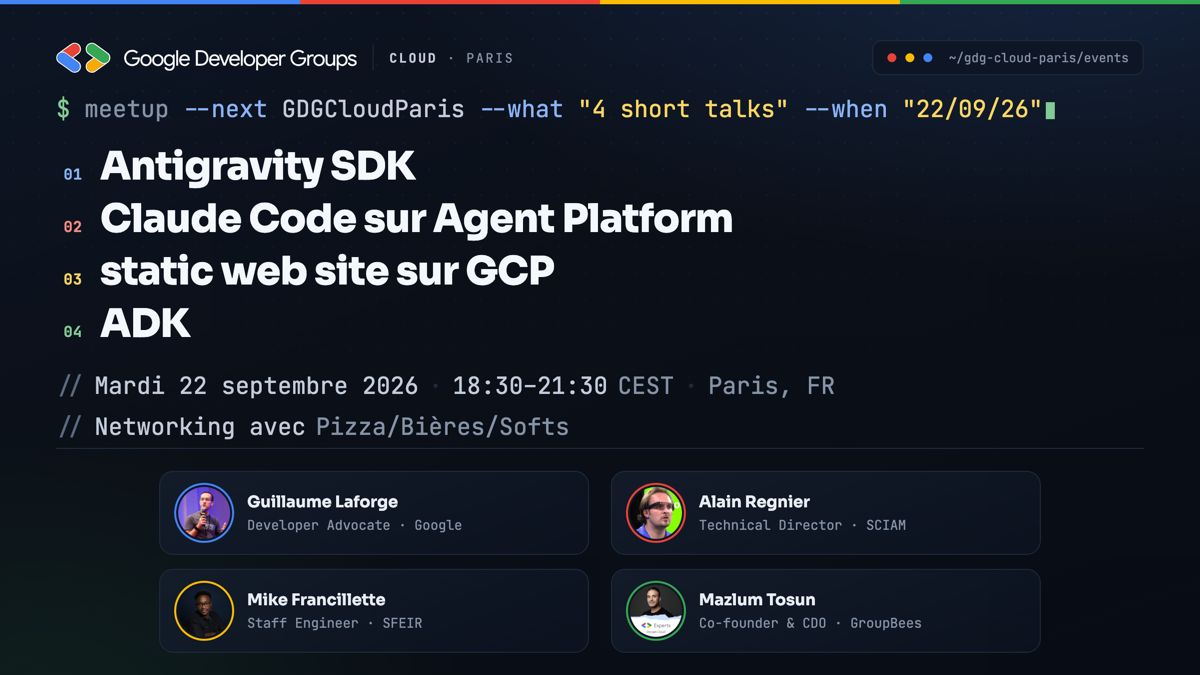
I spoke at GDG Cloud Paris, hosted at Sfeir. The meetup featured four short presentations on cloud and AI technologies, and my talk focused on the Antigravity SDK for the Java Developer.
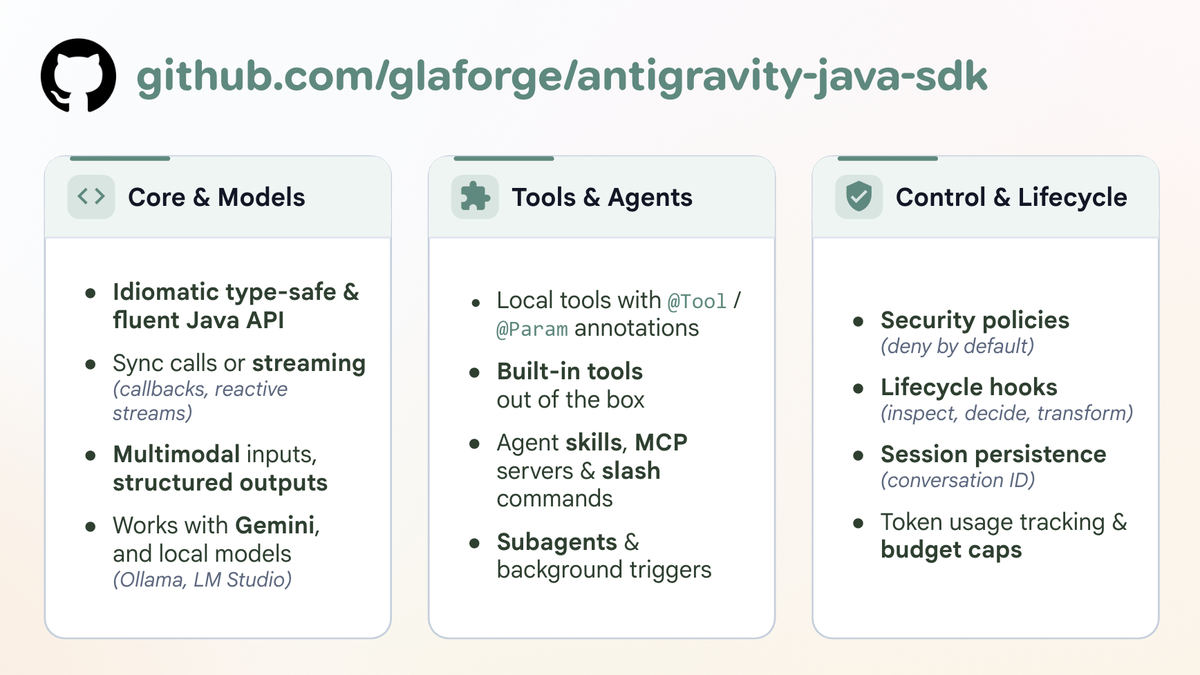
Most developers who have used Antigravity are familiar with its user-facing surfaces:
- Antigravity 2.0: the desktop agent manager
- Antigravity CLI: the terminal tool for command-line agent runs
- Antigravity IDE: the agent-centric code editor
Underneath these applications lies the Antigravity harness (actually, a Go binary!), which lets you programmatically define, host, and orchestrate AI agents with Gemini models. Google offers a Python SDK that wraps the Go binary. While the official SDK is currently available for Python, I built an unofficial Antigravity SDK for Java (with the help of Antigravity 2.0 itself) so JVM developers can build the same agent automations in Java.
The Java SDK provides a type-safe, fluent API that wraps the native Go execution harness (which downloads and caches automatically on first run). It supports local Java tools with annotations, streaming with model reasoning inspection, deny-by-default security policies, open Agent Skills, session state management, and subagent orchestration.
Below you’ll find the slide deck from the talk, followed by a walkthrough of all eight code samples from the accompanying GitHub repository.
Slides
The presentation slides are embedded below and available on Speaker Deck:
Code Walkthrough: The 8 Samples
All sample code demonstrated during the presentation is open source and available in the glaforge/agy-java-sdk-samples GitHub repository. The project uses Java 21+ and Maven.
Here is a walkthrough of each example
The code shown below removes some boilerplate like import statementss, main class, lots of System.out printing, etc, for brevity sake, and to focus on the most important lines exhibiting how to use the SDK.
1. Hello World (_01_HelloWorld.java)
_01_HelloWorld.java is the starting point.
It initializes an agent with system instructions and executes a basic request.
AgentConfig config = AgentConfig.builder()
   .instructions("You are a helpful and concise AI assistant.")
   .build();

try (Agent agent = new Agent(config)) {
  String prompt =
    "Hello! Please introduce yourself in two short bullet points.";
  AgentResponse response = agent.chat(prompt).get(30, TimeUnit.SECONDS);

  System.out.println(response.text());
}
Key points:
AgentConfig.builder()sets the baseline agent instructions, model parameters, and options.AgentimplementsAutoCloseable. Wrapping it in atry-with-resourcesblock guarantees that the background Go harness process shuts down cleanly when execution finishes.agent.chat(prompt)returns aCompletableFuture<AgentResponse>, allowing asynchronous execution or synchronous waiting with timeout guards.
2. Local Tools & Structured Output (_02_WeatherTool.java)
_02_WeatherTool.java shows two core capabilities:
giving the agent custom Java tools to call, and enforcing a strongly-typed structured output schema derived from a Java record.
public record WeatherReport
    String city,
    String condition,
    int temperatureCelsius,
    int humidityPercent) {}

public record WeatherAdvisory(
    String city,
    int temperatureCelsius,
    String condition,
    String clothingRecommendation,
    boolean umbrellaNeeded,
    List<String> suggestedActivities
) {}

public static class WeatherTools {
    @Tool(name = "get_weather", description =
          "Get current weather conditions and " +
          "temperature for a given city.")
    public WeatherReport getWeather(
            @Param(name = "city", description =
            "The name of the city, e.g. Paris, " +
            "Tokyo, London") String city
    ) {
        return new WeatherReport(
            "Paris", "Sunny with mild breeze", 22, 55);
    }
}
Configuring the agent:
AgentConfig config = AgentConfig.builder()
    .instructions("""
        You are a helpful weather assistant with access to local tools.
        Always use the get_weather tool when asked about the weather
        before advising the user.
        """)
    .addTool(new WeatherTools())
    .finishToolSchema(WeatherAdvisory.class)
    .build();

try (Agent agent = new Agent(config)) {
    AgentResponse response = agent.chat("""
        What is the current weather in Paris?
        Give me clothing advice and things to do.
        """).get(120, TimeUnit.SECONDS);

    WeatherAdvisory advisory =
        response.getStructuredOutput(WeatherAdvisory.class);
    IO.println("City: " + advisory.city());
    IO.println("Temp: " + advisory.temperatureCelsius() + "°C");
    IO.println("Clothing: " + advisory.clothingRecommendation());
    IO.println("Umbrella needed? " + advisory.umbrellaNeeded());
}
Key points:
- Annotating methods with
@Tooland parameters with@Paramregisters them as callable functions for the LLM. Return objects (likerecords or beans) are serialized to JSON automatically. - Calling
.finishToolSchema(WeatherAdvisory.class)automatically builds the JSON schema from the record components and instructs the model to return its final answer adhering to that structure. response.getStructuredOutput(WeatherAdvisory.class)parses the response directly into your Java record, eliminating manual JSON parsing.
3. Streaming Responses & Thinking (_03_Streaming.java)
_03_Streaming.java demonstrates real-time streaming using chatStream().
CompletableFuture<AgentResponse> future =
  agent.chatStream(prompt, chunk -> {
    // Stream reasoning/thoughts separately from answer text
    if (!chunk.thoughtsDelta().isEmpty()) {
      System.out.print("[Thinking] " + chunk.thoughtsDelta());
    }

    // Stream the actual response tokens
    if (!chunk.textDelta().isEmpty()) {
      System.out.print(chunk.textDelta());
    }
});

AgentResponse response = future.get(120, TimeUnit.SECONDS);
Key points:
chatStream()accepts a consumer for streaming chunks as they arrive from the model.- Modern Gemini models support internal chain-of-thought reasoning. The SDK isolates
thoughtsDelta()fromtextDelta(), so you can display thinking in a distinct style or fold it in your UI without mixing it into the final text. - The returned
AgentResponseincludes token usage statistics viausageMetadata().
4. Security Policies & Guardrails (_04_SecurityPolicies.java)
_04_SecurityPolicies.java addresses tool security.
Autonomous agents should not have unrestricted execution privileges.
AgentConfig config = AgentConfig.builder()
    .instructions("""
        You are a secure system administrator.
        Use available tools to perform maintenance when requested.
        If a tool execution is denied by policy,
        explain the refusal politely.
        """)
    .addTool(new AdminTools())
    // 1. Explicitly deny destructive actions
    .addPolicy(Policies.denyIf((toolName, argsNode) -> {
      if ("delete_file".equals(toolName)) {
        return true; // Denies execution
      }
      return false;
    }))
    // 2. Whitelist safe diagnostic tools
    .addPolicy(Policies.allowTool("read_system_status"))
    // 3. Fallback: deny any other tool
    .addPolicy(Policies.denyAll())
    .build();
Key points:
- Policies follow a deny-by-default posture.
- If an agent decides to invoke
delete_file, the SDK intercepts the call before Java code runs, returns a denial to the model, and allows the model to explain the refusal to the user. - You can inspect arguments programmatically via
argsNodeto enforce fine-grained rules (e.g., allowing deletions only in/tmp/).
5. Agent Skills (_05_AgentSkills.java)
_05_AgentSkills.java uses the open Agent Skills specification.
Instead of stuffing large rulebooks and API guides into the agent’s main system prompt,
skills keep documentation in folders containing a SKILL.md file and optional reference documents that are progressively disclosed to the agent if needed.
String skillPath = SkillResolver.resolveSkillPath(
    "skills/antigravity-sdk-java");

CapabilitiesConfig capabilities = CapabilitiesConfig.builder()
    .enableViewFile(true)
    .build();

AgentConfig config = AgentConfig.builder()
    .instructions("""
        You are an expert specializing in the Antigravity Java SDK.
        Consult your installed agent skills to answer technical
        questions accurately.
        """)
    .addSkillPath(skillPath)
    .capabilities(capabilities)
    .build();
Key points:
.addSkillPath(skillPath)registers the skill directory with the agent.- Progressive disclosure: the agent sees only the skill’s name and high-level description initially. When asked a relevant domain question, it reads the skill’s
SKILL.mdusing theview_filecapability, keeping context consumption low until needed.
6. Multi-Turn Chat & ToolContext (_06_MultiTurnChat.java)
_06_MultiTurnChat.java shows conversation continuity and runtime context injection.
public static class ProfileTools {
    @Tool(name = "save_preference", description =
         "Save a user preference key-value pair " +
         "into the active session.")
    public String savePreference(
        @Param(name = "key", description =
                "Preference key") String key,
        @Param(name = "value", description =
                "Preference value") String value,
        ToolContext context // Injected by the SDK
    ) {
        context.setState(key, value);
        return "Stored " + key + " = " + value + " in session state.";
    }

    @Tool(name = "get_preference", description =
            "Retrieve a user preference from the active session.")
    public String getPreference(
            @Param(name = "key", description =
                    "Preference key to retrieve") String key,
            ToolContext context
    ) {
        Object val = context.getState(key, "Unknown");
        return "Stored value for " + key + ": " + val;
    }
}
Executing multiple turns:
try (Agent agent = new Agent(config)) {
    // Turn 1
    agent.chat("""
        Hello! My name is Guillaume.
        My favorite coffee is an Ethiopian dark roast.
        """)
        .get(120, TimeUnit.SECONDS);

    // Turn 2
    AgentResponse response = agent.chat("""
        Can you recommend a morning beverage for me?
        """)
        .get(120, TimeUnit.SECONDS);
}
Key points:
- Consecutive
.chat()calls on the sameAgentinstance maintain full conversation history. ToolContextis injected by the runtime into tool methods without exposing it to the LLM’s function declaration parameters.- Tools use
context.setState()andcontext.getState()to manage session-scoped data linked to the conversation ID.
7. Built-in Capabilities (_07_BuiltinCapabilities.java)
_07_BuiltinCapabilities.java shows how to turn on native harness tools without writing custom Java implementations.
CapabilitiesConfig capabilities = CapabilitiesConfig.builder()
        .enableListDir(true)
        .enableViewFile(true)
        .enableWebSearch(true)
        .build();

AgentConfig config = AgentConfig.builder()
        .instructions("""
            Inspect the project directory
            using list_dir and view_file when asked.
            """)
        .capabilities(capabilities)
        .build();

try (Agent agent = new Agent(config)) {
    AgentResponse response = agent.chat(
        "Inspect this project and summarize what files exist.")
            .get(120, TimeUnit.SECONDS);
}
Key points:
- The Go harness provides native implementations for workspace file inspection (
list_dir,view_file,grep_search), URL fetching, and Google web search. - Enabling these flags gives the agent immediate system tools out of the box.
8. End-to-End Demo: GitHub PR Comparison Agent (_08_GitHubPRComparison.java)
_08_GitHubPRComparison.java brings everything together in an autonomous code review agent.
The scenario compares two competing Pull Requests in the LangChain4j repository (PR #6457 and PR #6462), both solving the same problem: surfacing generated images from Google GenAI chat responses.
// Configure native capabilities
CapabilitiesConfig capabilities = CapabilitiesConfig.builder()
    .enableSubagents(true)
    .enableUrlReading(true)
    .enableWebSearch(true)
    .enableShell(true)
    .runCommandConfig(RunCommandConfig.builder().enableSandbox(false).build())
    .enableViewFile(true)
    .enableWriteFile(true)
    .enableFileEdit(true)
    .enableListDir(true)
    .enableGrepSearch(true)
    .build();

// Configure agent with skill, GitHub tools, policies, and lifecycle hooks
AgentConfig config = AgentConfig.builder()
    .instructions("""
        You are a principal software engineer and open-source
        project maintainer reviewing GitHub Pull Requests.
        Always follow the guidelines and comparative rubrics
        in your installed 'github-pr-review' skill.
        Use your GitHub tools to examine the PR diffs and metadata.
        Synthesize an objective, structured comparison report.
        """)
    .addSkillPath(skillPath)
    .addTool(new GitHubTools())
    .capabilities(capabilities)
    .addPolicy(Policies.allowAll())
    .addPreToolCallDecideHook((toolCall, ctx) -> {
        System.out.println("  ⚙ [Tool Call] " + toolCall.name()
                            + "(" + toolCall.args() + ")");
        return CompletableFuture.completedFuture(HookResult.allowed());
    })
    .build();
Key points:
- Domain skill: uses
skills/github-pr-reviewto enforce evaluation criteria (architectural impact, defensive checks, test coverage, backwards compatibility). - Custom tools:
GitHubToolsretrieves live diffs and metadata from the GitHub REST API. - Lifecycle hooks:
addPreToolCallDecideHookintercepts tool calls in flight for logging and auditing before execution. - Subagents & capabilities: enables subagent orchestration and unconfined command execution when required.
- Real-time streaming: streams reasoning thoughts and tool execution milestones before rendering the final comparison report and synthesis.
What Would You Build?
The Antigravity SDK opens up plenty of automation possibilities, whether you prefer working in Java or Python. Automated code review bots running in GitHub Actions (like the sample above), background observability and telemetry agents, compliance checkers, or custom tools integrated directly into your internal developer platform are all great candidates.
I encourage you to clone the samples repository, run the code, and experiment with your own tools and skills.
I’d love to hear from you: what kind of use cases would you like to build with the Antigravity SDK? Where do you see agent automations bringing the most value to your projects? Reach out on Bluesky, X, or LinkedIn to share your ideas and feedback!
Resources
- Slides: Antigravity SDK for the Java Developer on Speaker Deck
- Code Samples: glaforge/agy-java-sdk-samples on GitHub
- SDK Repository: glaforge/antigravity-java-sdk on GitHub
- Meetup: GDG Cloud Paris hosted by Sfeir