
Restoring Skewed Lecture Slides: Prompt Benchmarking Meets LLM-as-a-Judge in ADK Java
Back in June, I wrote about vibe-coding a Philosophy Bac prep app to help my daughter revise her handwritten flashcards before her high school exams. She passed, and she is now in her first year of medical school.
Med school comes with a new set of study habits. In several of her courses (cell biology, biochemistry, histology), professors project dense slides packed with Western blots, fluorescence microscopy, and molecular structures, but do not share the slide decks with students. Seated in a large amphitheater, she does what every student does: she snaps quick photos of the projector screen with her phone, hoping to print them out later as clean study handouts.
If you have ever tried printing photos taken in a lecture hall or at a tech conference, you know how painful the result is:
- The slide is skewed at an angle and surrounded by beige amphitheater walls, speaker arrays, digital clocks, and emergency exit signs.
- Projector bulbs and ambient room lighting leave the slide washed out, turning high-contrast fluorescence microscopy into muddy beige squares.
- At conferences, you also run into curved cinema screens, DLP projector rainbow banding, live speech-to-text caption bars projected above or below the slide, and speakers or plants standing right in front of a diagram.
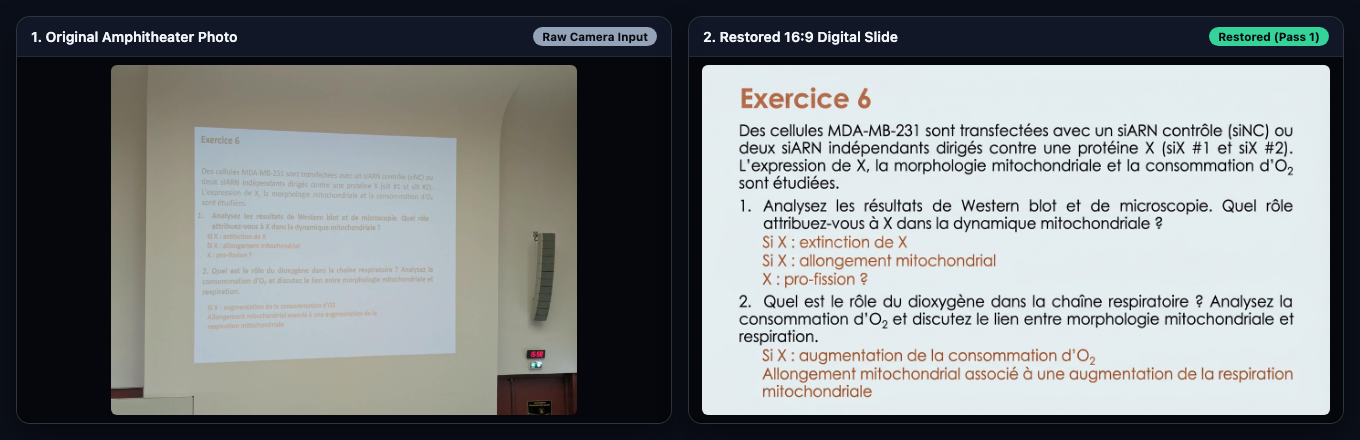
I wanted to build a web application, FixSlidePic, where she could drop a batch of lecture photos from her phone or laptop and get back a clean, flat, 16:9 PDF deck ready to print, just as if the professor had exported the original slides.
Tech stack at a glance:
- Source code: github.com/glaforge/fixslidepic
- Backend: Micronaut 5.2.5 (Java 25) + Apache PDFBox 3.0.7 for multi-slide PDF export
- Agent orchestration: ADK for Java 1.14.0 (
com.google.adk:google-adk:1.14.0) using aLoopAgent - Models: Nano Banana 2.1 (
gemini-nano-banana-2.1) for 16:9 slide restoration and Gemini 3.8 Flash (gemini-3.8-flash) as the multimodal LLM-as-a-Judge - Deployment: Containerized and deployed on Google Cloud Run, with a Progressive Web App (PWA) frontend
- Built with: Google Antigravity
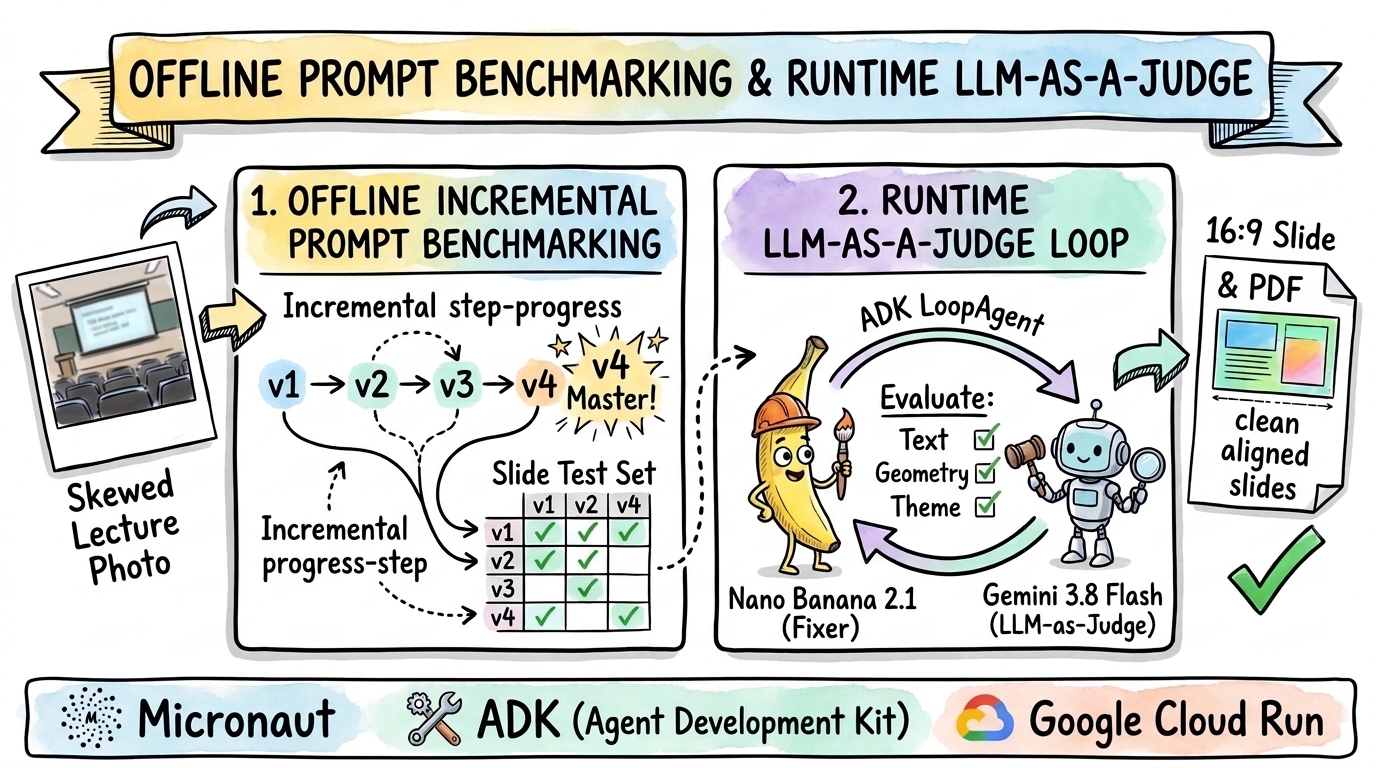
Building this application turned into an interesting exercise in evaluating and hardening an agentic workflow at two levels:
- I first ran an offline prompt benchmark, testing four prompt variations against a test set of difficult lecture and conference photos to find the best baseline instructions for Nano Banana 2.1.
- I then wired a runtime LLM-as-a-Judge inside an ADK
LoopAgent, pairing the image restoration agent with Gemini 3.8 Flash to inspect every restored slide against the original photo, score its fidelity, and trigger a fresh retry whenever a detail is missed.
Why One-Shot Prompting Isn’t Enough
When I first tested restoring slide photos manually with Nano Banana 2.1 (gemini-nano-banana-2.1), the model did a great job unskewing perspective and redrawing readable text.
My initial handwritten prompt (v1_baseline) was five lines long:
Improve the contrast so that this picture is readable.
Make the background white, but keep the color of the text or of boxes.
If the image is skewed or distorted, realign it properly.
Stay faithful to the original text, and don't change any letter or number.
I want to see the original slide that was presented on screen.
On simple white slides, that prompt worked fine. Once I tested it on a broader mix of conference and amphitheater photos, two separate problems showed up.
First, my prompt had systematic blind spots. Look at the second line: “Make the background white, but keep the color of the text or of boxes.” When a speaker uses a dark-mode slide deck, the model obeys literally, inverts the dark background to white, scrambles the contrast of colored pills, and introduces stray characters. And when a conference projects live speech-to-text subtitles in a black bar right above the slide, the model assumes the subtitle bar is part of the slide header.
Second, generative image models make occasional single-pass mistakes.
Even with a carefully written prompt, the model might nail the perspective crop and 99% of a biochemistry slide on Pass 1, but turn carbon 1 into carbon 2 on a fructose ring, or leave a brownish projector tint on a microscopy panel.
In med school, a wrong carbon number on a glycosidic bond (α1-β2) is the difference between a right and wrong exam answer.
Fixing the systematic blind spots called for offline prompt benchmarking across a diverse test set. Catching the single-pass mistakes called for runtime verification with an LLM-as-a-Judge loop.
Part 1: Benchmarking Prompt Variants Against a Test Set
Before building the web UI, I assembled a folder of 29 slide photographs in test-pictures/ (combining my daughter’s med school amphitheater photos with conference photos from Devoxx, JNation, and Google Cloud Summit).
From those 29 photos, I picked 5 torture-test images covering the hardest failure modes:
| Test Case | Primary Challenge |
|---|---|
dark_skew | Extreme 3D perspective skew + dark charcoal theme + two speakers & lectern in foreground |
rainbow_subtitles | DLP projector rainbow color-wheel stripes + external live speech-to-text caption bar above slide + audience silhouettes |
devoxx_split | Curved cinema screen + split-screen speaker camera feed on left + bottom sponsor/caption bar + complex architecture diagram |
sketchnote_chrome | Dense hand-drawn sketchnote + Chrome browser tabs and URL bar at top + podium occlusion in bottom-right corner |
led_occlusion | LED wall pixel-grid moiré + hanging spotlights + stage palm tree and speaker occluding the bottom banner text |
With Antigravity, I put together 4 prompt variants and ran a parallel Python script (run_benchmark.py) invoking gemini-nano-banana-2.1 across all 4 x 5 = 20 combinations, scoring every output with gemini-3.8-flash using a structured JSON rubric:
| Prompt Variant | Key Characteristics | Pass Rate (5 Torture Cases) | Avg Judge Score |
|---|---|---|---|
v1_baseline | My initial manual prompt (“Improve the contrast… Make the background white…”) | 60% (3/5) | 6.6 / 10 |
v2_structured_restoration | Bullet-point instructions preserving original dark/light theme, removing stage/browser clutter, and inpainting occlusions | 100% (5/5) | 7.4 / 10 |
v3_digital_twin_rules | Numbered 5-rule “Digital Twin” specification | 80% (4/5) | 6.8 / 10 |
v4_calibrated_master (Winner) | 5-rule specification explicitly targeting live speech-to-text caption bars, DLP rainbow color-wheel stripes, split-screen video walls, and strict theme preservation | 100% (5/5) | 7.4 / 10 (Highest on hardest cases) |
What the Benchmark Revealed
Comparing the generated images side by side made it obvious why v1_baseline and v3_digital_twin_rules dropped points, and how v4_calibrated_master fixed them.
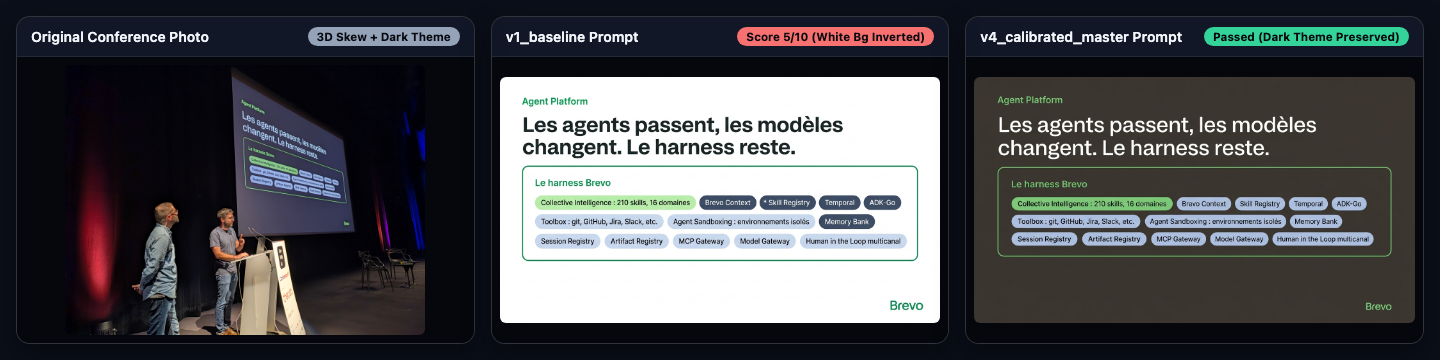
1. Dark-Theme Inversion and Severe 3D Skew (dark_skew)
Because v1_baseline asked to “make the background white”, it forced a white background onto a dark charcoal slide, altered the container pill colors, and hallucinated a leading asterisk (* Skill Registry instead of Skill Registry).
In v4_calibrated_master, Rule 3 explicitly instructs the model to preserve the slide’s authentic background theme (keeping dark slides dark and light slides light, without ever forcing a white background onto a dark-themed slide):
2. The Meta Slide: DLP Rainbow Stripes & Projected Live Captions (rainbow_subtitles)
By a funny coincidence, one of the hardest photos in my conference folder was a slide about AI Evaluation in 3 Steps (“1 - Simuler des inputs | 2 - Générer des outputs | 3 - Evaluer les outputs”):
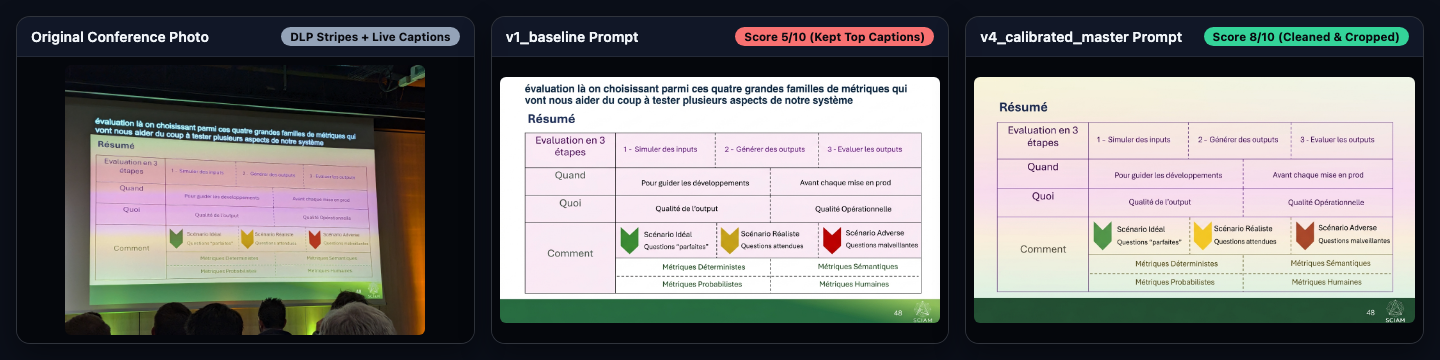
Look at the top of the original photo on the left: the conference room was projecting live French speech-to-text subtitles (“évaluation là on choisissant parmi ces quatre grandes familles de métriques…”) in a black strip directly above the slide’s Résumé header.
At the same time, the DLP projector’s spinning color wheel created pink, yellow, and green bands across the table.
Both v1_baseline and v3_digital_twin_rules mistook that projected subtitle strip for the title of the slide.
Once I saw that failure in the benchmark results, I updated Rule 1 and Rule 3 in v4_calibrated_master to explicitly exclude live speech-to-text caption or subtitle bars projected above or below the slide and neutralize horizontal DLP projector rainbow/color-wheel banding.
3. Inpainting Foreground Occlusions: Speakers and Stage Palm Trees (led_occlusion)
At conferences, speakers move around on stage, and stage designers love putting plants and spotlights right in front of the screen.
On this Google Cloud Summit photo, a palm tree, a lectern, and the speaker overlapped the colored banner at the bottom of the slide ("...e path to success and excellen..."):
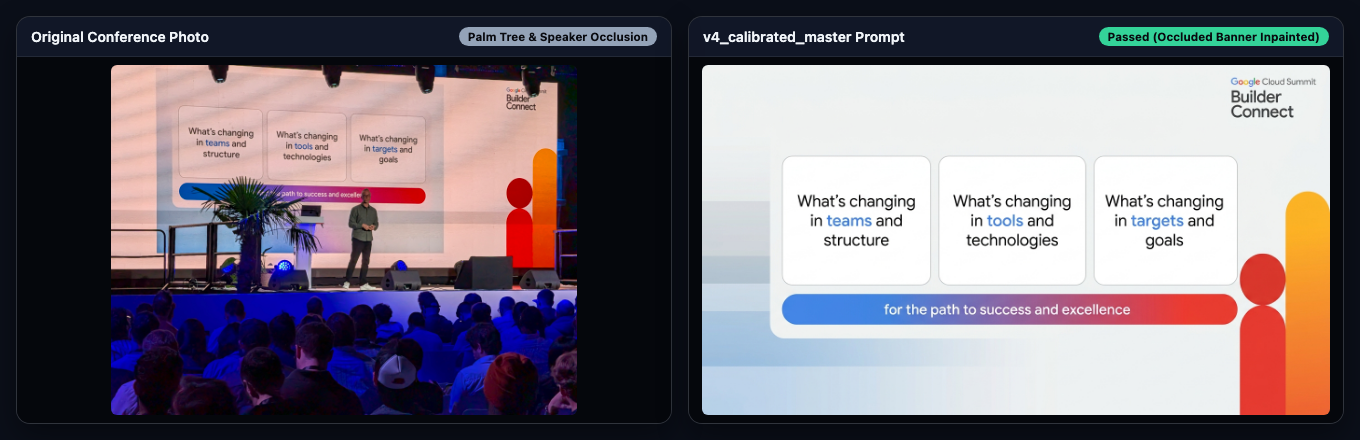
With Rule 4 (instructing the model to remove foreground obstructions like speakers, lecterns, plants, or stage lights and reconstruct the occluded shapes and text from context), gemini-nano-banana-2.1 removed the audience, stage lights, palm tree, and presenter, cleaned up the LED wall moiré, and reconstructed the full banner text: "for the path to success and excellence".
The Winning Master Prompt (v4_calibrated_master)
Here is the 5-rule prompt that won the benchmark and now lives in SlideFixerService.MASTER_SLIDE_RESTORATION_PROMPT:
Task: Extract and restore the presentation slide from this camera
photo into a clean, flat, high-resolution 16:9 digital slide as it
would appear directly on a computer screen.

Follow these 5 restoration rules strictly:

1. ISOLATE ONLY THE SLIDE CANVAS: Identify the exact boundaries of
   the presentation slide itself. Crop out and exclude everything
   outside the slide canvas: auditorium walls, stage, speakers,
   podiums, audience heads, OS menu bars, browser tabs/URL bars,
   conference video-wall split-screen feeds (such as live camera
   feeds of the speaker), and any live speech-to-text caption or
   subtitle bars projected above or below the slide.

2. GEOMETRIC RECTIFICATION: Correct all 3D perspective distortion,
   keystone skew, tilt, and curved-screen warping so the slide is
   perfectly rectangular, flat, and fills the 16:9 frame edge-to-edge.

3. COLOR & SURFACE PURIFICATION: Remove camera noise, DLP projector
   rainbow/color-wheel banding (horizontal pink, magenta, yellow, or
   green stripes across the screen), LED pixel-grid moire patterns,
   screen glare, and uneven lighting. Neutralize projector color
   bands completely so the slide background and table cells have
   uniform, flat digital colors. Preserve the slide's authentic
   background theme and color palette (keep dark/black slides dark,
   light slides light, and colored/tinted slides faithful to the
   original), and NEVER force a white background onto a dark slide.

4. INPAINT FOREGROUND OCCLUSIONS: If a speaker, lectern, microphone,
   plant/palm tree, stage light, or silhouette overlaps part of the
   slide canvas, cleanly remove the obstruction and reconstruct the
   occluded slide background, shapes, and text from context.

5. VERBATIM TEXT & DIAGRAM FIDELITY: Reproduce every word, letter,
   number, accent, URL, QR code, box, arrow, logo, and illustration
   with 100% accuracy. Do not invent, paraphrase, summarize,
   translate, or alter any text.
Part 2: Runtime Self-Correction with ADK Java’s LoopAgent and LLM-as-a-Judge
Offline benchmarking gave me a strong default prompt.
Still, when a med school slide has tiny chemical subscripts (CH₂OH, α1-β2) or low-contrast microscopy panels, the first generation pass can occasionally miss a detail.
Rather than returning the first generated image unchecked, I wrapped the restoration workflow in an ADK for Java LoopAgent (com.google.adk:google-adk:1.14.0) that runs up to 3 iterations:
User Upload
  └──► ADK LoopAgent ("slide_restoration_loop", maxIterations = 3)
        │
        ├──► 1. slide_fixer_agent (gemini-nano-banana-2.1)
        │       Generates 16:9 slide from Original Photo
        │       + Master Prompt (+ Judge Feedback)
        │
        └──► 2. slide_judge_agent (gemini-3.8-flash)
                Compares Original Photo vs. Generated Slide
                ├─ satisfied == true  ──► setEscalate(true) (Exit!)
                └─ satisfied == false ──► Save instructions & retry
Real Examples: Catching Subtle Med School Defects on Pass 1
This runtime LoopAgent proved its value right away when I tested my daughter’s biochemistry and cell biology lecture photos.
Example 1: Fixing a Misnumbered Carbon Atom on a Sucrose Molecule
Look at this amphitheater photo of a biochemistry slide on Saccharose (D-Glucose + D-Fructose):
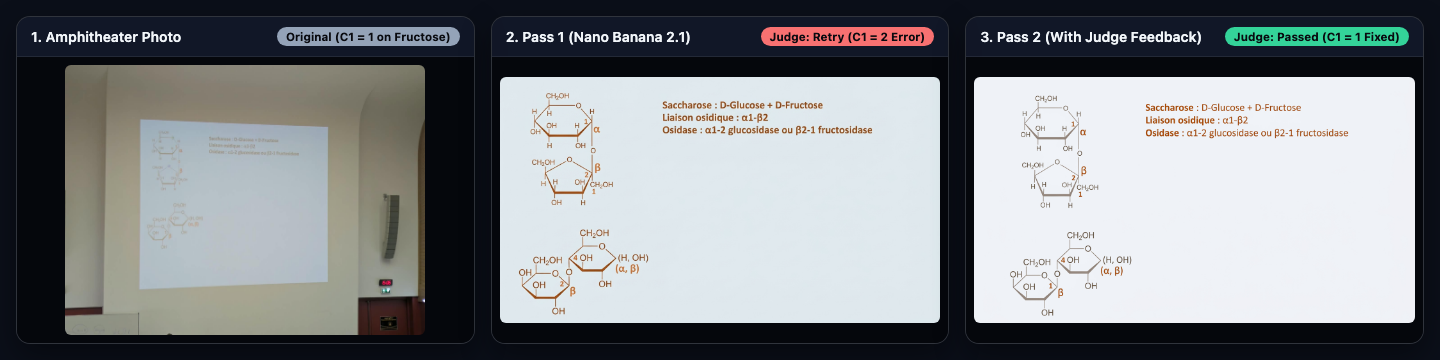
At first glance, Pass 1 (middle panel) looks great: the beige amphitheater wall, speaker column, and red 15:06 clock are gone, and the Haworth projections are sharp.
Look closely at the bottom-left fructose ring in the lower Haworth projection, though (just to the left of the β label):
- In the original photo (left), the carbon atom participating in the glycosidic bond is labeled
1. - In Pass 1 (middle),
gemini-nano-banana-2.1wrote2instead of1inside that bottom-left ring. slide_judge_agent(gemini-3.8-flash) compared the two images, caught the numbering error, and emittedrewrittenPromptInstructionsto fix the ring numbering and clean up the slight bluish tint.- In Pass 2 (right),
slide_fixer_agentregenerated the slide from the original photo using the Judge’s instructions, restoring the1label on the lower ring.
Example 2: Purifying Washed-Out Fluorescence Microscopy Panels
Here is another slide from the same lecture showing 6 fluorescence microscopy panels (siNT (contrôle), siMFN1 + siMFN2, siOPA1, Contrôle, DRP1 (surexpression), DRP1-K38A (mutant GTPase-)):
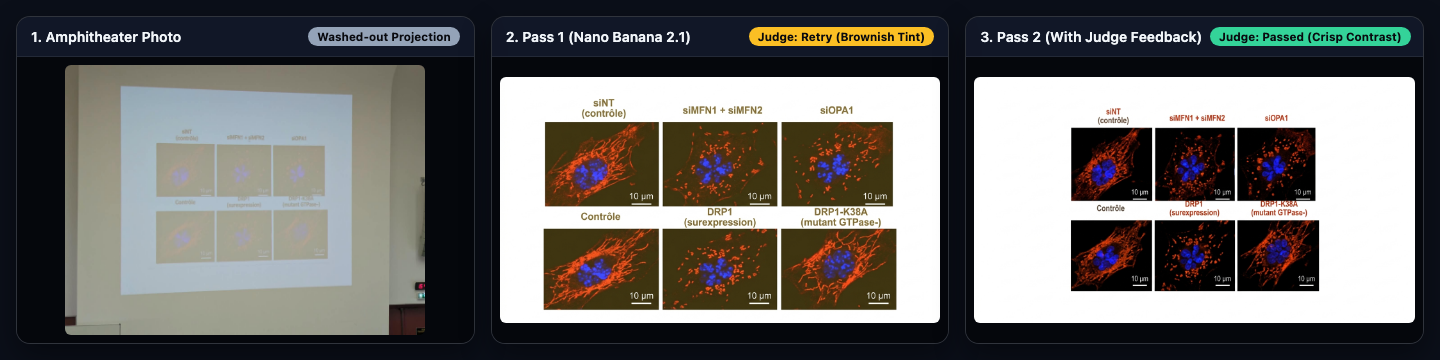
In the raw amphitheater photo (left), the room lights washed out the projector screen so badly that the black microscopy backgrounds looked pale tan.
On Pass 1 (middle), gemini-nano-banana-2.1 improved the contrast, but left a muddy brownish-olive tint inside the microscopy squares.
The Judge rejected Pass 1 and instructed the fixer to restore true black backgrounds inside the fluorescence microscopy panels while keeping the white slide canvas, producing the clean Pass 2 result on the right.
Implementing the LoopAgent in ADK for Java
Let’s look at the code in SlideFixerService.java and three details that make this loop work well in practice.
1. Fresh Retry Grounding on the Original Photo (beforeModelCallbackSync)
A common trap in image-to-image refinement loops is feeding the previous generated image back into the image model on retry (Photo -> Gen 1 -> Gen 2 -> Gen 3).
Every generation pass compounds visual artifacts and drifts further away from the ground truth.
Instead, in slide_fixer_agent’s beforeModelCallbackSync, every retry starts fresh from the original camera bytes combined with the master prompt and the Judge’s corrective instructions stored in the ADK session state:
LlmAgent slideFixerAgent = LlmAgent.builder()
    .name("slide_fixer_agent")
    .model(createGeminiModel("gemini-nano-banana-2.1"))
    .instruction(MASTER_SLIDE_RESTORATION_PROMPT)
    .generateContentConfig(GenerateContentConfig.builder()
        .responseModalities("IMAGE")
        .imageConfig(ImageConfig.builder()
            .aspectRatio("16:9")
            .build())
        .build())
    .outputKey(STATE_LATEST_IMAGE_ID)
    .beforeModelCallbackSync((callbackContext, llmRequestBuilder) -> {
        String judgeFeedback = (String) callbackContext.state().get(STATE_JUDGE_FEEDBACK);
        String userFeedback = (String) callbackContext.state().get(STATE_USER_FEEDBACK);

        StringBuilder promptBuilder = new StringBuilder(MASTER_SLIDE_RESTORATION_PROMPT);
        if (userFeedback != null && !userFeedback.isBlank()) {
            promptBuilder.append("\n\nUSER REFINEMENT INSTRUCTIONS (HIGH PRIORITY):\n")
                .append(userFeedback.trim());
        }
        if (judgeFeedback != null && !judgeFeedback.isBlank()) {
            promptBuilder.append("\n\nCORRECTIVE INSTRUCTIONS FROM PREVIOUS JUDGE AUDIT (MUST FIX):\n")
                .append(judgeFeedback.trim());
        }

        // Always ground the request on the ORIGINAL camera photograph + updated prompt
        Content freshContent = Content.fromParts(
            Part.fromBytes(record.originalBytes, record.originalMimeType),
            Part.fromText(promptBuilder.toString())
        );
        llmRequestBuilder.contents(List.of(freshContent));
        return Optional.empty();
    })
    // afterModelCallbackSync extracts the inline image bytes, saves the artifact,
    // and stores the generated imageId in callbackContext.state()
    .build();
2. Structured Multimodal Judging and Early Loop Escalation
Next, slide_judge_agent uses Gemini 3.8 Flash (gemini-3.8-flash) with a JSON response schema (JUDGE_SCHEMA) that maps directly to a Java 25 record:
@Serdeable
@JsonIgnoreProperties(ignoreUnknown = true)
public record JudgeVerdict(
    boolean satisfied,
    int overallScore,
    int textFidelity,
    int geometryAndCropping,
    int themeAndVisualQuality,
    String critique,
    String rewrittenPromptInstructions
) {}
In slide_judge_agent, beforeModelCallbackSync passes both IMAGE 1 (the original camera photo) and IMAGE 2 (the latest generated slide) into the multimodal request.
Then, afterModelCallbackSync parses the JudgeVerdict. When verdict.satisfied() is true, it calls callbackContext.eventActions().setEscalate(true) to exit the LoopAgent right away without running unnecessary extra passes:
LlmAgent slideJudgeAgent = LlmAgent.builder()
    .name("slide_judge_agent")
    .model(createGeminiModel("gemini-3.8-flash"))
    .instruction(JUDGE_SYSTEM_INSTRUCTION)
    .generateContentConfig(GenerateContentConfig.builder()
        .responseMimeType("application/json")
        .responseSchema(JUDGE_SCHEMA)
        .build())
    .outputKey("judge_verdict_json")
    .beforeModelCallbackSync((callbackContext, llmRequestBuilder) -> {
        String latestImageId = (String) callbackContext.state().get(STATE_LATEST_IMAGE_ID);
        StoredImage latestImage = imageStore.get(latestImageId);

        Content compareContent = Content.fromParts(
            Part.fromText("IMAGE 1 - ORIGINAL CAMERA PHOTOGRAPH:"),
            Part.fromBytes(record.originalBytes, record.originalMimeType),
            Part.fromText("IMAGE 2 - GENERATED RESTORED SLIDE:"),
            Part.fromBytes(latestImage.bytes(), latestImage.mimeType()),
            Part.fromText("Evaluate IMAGE 2 against IMAGE 1 according to your rubric and return JSON.")
        );
        llmRequestBuilder.contents(List.of(compareContent));
        return Optional.empty();
    })
    .afterModelCallbackSync((callbackContext, llmResponse) -> {
        JudgeVerdict verdict = parseVerdict(extractText(llmResponse));

        if (!verdict.rewrittenPromptInstructions().isBlank()) {
            callbackContext.state().put(STATE_JUDGE_FEEDBACK, verdict.rewrittenPromptInstructions());
        }

        if (verdict.satisfied()) {
            // Signal the ADK LoopAgent to exit early!
            callbackContext.eventActions().setEscalate(true);
        }
        return Optional.empty();
    })
    .build();

LoopAgent slideRestorationLoop = LoopAgent.builder()
    .name("slide_restoration_loop")
    .subAgents(slideFixerAgent, slideJudgeAgent)
    .maxIterations(3)
    .build();
3. Calibrating the Judge Rubric
One lesson I learned while testing the Judge is that an uncalibrated LLM-as-a-Judge is either too nitpicky or too vague.
Initially, gemini-3.8-flash would sometimes fail a clean restoration (overallScore = 7, satisfied = false) because a bullet point’s font weight was slightly bolder than in the projector photo.
A retry cannot meaningfully improve sub-pixel font weight, and forcing an extra pass adds ~12 seconds of latency.
I added an explicit Calibration Rubric to JUDGE_SYSTEM_INSTRUCTION so the Judge only triggers a retry for concrete, fixable defects:
Calibration Rubric:
- Set `satisfied = true` (and `overallScore` 8-10) if the slide is
  clean, flat, readable, preserves the original theme and text
  faithfully, and has no stage/browser/caption clutter or unremoved
  obstructions. Minor differences in font weight, icon rendering, or
  container padding are normal and SHOULD STILL PASS
  (`satisfied = true`).
- Set `satisfied = false` (and `overallScore` <= 7) ONLY if there is
  a concrete defect that a retry can fix: inverted background theme
  (e.g. dark slide made white), uncropped live-caption/subtitle bar
  or browser chrome, remaining stage/speaker obstruction, remaining
  perspective skew, or corrupted/missing slide text.
- When `satisfied = false`, provide `rewrittenPromptInstructions`:
  specific, direct corrective instructions to append to the
  restoration prompt on the next pass (starting fresh from the
  original photo) to fix the exact defect(s).
Part 3: The FixSlidePic Web Application
With the prompt benchmarked and the LoopAgent calibrated, I wrapped everything in a responsive Micronaut 5 web application (and installable Progressive Web App) built for quick study sessions.
Real-Time SSE Progress & Parallel Batching
When my daughter finishes a two-hour lecture, she does not just have one photo; she has a dozen or more photos from the session. Uploading and restoring 15 slides sequentially one by one would take several minutes.
So I added multi-file drag-and-drop with parallel batching, restoring up to 4 slides concurrently (backed by a fixed 4-thread pool on the Micronaut controller and a 4-worker pool in the browser):
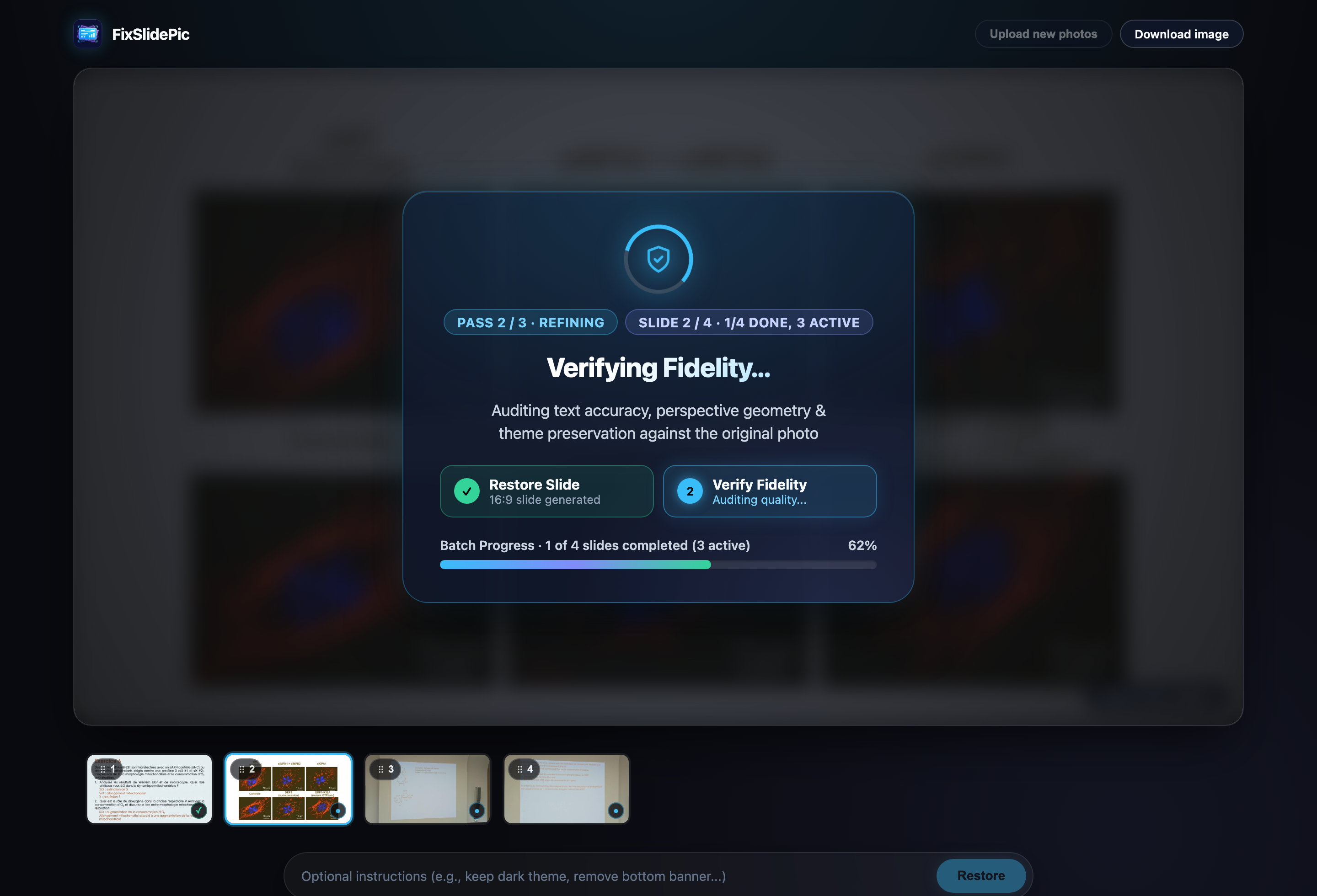
As each slide moves through the LoopAgent, the Micronaut /api/slides/fix-stream endpoint streams real-time Server-Sent Events (text/event-stream) to the browser (FIXER_STARTED, FIXER_COMPLETED, JUDGE_STARTED, JUDGE_COMPLETED, LOOP_FINISHED), updating the stage progress popup (Pass 2 / 3 · Refining, Slide 2 / 4 · 1/4 done, 3 active, the two-step Restore Slide / Verify Fidelity pipeline cards, and the overall batch progress bar) as well as the filmstrip thumbnails at the bottom.
Inspecting Passes, Peeking at the Original, and Exporting to PDF
Once the batch finishes, the app automatically assembles all the restored 16:9 slides into a single multi-page PDF document (using Apache PDFBox) and triggers the download (Download PDF (4 slides)):
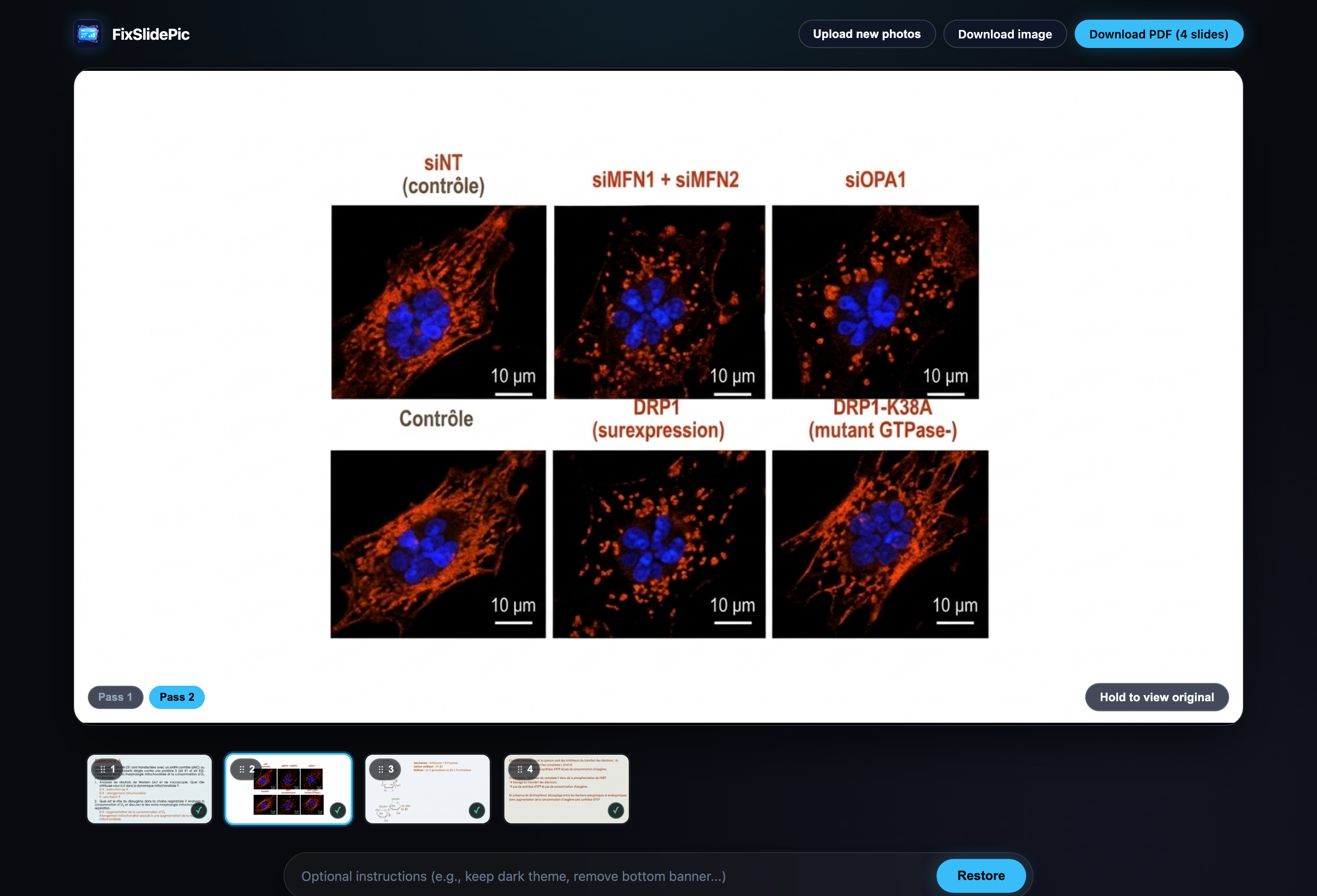
For any slide in the filmstrip, you can switch between Pass 1 and Pass 2 using the pills in the bottom-left corner of the stage to see what the LoopAgent improved between iterations.
You can also press and hold “Hold to view original” in the bottom-right corner to compare the raw amphitheater photo with the restored 16:9 slide in place, or type optional instructions in the bottom bar (for instance, “keep dark background inside the microscopy squares”) and click Restore to run another pass through the LoopAgent.
Wrap-up
Combining offline prompt benchmarking with an online LLM-as-a-Judge loop turned out to be a very practical recipe:
- Offline benchmarking across a small, representative torture-test set catches systematic prompt flaws (like inverting dark-mode slides or keeping projected live-caption bars) before you write application code.
- Runtime self-correction with Nano Banana 2.1 (
gemini-nano-banana-2.1) and Gemini 3.8 Flash (gemini-3.8-flash) inside an ADK JavaLoopAgentcatches stochastic single-pass mistakes (like a misnumbered carbon atom on a sucrose ring) and exits early viasetEscalate(true)as soon as the output passes inspection. - Fresh retry grounding in
beforeModelCallbackSync(always passing the original camera photo + the Judge’s rewritten instructions rather than chaining generated images) prevents multi-generation drift.
Most importantly, my daughter now has clean, readable PDF handouts for her med school lectures! You can browse the full source code on GitHub at glaforge/fixslidepic. If you are building multimodal or agentic pipelines with ADK for Java, let me know how you approach prompt evaluation and runtime judging in your own projects.