
The Unofficial Antigravity SDK for Java
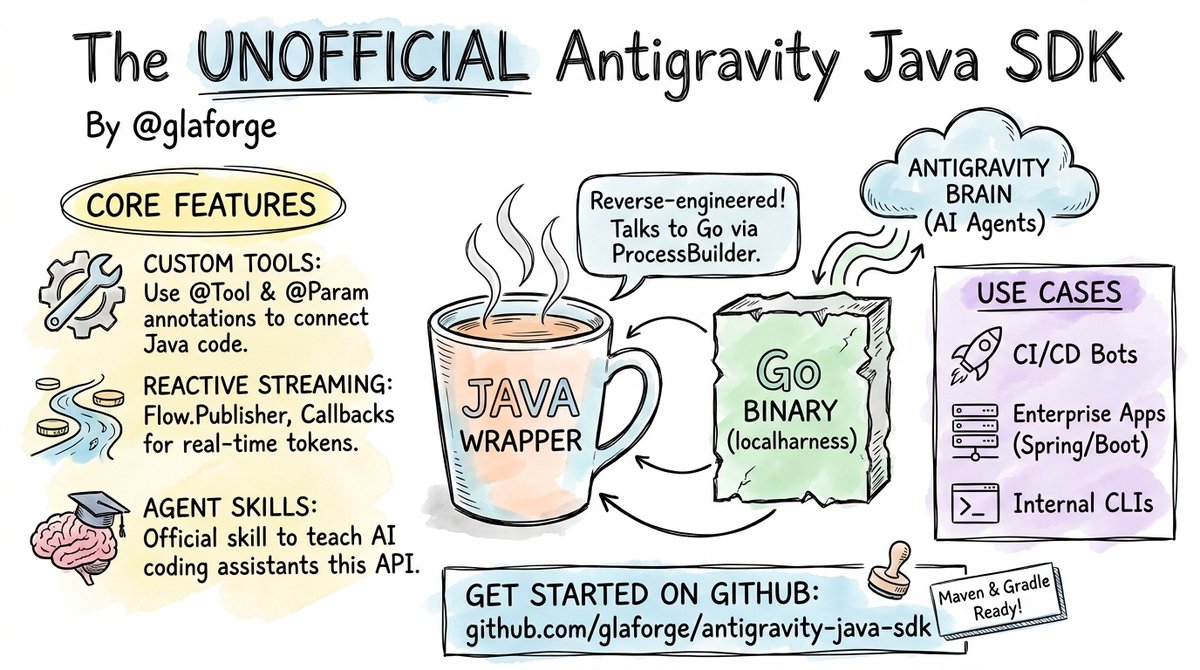
Before heading for well-deserved vacations, I wanted to share something I’ve been cooking on and off for the past few weeks: an unofficial Java SDK for Antigravity.
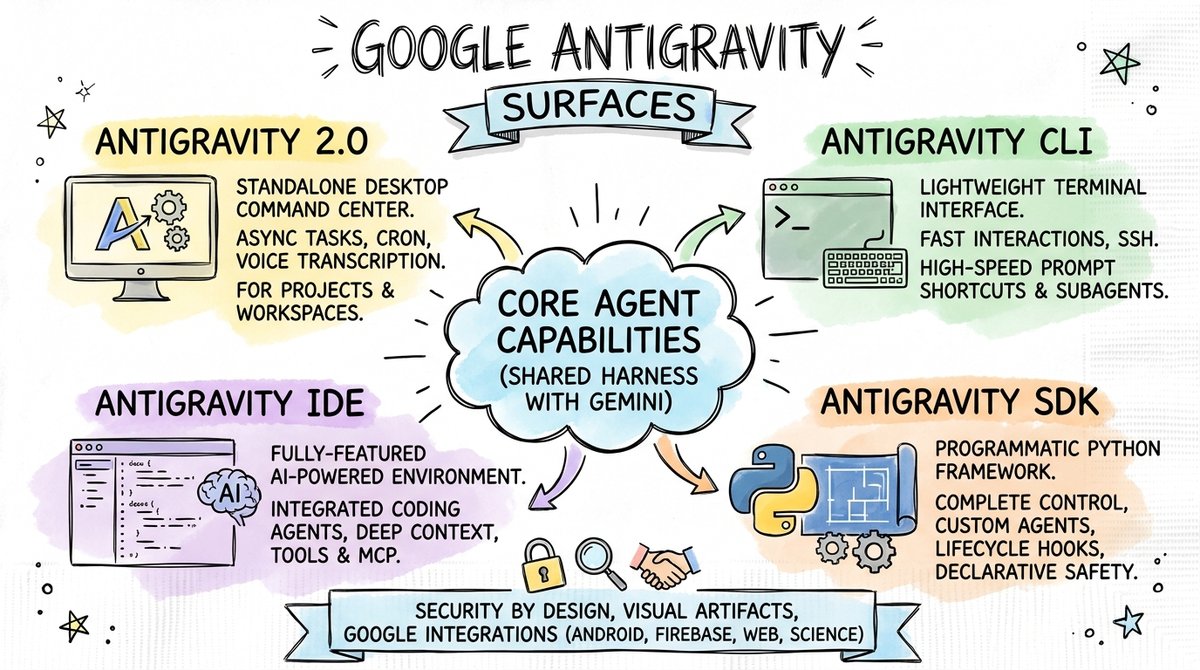
If you’re familiar with Antigravity, you’ll know it’s available across different surfaces:
- Antigravity 2.0: an agent manager for the Antigravity harness, where you can work across multiple projects and sessions from a rich UI,
- Antigravity CLI: a CLI coding agent, where you can interleave running terminal commands, with active agent coding actions,
- Antigravity IDE: a VSCode fork, with an integrated Antigravity chat assistant, when you want to be deep into the code,
- Antigravity SDK: which is actually a toolkit you can integrate and manage yourself, to create your own Antigravity harness.
The first three are pretty natural surface areas, but I was more curious about the latter one, the SDK. With an SDK, I can run my custom agents powered by the Antigravity harness brain, but I can control exactly how it works, I can integrate it however I like, or I could even create my own custom IDE or some crazy other surface.
However, as you know, I’m a Java developer, and I’d rather use the SDK in a language I’m more familiar with, and I can more easily integrate in my work. So I decided to, somehow, reverse engineer the Python SDK, with the help of Antigravity 2.0, to create my own (unofficial) Antigravity SDK for Java.
What’s interesting is that the Antigravity SDK for Python is actually a Python framework wrapping… a Go binary!
Yes, the heart of the SDK is actually built in Go, not Python.
This means I can also interact with the localharness Go binary with Java’s process builder.
The Python SDK comes in the form of a python wheel which contains the binary, so I have to download them (for all platforms) and bundled them in my own artifact.
You can find the unofficial Antigravity Java SDK on GitHub.
The README.md details the features supported by the SDK.
Example Use Cases
Why would you use an agent SDK in Java? Here are a few concrete scenarios:
- GitHub Actions & CI/CD Pipelines: Run custom Java tools or scripts inside GitHub Actions to automate pull request reviews, perform automatic bug triaging, generate release notes, or audit incoming issue reports.
- Enterprise Applications: Integrate an AI agent into an existing Spring Boot, Quarkus, or Micronaut application to automate backend workflows or internal assistant logic.
- Internal Java Tools & CLIs: Build command-line utilities that combine standard Java libraries with agent capabilities like code generation, refactoring, or documentation processing.
- Background Monitoring Agents: Run background services that periodically inspect databases, server logs, or APIs, and run agent turns when specific conditions occur.
- Custom Interfaces: Build custom desktop or web user interfaces in Java that interact directly with the Antigravity engine (for example a document authoring assistant, a blog drafter).
Getting Started: Hello Java World
It had to start with a Hello World example, right? 😃
To start using the Antigravity Java SDK in your project, add the antigravity-sdk-wrapper dependency.
(You only need to declare antigravity-sdk-wrapper because Maven and Gradle will transitively fetch antigravity-sdk-protocol which contains the generated Protobuf classes).
Maven
<dependency>
    <groupId>io.github.glaforge.antigravity</groupId>
    <artifactId>antigravity-sdk-wrapper</artifactId>
    <version>0.2.5</version>
</dependency>
Gradle
implementation 'io.github.glaforge.antigravity:antigravity-sdk-wrapper:0.2.5'
Basic Agent Turn
Here is a minimal example creating an agent with system instructions and sending a prompt testing its Java knowledge:
import io.github.glaforge.antigravity.Agent;
import io.github.glaforge.antigravity.AgentConfig;
import io.github.glaforge.antigravity.AgentResponse;

import java.util.concurrent.TimeUnit;

public class Main {
    public static void main(String[] args) throws Exception {
        AgentConfig config = AgentConfig.builder()
            .instructions(
                "You are a helpful software architecture assistant.")
            .build();

        try (Agent agent = new Agent(config)) {
            AgentResponse response = agent.chat(
                "What are the main benefits of using Java records?")
                .get(60, TimeUnit.SECONDS);

            System.out.println(response.text());
        }
    }
}
There are a couple of noteworthy details in this short snippet:
- Resource Management (
try-with-resources):AgentimplementsAutoCloseable. Instantiating an agent starts the nativelocalharnessGo process and establishes the WebSocket connection. WrappingAgentin atry-with-resourcesblock ensuresagent.close()is called automatically, cleanly terminating the Go subprocess and closing network sockets when the block exits. - Asynchronous
CompletableFuture& Timeouts: Theagent.chat(...)method returns aCompletableFuture<AgentResponse>. Calling.get(60, TimeUnit.SECONDS)waits for the turn to complete. Using an explicit timeout is good practice to prevent your application from blocking indefinitely if a network request stalls. You can also use standardCompletableFuturemethods likethenApply()orthenAccept().
If you prefer non-blocking reactive patterns or want to process tokens in real-time as they are generated, the SDK also supports streaming responses with callbacks and Flow.Publisher,
detailed in the Reactive & Token Streaming section below.
Calling Java Code from the Antigravity Harness
One of the useful capabilities of the SDK is extending the agent with your own custom Java code.
When you configure an agent with a custom tool, the SDK automatically generates a JSON schema for the parameter types. During an agent turn, if the model decides it needs to invoke your tool:
- The
localharnessGo binary sends a tool invocation request over WebSockets to the Java process. - The Java SDK receives the request, parses the JSON arguments into Java parameters, and executes your Java method.
- The method result is sent back to the Go harness over WebSockets, allowing the model to continue its reasoning turn.
Here is an example using the @Tool and @Param annotations:
import io.github.glaforge.antigravity.annotations.Param;
import io.github.glaforge.antigravity.annotations.Tool;

public class InventoryService {

    public record StockInfo(String productId, int availableQuantity, String warehouseLocation) {}

    @Tool(name = "check_inventory", description =
          "Check available stock levels for a given product ID.")
    public StockInfo checkInventory(
        @Param(name = "productId", description =
        "The unique SKU or product ID") String productId
    ) {
        // Query a DB, call an internal service,
        // or execute your own business logic
        return new StockInfo(productId, 42, "Warehouse B, Aisle 3");
    }
}
To register this tool with your agent, add it to the AgentConfig:
InventoryService service = new InventoryService();

AgentConfig config = AgentConfig.builder()
    .instructions("""
        You are a helpful logistics assistant.
        Use the `check_inventory` tool when asked about stock.""")
    .addTool(service)
    .build();

try (Agent agent = new Agent(config)) {
    AgentResponse response = agent.chat(
        "How many units of SKU-1234 do we have in stock?").get(60, TimeUnit.SECONDS);
    System.out.println(response.text());
}
The agent executes checkInventory("SKU-1234") in Java, receives the StockInfo record, and returns a natural language response to the user.
Reactive & Token Streaming
In addition to returning CompletableFuture<AgentResponse>, the SDK provides reactive streaming capabilities so you can process tokens as they are generated by the model.
1. Callback-based Streaming
If you want a simple way to consume tokens as they arrive, use agent.chatStream:
CompletableFuture<AgentResponse> future = agent.chatStream(
    "Tell me a short story.",
    chunk -> System.out.print(chunk.textDelta())
);
future.get(120, TimeUnit.SECONDS);
2. Reactive Streams (Flow.Publisher)
For modern reactive frameworks (such as Project Reactor, or RxJava 3),
agent.chatPublisher returns a standard java.util.concurrent.Flow.Publisher<AgentResponseChunk>:
Flow.Publisher<AgentResponseChunk> publisher =
    agent.chatPublisher("Explain virtual threads in Java.");

// Integration example with Project Reactor:
// Flux<AgentResponseChunk> flux = Flux.from(publisher);

// Standard Java 9+ Subscriber
publisher.subscribe(new Flow.Subscriber<>() {
    private Flow.Subscription subscription;

    @Override
    public void onSubscribe(Flow.Subscription subscription) {
        this.subscription = subscription;
        subscription.request(Long.MAX_VALUE);
    }

    @Override
    public void onNext(AgentResponseChunk chunk) {
        System.out.print(chunk.textDelta());
    }

    @Override
    public void onError(Throwable throwable) {
        throwable.printStackTrace();
    }

    @Override
    public void onComplete() {
        System.out.println("\nDone!");
    }
});
3. Thought & Tool Event Streams
If you are building rich user interfaces, agent.streamChat(...) returns an AgentStream object allowing you to separate the model’s internal reasoning process (thoughts()) from tool execution events (toolCalls()):
AgentStream stream = agent.streamChat(
    "Think step-by-step and check stock for SKU-1234.");

// Stream model reasoning deltas
stream.thoughts().subscribe(thought ->
    System.out.println("Thinking: " + thought));

// Intercept tool calls in real-time
stream.toolCalls().subscribe(call ->
    System.out.println("Executing tool: " + call.name()));

// Wait for the final complete response
AgentResponse response = stream.result().get(60, TimeUnit.SECONDS);
Agent Skill for AI Coding Assistants
To help you build applications with this SDK, the repository includes an official Agent Skill conforming to the open Agent Skills specification.
If you use AI coding tools or CLI coding agents (such as Antigravity CLI, Cursor, Windsurf, or Claude Code), installing this skill gives your assistant native knowledge of the SDK’s API, classes, configuration options, and design patterns.
You can install it directly from the GitHub repository using npx skills or gh skills:
# Using npx skills
npx skills add glaforge/antigravity-java-sdk

# Or using the GitHub CLI skills extension
gh skills add glaforge/antigravity-java-sdk
Once added, your AI coding assistant will automatically know how to configure AgentConfig builders, stream tokens, attach security policies, and write custom Java @Tool implementations.
Supported Features
The Java SDK provides feature parity with the Python SDK:
- Agent Chat & Session Persistence: Synchronous and asynchronous turns, multi-turn history, and session resumption via
conversationId. - Streaming Options:
- Callback-based streaming (
chatStream). - Reactive Streams integration (
Flow.PublisherviachatPublisher). - Filtered streams for model thinking process (
thoughts()) and tool calls (toolCalls()).
- Callback-based streaming (
- Custom Tool Calling: Annotated Java methods (
@Tool) and dynamic runtime tool definitions (DynamicTool). - Model Context Protocol (MCP): Native connection to external MCP servers over
stdio,sse, andstreamableHttptransports. - Agent Skills: Ability to load file-based skills matching the open Agent Skills specification.
- Security Policies: Configurable policy chains (
Policies.denyAll(),Policies.allowTools(),Policies.askUser()) for tool execution safety. - Lifecycle Hooks: Intercept and modify turns, tool calls, and user interactions (
PreTurnHook,PreToolCallDecideHook,OnInteractionHook). - Background Triggers: Run periodic background tasks to inject context into an active agent session.
- Multimodal Inputs: Send text, images, audio, and video inputs to the agent.
- Structured Outputs: Map model responses directly to Java
recordtypes using JSON Schema constraints. - Subagents: Support for spawning and delegating tasks to subagents.
- Slash Commands: Send CLI-style commands (like
/helpor/clear) directly in agent chat turns. - Built-in Capabilities: Toggle built-in tools like web search, shell execution, file editing, and image generation.
Again, be sure to check the README.md which details the features listed above.
Summary
Building this SDK has been a fun exercise, with the help of Antigravity itself, doing some forensics & reverse engineering, and in connecting native Go binaries with modern Java 21 features like records, virtual threads, and Reactive Streams.
If you are a Java developer interested in building AI agents using the Antigravity harness, check out the Antigravity SDK for Java on GitHub.
Feedback, issues, and pull requests are welcome! I’m particularly curious to hear more about use cases you have in mind for your own Antigravity harness based integrations.