
Open Reasoning Format: Building Self-Learning AI Coding Agents Without Server Infrastructure
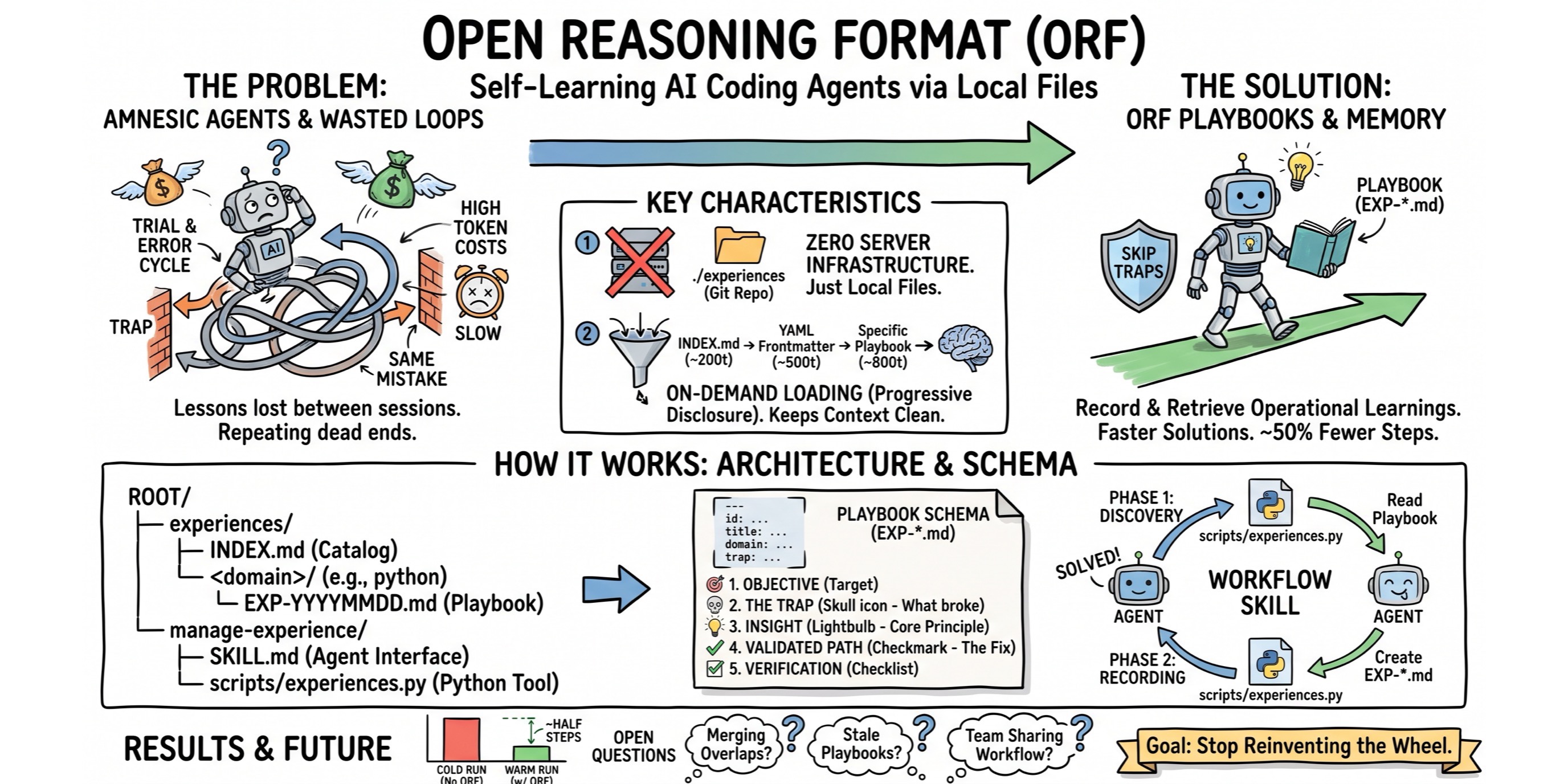
When AI coding agents tackle complex tasks, they often waste time making the same mistakes, running into environment quirks, or retrying failed approaches before finding something that works. If an agent encounters a domain-specific trap in one session, that lesson is lost when the next session starts, forcing the agent to repeat the exact same trial-and-error cycle.
I built the Open Reasoning Format (ORF) to fix this. ORF is a lightweight, file-based specification that lets AI agents record and retrieve operational learnings across sessions. With access to playbooks from previous runs, agents facing similar problems can skip known dead ends, reach working solutions faster, and use about half the steps (and tokens).
Why I Created ORF
When I built my Antigravity “brain” visualizer to analyze the trajectories of my favorite coding agent, my goal was to better understand how the agent worked, and to figure out how I could potentially get it to converge faster towards the goal, making less trial and error steps along the way. That’s why I had added an analysis by Gemini of the trajectories (Gemini suggested to create a skill to do this or that, add a new tool, etc.)
The main goal behind ORF is avoiding unnecessary steps. Execution speed and token costs depend on keeping agent trajectories clean. When an agent gets stuck in a trial-and-error loop, it burns tokens fast and risks making things worse.
I wanted a simple way for an agent that solves a tricky problem to record what broke and how it fixed it. By making those experiences available as playbooks in the workspace, future agent runs can skip dead ends and get things right on the first try.
Origins and Inspirations
ORF builds on several existing ideas:
- The Reasoning Bank paper (Google): Separating knowledge into explicit objectives, traps, insights, and verified solutions.
- Open Knowledge Format (OKF): Using human-readable Markdown paired with YAML frontmatter.
- Agent Skills Specification: Loading knowledge on demand so the base system prompt stays clean.
- Antigravity Trajectory Analysis: My earlier work analyzing Google Antigravity logs with Gemini to spot wasted steps and improve agent instructions.
- Team Collaboration: A conversation with a colleague about a bank customer wanting to share agent learnings across dev teams, so one developer’s agent fix helps everyone else automatically.
Key Characteristics
I set two main constraints for ORF:
- Zero Server Infrastructure: ORF relies entirely on local files in the project repository (
./experiences). It doesn’t need vector databases, embedding APIs, sidecars, or external servers (just standard files that can be committed to version control). - On-Demand Loading (via “progressive disclosure”): Dumping past execution logs into an agent’s context wastes tokens and dilutes focus. Instead, ORF loads information in three small steps:
- First, the agent reads a small index (
INDEX.md) listing domain categories (~200 tokens). - Next, it checks the YAML frontmatter descriptions for playbooks in relevant categories (~500 tokens).
- Finally, it loads only the specific playbook (
EXP-*.md) that matches its current task (~800 tokens).
- First, the agent reads a small index (
This keeps prompt overhead minimal while giving the agent targeted guidance right when it needs it.
How the ORF System Works
The ORF architecture consists of three components:
- the experience folder layout,
- the standard playbook file schema, and
- an agent skill powered by a Python helper script.
.
├─ experiences/
│  ├─ INDEX.md             # Root category catalog (YAML frontmatter)
│  └─ <domain>/            # Domain directories
│      └─ EXP-<YYYYMMDD>-<seq>.md   # Playbook files
└─ manage-experience/
   ├─ SKILL.md             # Agent Skill specification
   └─ scripts/
       └─ experiences.py   # Reference Python CLI script
1. The Index (INDEX.md)
The experiences/INDEX.md file acts as the entry point and primary indirection layer for the entire system.
It combines YAML frontmatter defining domain categories (id, name, description)
with a Markdown body that links directly to individual experience records alongside one-line summaries.
Rather than forcing an agent to traverse directory trees or parse dozens of individual files on startup,
reading INDEX.md allows the agent to discover available domains and trigger summaries in a single lightweight operation (~200 to 500 tokens).
Whenever an agent records a new experience, the helper script automatically appends the entry to INDEX.md under its matching category,
keeping the index synchronized without manual editing.
---
spec_version: "0.1"
last_updated: "2026-07-21"
categories:
  - id: "python-scripting"
    name: "Python Scripting"
    description: "Best practices, traps, and procedural playbooks for Python 3 automation tools and CLI applications."
  - id: "java-langchain4j"
    name: "Java LangChain4j & Gemini"
    description: "Best practices and versioning guidelines for building Java Maven projects with LangChain4j and Google Gemini models."
---

# Experiences Index

## Category: Python Scripting (`python-scripting`)
* [EXP-20260720-0001](python-scripting/EXP-20260720-0001.md): Handle YAML frontmatter parsing safely when updating Markdown index files.
* [EXP-20260720-0002](python-scripting/EXP-20260720-0002.md): Perform atomic file writes using temporary files and OS replace.
* [EXP-20260720-0003](python-scripting/EXP-20260720-0003.md): Prevent subprocess pipe buffer deadlocks when capturing command output.

## Category: Java LangChain4j & Gemini (`java-langchain4j`)
* [EXP-20260721-0001](java-langchain4j/EXP-20260721-0001.md): Configure LangChain4j with Google Gemini in Java Maven projects.
2. The Playbook Schema (EXP-*.md)
Each experience file is written in Markdown with YAML frontmatter. It follows a strict 5-section layout:
---
id: "EXP-20260720-0001"
title: "Parse Markdown frontmatter using line-anchored regex"
description: "Trigger when parsing or modifying Markdown files with YAML frontmatter."
domain: "python-scripting"
keywords: [markdown, yaml, frontmatter, regex]
complexity: "medium"
created_at: "2026-07-20"
---

## 1. Objective
Update index files containing YAML frontmatter
without stripping headers.

## 2. The Trap
Using basic string split on '---' matches horizontal rules
inside the body, corrupting the document.

## 3. Abstracted Insight
> **Core Principle:** Always anchor YAML frontmatter regex
matching to line starts (`^---\s*$`).

## 4. Validated Path
Use regex with `re.MULTILINE` flag to match header delimiters
explicitly before splitting content.

## 5. Verification Checklist
- [ ] Verify frontmatter block remains intact after writing updates.
3. The manage-experience Skill
The agent interacts with the experience directory through an agentskills.io-compatible skill (manage-experience/SKILL.md) backed by experiences.py. The skill guides the agent through a two-phase workflow:
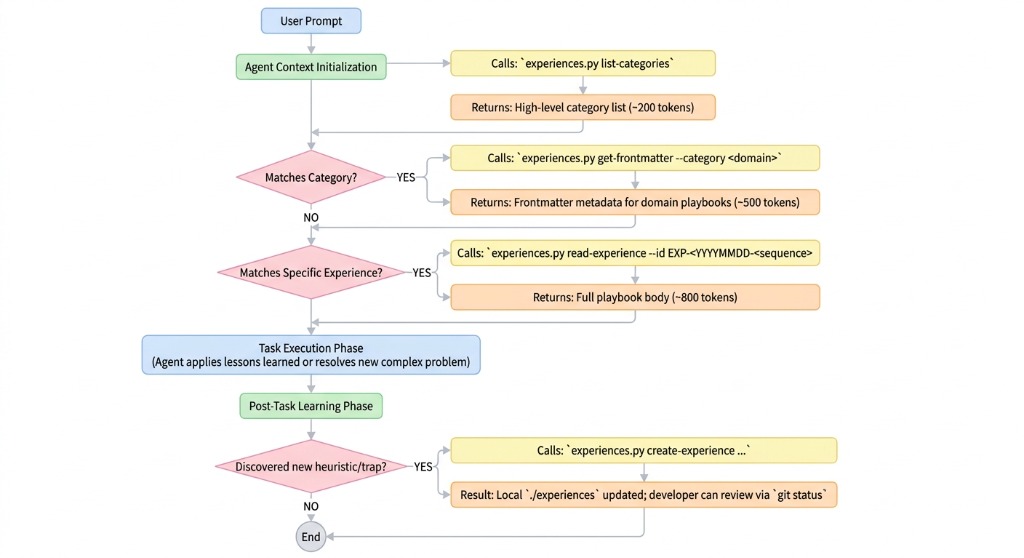
Phase 1: Discovery & Retrieval
python3 manage-experience/scripts/experiences.py list-categories
Lists active domain categories.python3 manage-experience/scripts/experiences.py get-frontmatter --category <domain>
Inspects trigger descriptions for matching playbooks.python3 manage-experience/scripts/experiences.py read-experience --id <EXP-ID>
Loads the target playbook’s insight, validated path, and checklist into context.
Phase 2: Recording New Experiences
When an agent resolves a tricky issue or edge case, it saves the lesson with create-experience:
python3 manage-experience/scripts/experiences.py create-experience \
  --domain "python-scripting" \
  --title "..." \
  --description "..." \
  --keywords "..." \
  --complexity "medium" \
  --objective "..." \
  --trap "..." \
  --insight "..." \
  --validated-path "..." \
  --checklist-item "..."
This writes the new EXP-*.md file and updates experiences/INDEX.md.
In case your agent didn’t call the create-experience script on its own, you can nudge it to do so.
When you notice that a prompt derailed and yielded too many steps, got into too many tool call error traps,
you can ask your agent to explain the problems it got into, and to summarize its findings,
then requesting it to record those findings with the create-experience skill script.
Evaluation Results: SWE-bench Lite & Trajectory Benchmarks
To empirically measure the impact of ORF, I evaluated AI agents across benchmark scenarios and SWE-bench Lite and SWE-bench Multilingual instances using a 3-stage evaluation harness (Cold Run baseline vs. Warm Run with ORF playbooks).
1. Task Success Rate Improvement (SWE-bench Lite)
In benchmark evaluations on SWE-bench Lite problem sets running in isolated Podman container environments:
| Metric | Cold Run (Baseline) | Warm Run (With ORF) | Efficacy Delta |
|---|---|---|---|
| Tasks Resolved | 2 / 3 | 3 / 3 | +1 task resolved |
| Pass Rate | 66.7% | 100.0% | +33.3% |
On the baseline Cold Run, the agent failed to resolve 1 out of 3 tasks because it got trapped in an environment configuration error loop. On the Warm Run (this time with an ORF playbook recorded from a prior resolution) the agent retrieved the insight upfront, avoided the trap, and achieved a 100% pass rate.
2. Step Count Reduction & Trajectory Efficiency
Comparing agent execution trajectories across specific scenarios:
| Scenario | Cold Success | Cold Steps | Warm Success | Warm Steps | Step Reduction | Debug Error Loops |
|---|---|---|---|---|---|---|
frontmatter-parser | ✅ | 25 steps | ✅ | 12 steps | 52.0% | 0 loops (down from 4) |
Key observations from the trajectory logs:
- 52% Reduction in Step Count: On
frontmatter-parser, step count dropped from 25 steps down to 12 steps. - First-Attempt Convergence: In the Cold Run, the agent spent 4 step cycles debugging string splitting edge cases. In the Warm Run, the agent loaded
EXP-20260720-0001.md, cited the core principle in its initial code edit, and passed verification on the first attempt. - Direct Token Savings: Cutting step counts by half translated into a proportional reduction in token usage and execution wall-clock time.
The few scenarios I tested often exhibited similar 50% reduction of steps. But this is by no means a scientific evaluation, as I only tested a handful of cases, either AI generated, one of my own, plus a few from SWE-bench. It would be useful to run the whole SWE-bench examples to have more precise figures.
However, I’d like to highlight that some recorded experiences seem to be very specific to the use case at hand. Those experiences would probably not be used and triggered for other use cases. Maybe instructing the LLM to create more generic experiences would make reusability better.
Installing the Skill in Your AI Agent
To enable ORF support in an agent framework that supports agentskills.io (such as Google Antigravity):
- Copy the
manage-experience/directory into your project root or your agent’s skills location. - Ensure your execution environment has Python 3.10+ and
PyYAMLinstalled:pip install pyyaml - Initialize or prompt your host agent. The agent will discover
manage-experience/SKILL.mdand use it during Phase 1 (task startup) and Phase 2 (task completion).
Alternatively, you can use tools like Vercel’s skills tool,
or GitHub’s experimental gh skill command.
Creating Scenarios and Running Evaluation Tests
To measure how ORF impacts agent performance on your own tasks, the repository includes an evaluation harness in ./evals:
# 1. Run dry-run verification of benchmark scenarios
python3 evals/runner.py --dry-run

# 2. Run live A/B evaluations using the local Antigravity CLI (agy)
python3 evals/runner.py --agy

# 3. Export Markdown and JSON benchmark reports
python3 evals/runner.py --agy \
  --export-markdown evals/reports/agy_report.md \
  --export-json evals/reports/agy_report.json
The runner executes a 3-stage benchmark:
- Stage 1 (Cold Run): Evaluates baseline performance without prior experience and tests whether the agent records a new experience upon resolving a trap.
- Stage 2 (Spec Validation): Audits generated
EXP-*.mdfiles against the ORF schema rules. - Stage 3 (Warm Run): Runs a fresh agent instance with access to the newly recorded experience, measuring step reduction and trap avoidance.
Open Questions
While ORF provides a functional baseline for file-based agent memory, several open questions remain for future exploration:
- Consolidation: As agents generate more playbooks, overlapping experiences (or perhaps conflicting ones!) will need to be merged or summarized automatically.
- Staleness: Playbooks will eventually become outdated as frameworks and models evolve. We need clean ways for agents to flag or invalidate stale paths.
- Team Sharing: How should teams distribute these files? Checking
experiences/into Git works well locally, but mature playbooks might eventually make more sense as reusable skills.
Going Forward
This is still early days, but I wanted to share this experiment ahead of time. I haven’t used the ORF skill in anger yet, but in my scenario tests, it seemed to yield good results. Don’t hesitate to reach out with feedback or suggestions. Let’s see where this leads us!
If you’re building with AI coding agents, check out the Open Reasoning Format repository on GitHub, read the specification, try out the evaluation benchmark on your own workflows, and install the skill to see if it improves your agent trajectories on common tasks.